AIDC Fabric

Asteria AIDC Controller

The AIDC Controller is a high-performance network management platform specifically designed for AI data centers. It supports full-scenario deployment
across backend, frontend, storage, and DC-converged networks. 
AIDC Fabric

Asteria AIDC Controller

Centralized management for your entire campus infrastructure, from APs
and switches to routers and integrated PON networks.


Asteria AIDC Controller
Function Highlights

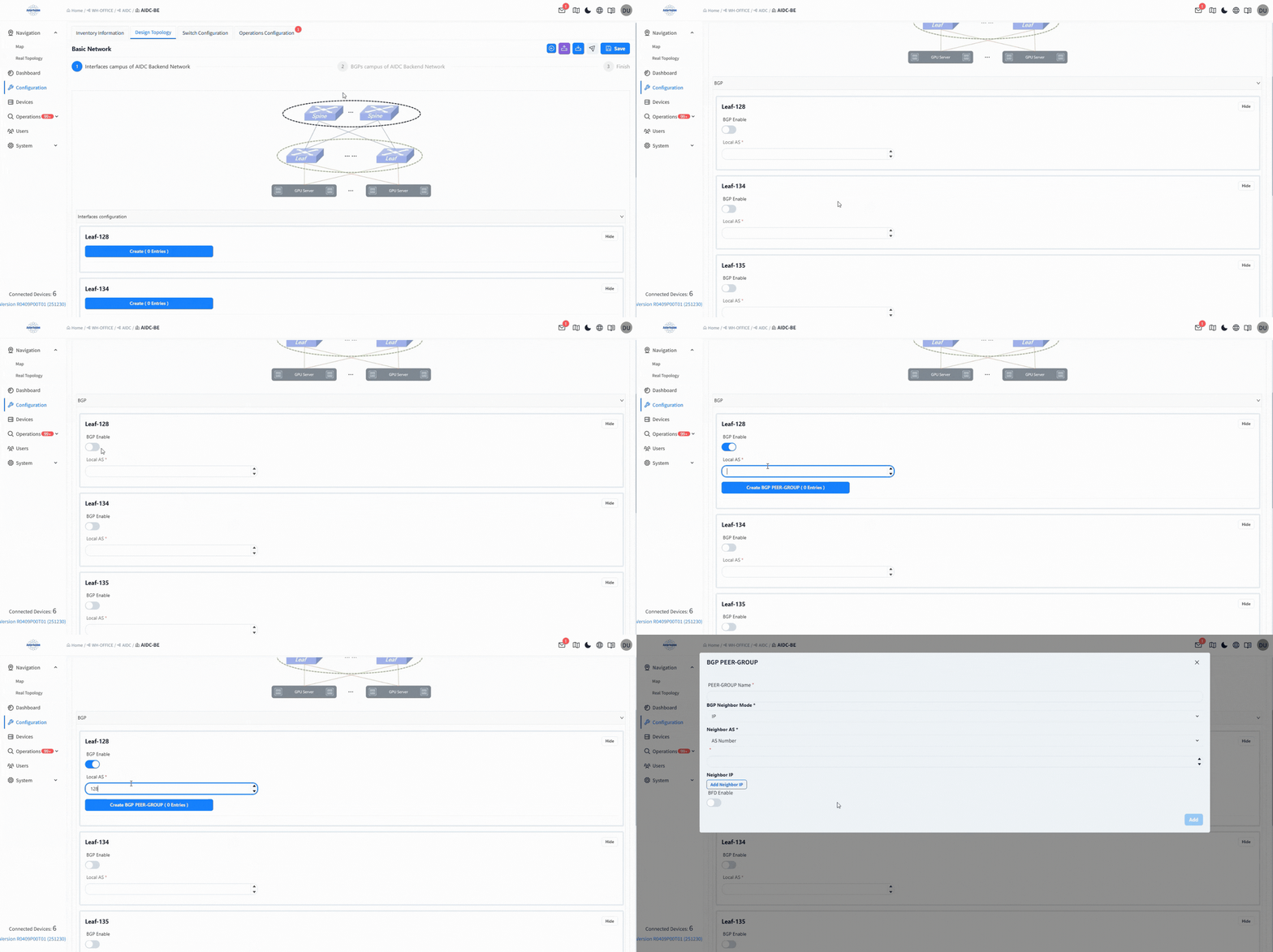
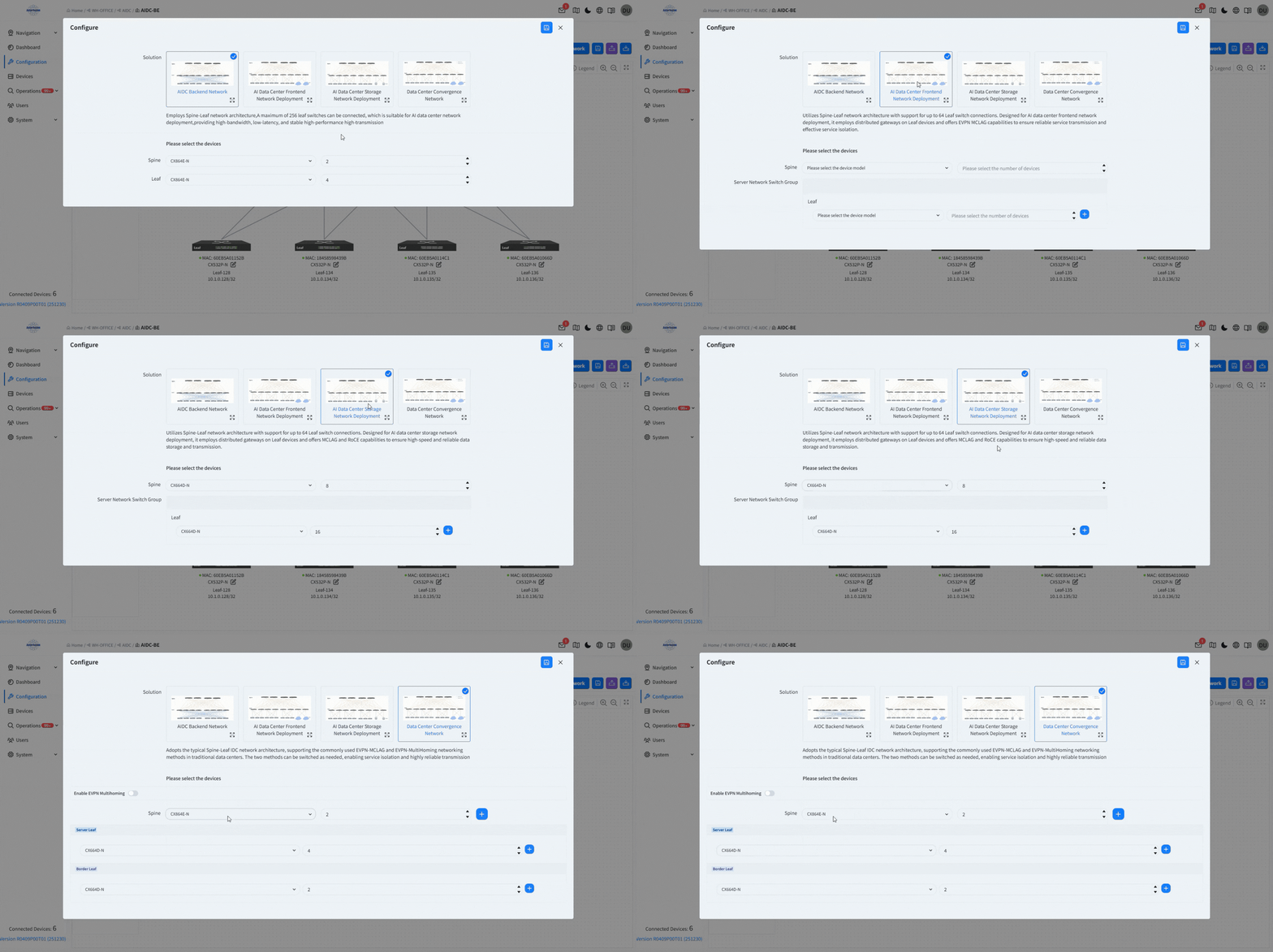
Smart Pre-design

  •   Scenario-based Topology Presets
  •   Topology Consistency Verification
  •   Device Health Pre-Check

asteria-aidc-controller-ZTP

ZTP

  • Basic network setup (IP, BGP, etc.)
  • Batch import via CSV (RoCE, routing, ARS)
  • Enable advanced AIDC features
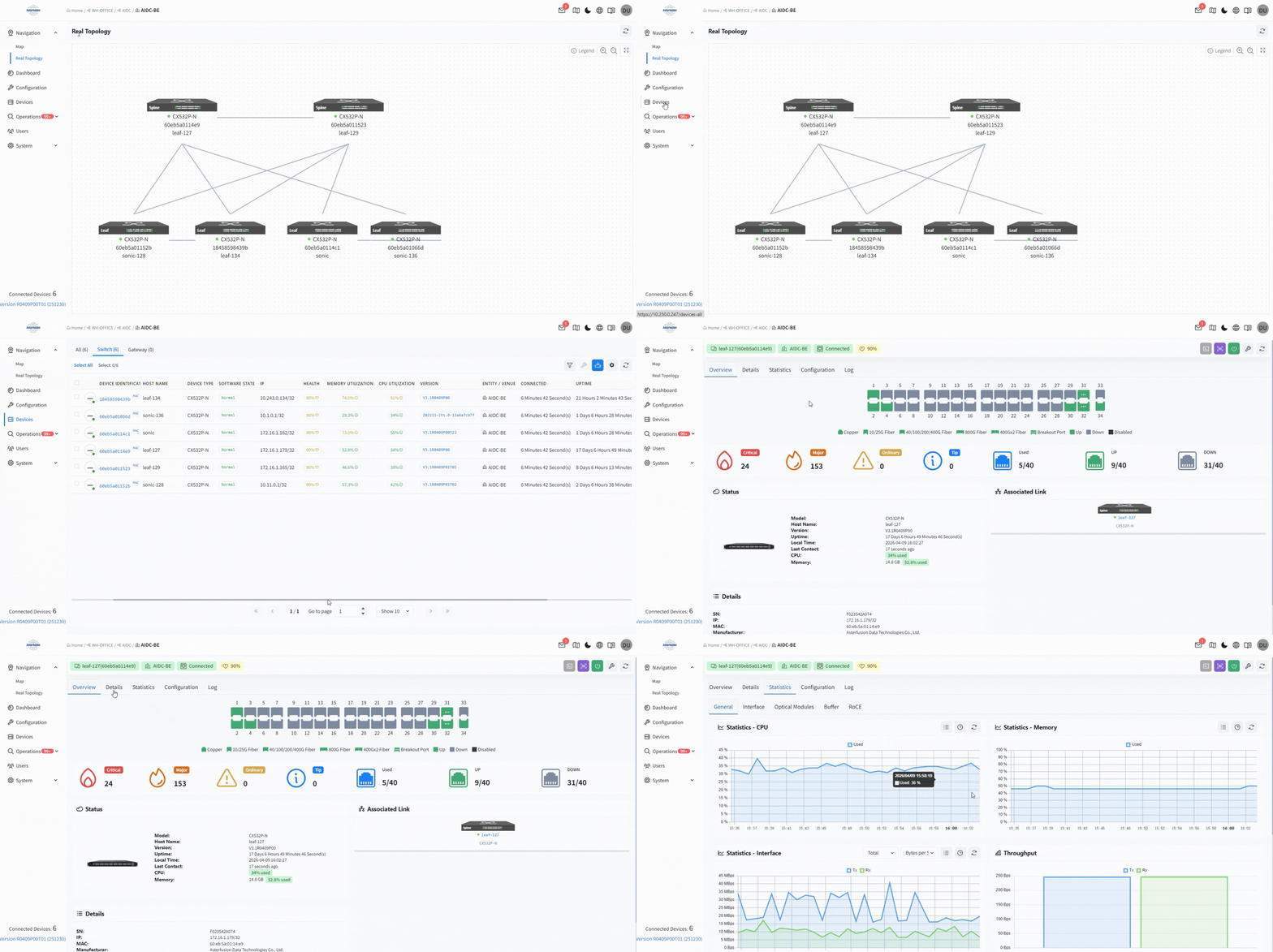
asteria-aidc-controller-multi-dimensional-monitoring

Multi-Dimensional Monitoring

  •   Network Health Dashboard
  •   In-depth Telemetry
  •   Traffic and Packet Loss Insights

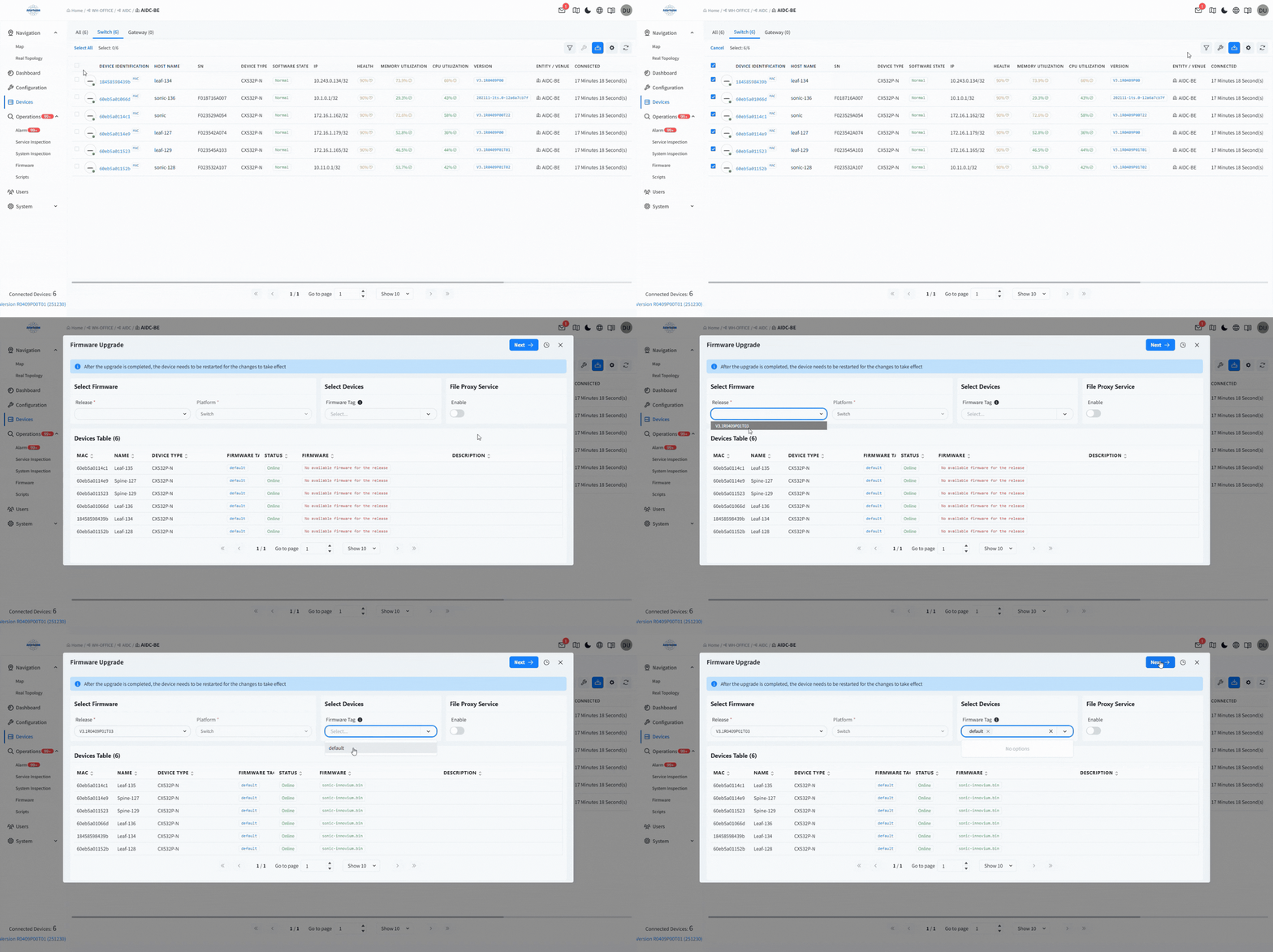
One-Click Updates

  •   Unified Firmware Management
  •   Incremental Patch Updates

asteria-aidc-controller-one-click-updates

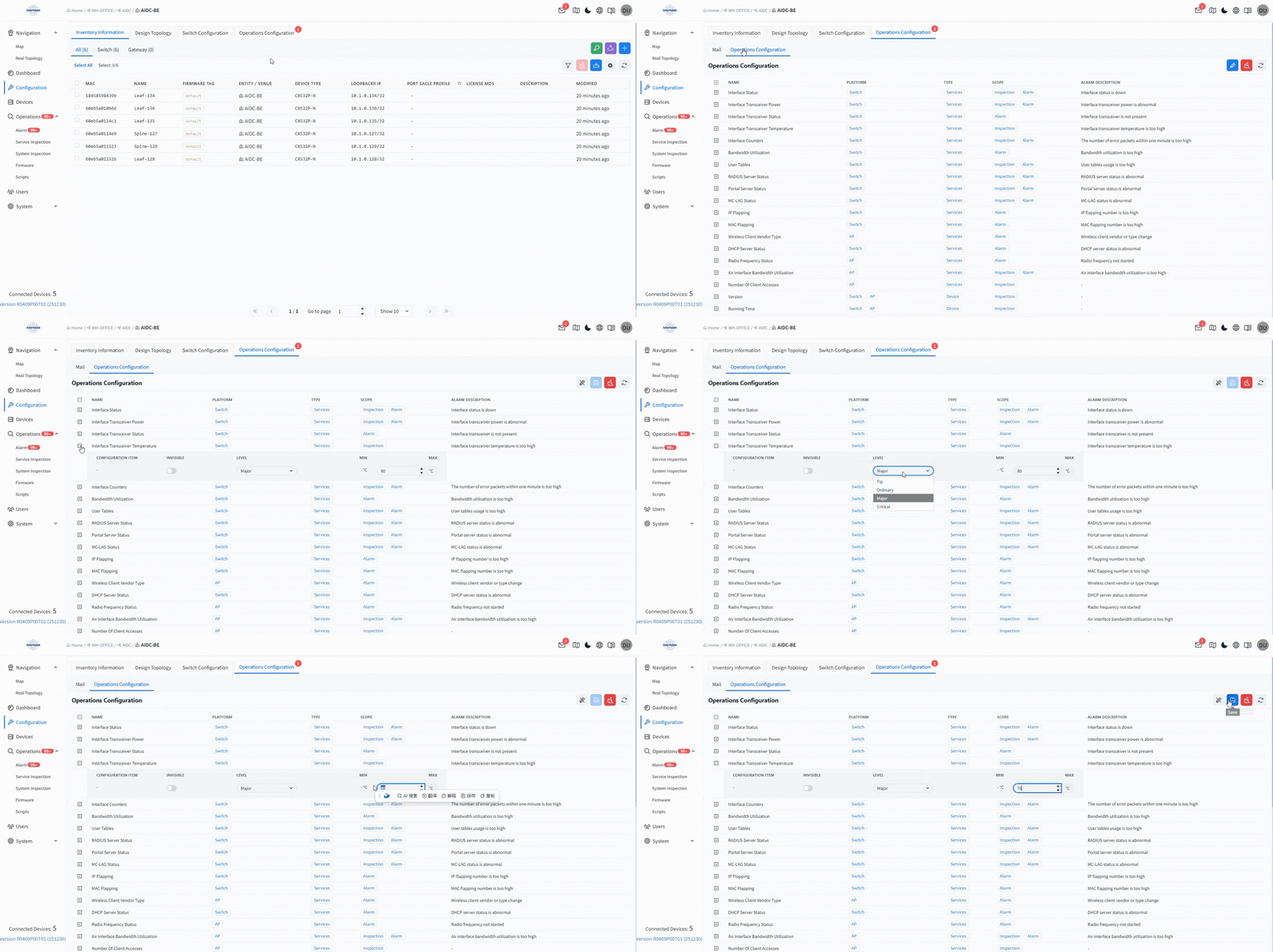
Intelligent Alarm

  •   Multi-Level Threshold Alerts
  •   Real-Time Remote Notifications
  •   Fault Lifecycle Management

asteria-aidc-controller-intelligent-alarm-1

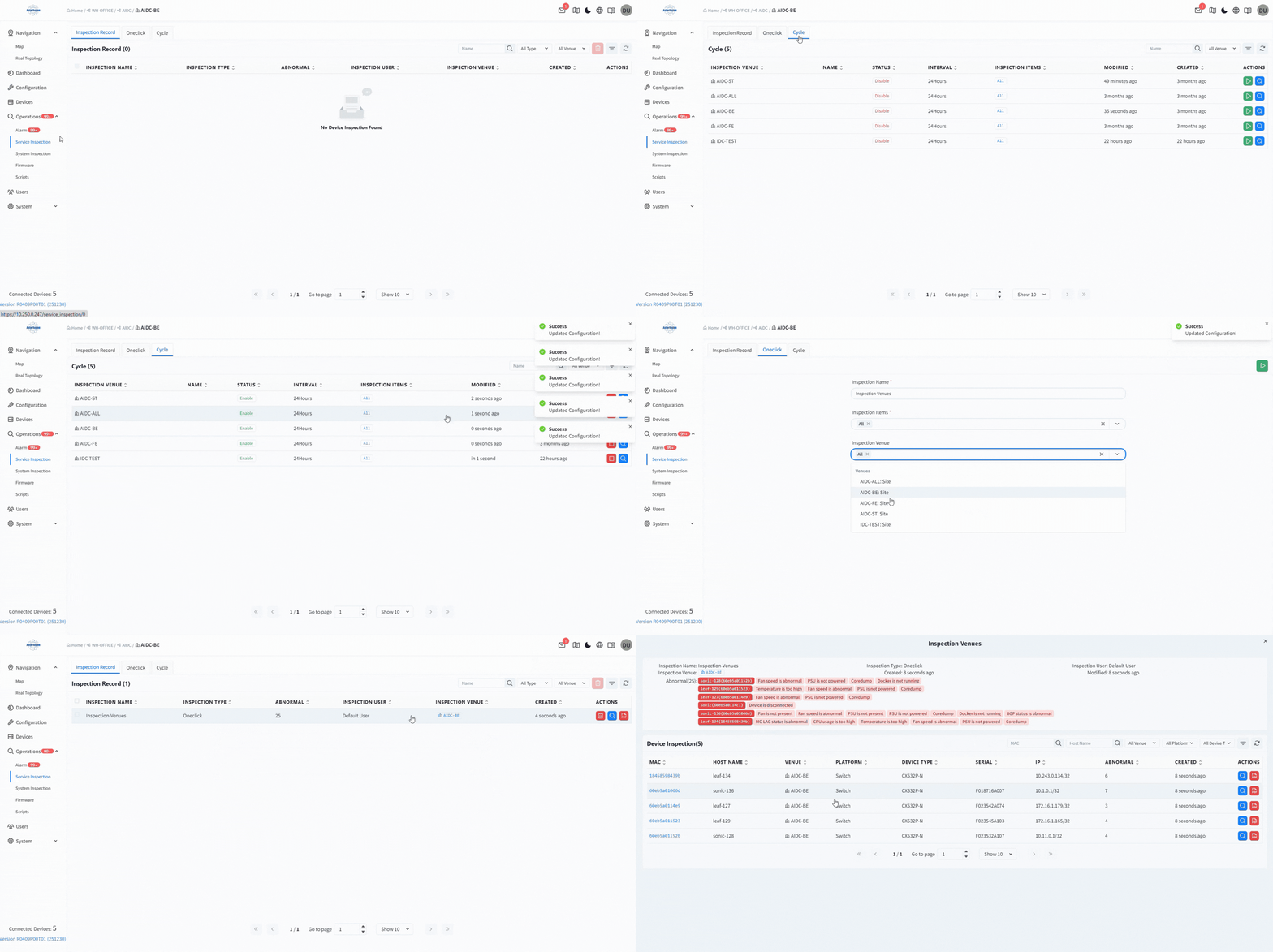
Periodic Inspection

  •   One-Click Service Inspection
  •   Scheduled Inspections
  •   Health Assessment Reports

asteria-aidc-controller-periodic-inspection

One-Click Device Updates

  •   Unified Firmware Management
  •   Incremental Patch Updates

asteria-openwifi-controller-built-in-aaa-dhcp-server-ui-demo

Intelligent Alarm

  •   Multi-Level Threshold Alerts
  •   Real-Time Remote Notifications
  •   Fault Lifecycle Management

Periodic Inspection

  •   One-Click Service Inspection
  •   Scheduled Inspections
  •   Health Assessment Reports

AIDC Controller Supported Features

  FeaturesLevel 1Level 2
    Navigation    MapTree structure diagram displaying all organization & device information under the current account
    Navigation    MapMap structure hierarchy
    Navigation    MapSupports operations for organizations, sites, and canvas
    Navigation    Real TopologyTopology generation & viewing
    Navigation    Real TopologyBasic device information
    Navigation    Real TopologyConnection information between devices and their peers
    Navigation    Real TopologyInterface rate/LACP negotiation status display
    Dashboard    Aggregated DashboardTop 10 Traffic
    Aggregated Dashboard    Aggregated DashboardSwitch Count
    Aggregated Dashboard    Aggregated DashboardAlarms
    Aggregated Dashboard    Venue DashboardSwitch Count
    Aggregated Dashboard    User-Customizable DashboardBuilt-in multi-dimensional visual data components
    Aggregated Dashboard    User-Customizable DashboardComponent operations
    Aggregated Dashboard    User-Customizable DashboardDashboard reset
    Configuration Management    Inventory ManagementInventory device import/export, configure inventory devices
    Configuration Management    Inventory ManagementClassification for devices
    Configuration Management    Planning TopologyNetwork planning for devices
    Configuration Management    Planning TopologyValidation between planned topology and real topology
    Configuration Management    Planning TopologyHealth status check for devices in planned topology
    Configuration Management    Alarm Configurationseverityn/description/threshold/ suppression
    Configuration Management    Alarm ConfigurationSynchronization to subordinate organizations/sites
    Configuration Management    Alarm Notificationrecipient information
    Configuration Management    Alarm Notificationemail notification enable
    Configuration Management    Alarm Notificationalarm types triggering email notification
    Configuration Management    Alarm Notificationalarm severities triggering email notification
    Configuration Management    Alarm NotificationSynchronization to subordinate organizations/sites
    Configuration Management    AIDC Backend Network Deployment ScenarioBasic network configuration: Interface config, BGP config, config import/export
    Configuration Management    AIDC Backend Network Deployment ScenarioWired service configuration: Intelligent path selection, RoCE, ARS, CSV batch import, filtering & batch push
    Configuration Management    AIDC Frontend Network Deployment ScenarioBasic network configuration: Interface config, BGP config, MCLAG config, config import/export
    Configuration Management    AIDC Frontend Network Deployment ScenarioWired service configuration: Service provisioning, RoCE, CSV batch import, filtering & batch push
    Configuration Management    AIDC Storage Network Deployment ScenarioBasic network configuration: Interface config, BGP config, MCLAG config, config import/export
    Configuration Management    AIDC Storage Network Deployment ScenarioWired service configuration: Service provisioning, RoCE, CSV batch import, filtering & batch push
    Configuration Management    DC Convergence Network Deployment ScenarioBasic network configuration: Interface/SubInterface/Vlan/Lag config, VRF/Route-map/IP-Prefix/BGP/OSPF/Static Route/SLA/Track config, MCLAG config, config import/export
    Configuration Management    DC Convergence Network Deployment ScenarioWired service configuration: Service provisioning, RoCE,ACL, CSV batch import, filtering & batch push
    Device Management    Device Basic InformationHostname
    Device Management    Device Basic InformationType
    Device Management    Device Basic InformationModel
    Device Management    Device Basic InformationIP Address
    Device Management    Device Basic InformationMAC Address
    Device Management    Device Basic InformationSystem Version
    Device Management    Device Basic InformationSerial Number
    Device Management    Device Basic InformationCreation Time
    Device Management    Device Basic InformationLast Update Time
    Device Management    Device Basic InformationOrganization/Site
    Device Management    Device Basic InformationLoopback IP Address
    Device Management    Device Status InformationConnection Status
    Device Management    Device Status InformationUptime
    Device Management    Device Status InformationLast Contact Time
    Device Management    Device Status InformationLocal Time
    Device Management    Device Status InformationLoad
    Device Management    Device Status InformationCPU Real-time Usage
    Device Management    Device Status InformationMemory Real-time Usage
    Device Management    Device Status InformationHealth Status
    Device Management    Device Status InformationSSIDs
    Device Management    Device Peripheral InformationTemperature
    Device Management    Device Peripheral InformationFan
    Device Management    Device Peripheral InformationPower
    Device Management    Device Alarm Information-
    Device Management    Device Interface Usage Information Usage Information
    Device Management    Device Interface Usage InformationCount of Up interfaces
    Device Management    Device Interface Usage InformationCount of Down interfaces
    Device Management    Device Log Information-
    Device Management    Device Health Statistics-
    Device Management    Device Coredump Logs-
    Device Management    Switch Device LLDP Information-
    Device Management    Device detail InformationMAC
    Device Management    Device detail InformationNeighbor
    Device Management    Device detail InformationPBR
    Device Management    Device detail InformationRoCE
    Device Management    Device detail InformationAI-Network
    Device Management    Device detail InformationMCLAG
    Device Management    Device detail InformationEVPN-TUNNEL
    Device Management    Device detail InformationARS
    Device Management    Device StatisticsPer-interface & system-wide rx_Bps/tx_Bps/rx_packets/tx_packets Statistics
    Device Management    Device StatisticsCPU/Memory usage history
    Device Management    Device StatisticsInterface info
    Device Management    Device StatisticsOptical module info
    Device Management    Device StatisticsDevice BUFFER
    Device Management    Device StatisticsROCE metric statistics
    Device Management    Device Operation Command Log-
    Device Management    Device NotesNote Content/Note Creator
    Device Management    Remote Device Operation CommandsReboot
    Device Management    Remote Device Operation CommandsFactory Reset Device
    Device Management    Remote Device Operation CommandsRemote Packet Capture
    Device Management    Remote Device Operation CommandsFirmware Upgrade
    Device Management    Remote Device Operation CommandsConfiguration File Commands
    Device Management    Remote Device Operation CommandsRemote Command/Script Execution
    Device Management    Remote Device Operation CommandsPatch Application
    Device Management    Remote Device Operation CommandsDevice Inspection
    Device Management    Remote Device Operation CommandsChange Device IP
    Inventory Management    Inventory List InformationMAC Address
    Inventory Management    Inventory List InformationName
    Inventory Management    Inventory List InformationConfiguration Tag
    Inventory Management    Inventory List InformationOrganization/Site
    Inventory Management    Inventory List InformationType
    Inventory Management    Inventory List InformationLoopback0 IP
    Inventory Management    Inventory List InformationPort Scale
    Inventory Management    Inventory List InformationLicense MD5
    Inventory Management    Inventory List InformationDescription
    Inventory Management    Inventory List InformationStatus Information
    Inventory Management    Inventory OperationsFilter, Create, Edit, Delete Inventory
    Inventory Management    Inventory OperationsSwitch Inventory Device Organization/Site
    Inventory Management    Inventory OperationsDownload Inventory Info CSV File
    Inventory Management    Inventory OperationsFilter, Create, Edit, Delete Inventory
    Operations Management    Alarm FunctionActive/Historical Alarms
    Operations Management    Alarm FunctionAlarm Settings
    Operations Management    Alarm FunctionAlarm Notifications
    Operations Management    Inspection FunctionOne-click & Scheduled Inspection
    Operations Management    Inspection FunctionInspection Record Export/View/Delete
    Operations Management    Inspection FunctionInspection Threshold Configuration
    Operations Management    FirmwareFirmware
    Operations Management    FirmwarePatches
    Operations Management    Scripts-
    User Management    Personal User Settings-
    User Management    Built-in Users, Add User, Modify User, Delete User-
    User Management    Roles-
    User Management    User Actions-
    System    Controller Configuration-
    System    Controller UpgradeVersion Deployment
    System    Controller UpgradeController Version Management
    System    Controller UpgradeController Patch Management
    System    Controller UpgradeController Upgrade Logs
    System    Controller Configuration Migration-
    System    Controller Subsystem Logs-
    System    Controller Service Management-
    System    Version Description-

Frequently Asked Questions

What is the primary function of the AIDC Controller and its typical use cases?
The AIDC Controller is a high-performance management platform designed for AI Data Centers. It automates deployment across four main scenarios:
  • Backend Network: High-bandwidth, low-latency Spine-Leaf architectures.
  • Frontend Network: Service isolation and reliability via EVPN-MCLAG.
  • Storage Network: Lossless data transfer using RoCE and MCLAG.
  • DC Convergence Network: Standard Spine-Leaf networking supporting both EVPN-MCLAG and EVPN-Multi-homing
What are the hardware requirements for the controller?
We recommend deploying on an x86 server running Ubuntu 18.04 LTS (or higher) with Docker 20+.
Asterfusion CX-N series switches natively support the deployment of this controller.
Is the deployment complicated? Does it support containers?
Not at all. It supports one-click installation and is fully containerized. Just upload the .bin file to your server, run the installation command to set the Controller IP, and use docker-compose up -d to launch the full suite of microservices.

I have hundreds of switches. How do I add them to the controller quickly?
You can follow a simple two-step process:
  1. Bulk Import: Upload an Excel/CSV template containing device MAC addresses, models, and Loopback IPs.
  2. Auto-Onboarding: Automatically plan the topology for a selected scenario. Once all devices in the planned topology are online and connected, the controller will discover and identify them automatically.

Can I get immediate notifications if the network fails?
Yes. The controller features robust Alarm Management covering dozens of metrics, including:
  • Interface Up/Down status and Optical Power anomalies.
  • IP/MAC flapping.
  • Hardware issues (Fan/Power Supply failures).

Can the controller automate routine maintenance and inspections?
Yes. The “Automated Inspection” feature removes the need for manual checks:
  • Scheduled Inspections: Set tasks to run daily, weekly, or monthly. The system runs quietly in the background.
  • One-Click Health Checks: Instantly perform a deep “physical exam” on specific network areas.
  • Inspection Reports: Detailed records are generated automatically and can be exported as PDFs for your maintenance records.