Table of Contents
In our previous article, drawing on over 15 years of industry experience, we covered everything you need to know about Network Packet Brokers. In real-world deployments, however—especially in network visibility and security monitoring environments—you’ll often see three types of devices used together: Network TAPs, Network Packet Brokers (NPBs), and Bypass Switches.
At first glance, they may seem similar, as all three are involved in capturing or forwarding traffic. This naturally raises a common question: what exactly differentiates them, and why do telecom operators, banks, and large enterprises frequently deploy all three at the same time?
The answer lies in their distinct roles within the architecture. Simply put, a TAP is responsible for capturing network traffic, an NPB is used to process and intelligently distribute that traffic, and a Bypass Switch ensures link continuity and protects network availability. Rather than being interchangeable, these components are highly complementary. Together, they form a cohesive foundation for a robust, scalable network visibility and security infrastructure.
What is a Network Test Access Point (TAP)?
A Network TAP (Test Access Point) is a dedicated hardware device designed to duplicate network traffic. Simply put, a TAP acts as a passive “observation point” in the network. Deployed inline between two network devices—such as a switch and a router—it passively clones the traffic passing through the link and sends the duplicated data to monitoring, security analysis, or data acquisition systems.
For instance, consider a standard network link: Router →Switch; If an enterprise needs to analyze the communication on this link, a TAP can be deployed as follows:
Router —- TAP —- Switch
|
↓
Monitoring System
The original production traffic continues along its primary path (Router → Switch) without passing through the monitoring equipment or incurring performance impacts. The TAP simply replicates a copy of the traffic: Copy Traffic → Monitoring System.
This represents the primary advantage of a TAP: it leaves original network communications untouched and introduces zero additional latency. Consequently, TAP devices are widely adopted in environments where reliability is paramount, such as telecom operator, financial, and power utility networks.
What is a Network Packet Broker (NPB) for you Network Visibility?
If a TAP is responsible for “traffic acquisition,” the Network Packet Broker (NPB) is responsible for “traffic management.” It aggregates streams cloned by numerous TAPs, performing internal operations like aggregation, deduplication, desensitization, and port-level filtering before precisely distributing the sanitized data to downstream IDS, WAF, or monitoring software.
In a basic network, a single TAP might connect directly to a single analysis tool:TAP → IDS
In large-scale enterprise or carrier environments, however, the architecture becomes significantly more complex.For example, a telecom operator or large enterprise might concurrently deploy:
- IDS/IPS (Intrusion Detection/Prevention Systems)
- DPI (Deep Packet Inspection) Systems
- NDR (Network Detection and Response) Platforms
- SIEM (Security Information and Event Management) Platforms
These systems do not require identical data feeds, nor are they designed to handle raw, full line-rate traffic in its entirety. Sending unfiltered traffic directly to all tools can quickly lead to excessive hardware load, wasted resources on irrelevant data, higher monitoring and licensing costs, and increased operational complexity. This is exactly where the Network Packet Broker (NPB) becomes essential, acting as an intelligent intermediary that filters, optimizes, and distributes traffic efficiently to the appropriate systems.
A typical architecture looks like this:
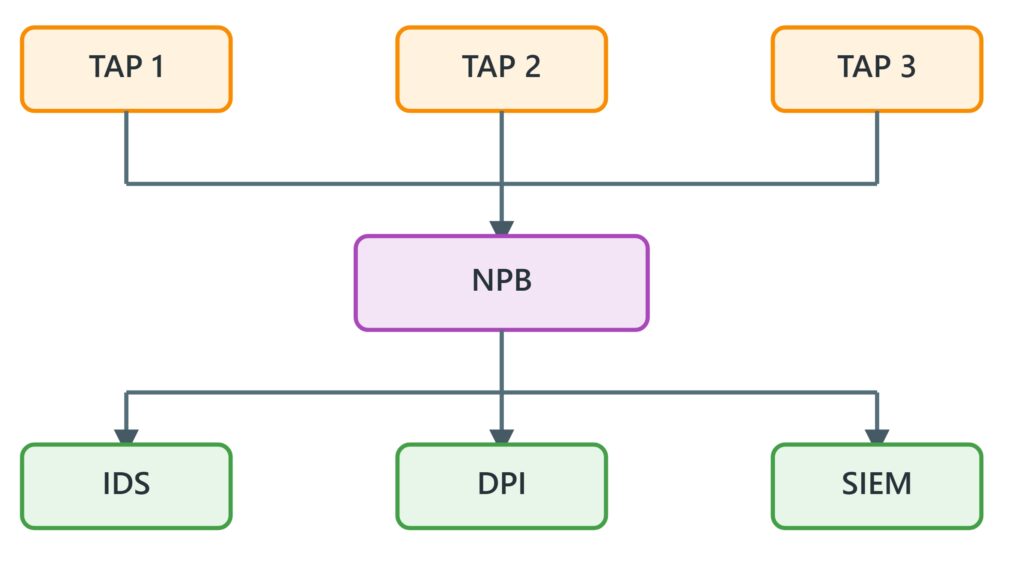
The NPB ingests traffic from multiple TAPs or switch SPAN/mirror ports, applies intelligent processing based on administrative policies, and then routes the optimized traffic to the appropriate analysis systems. For instance, on a 400G link generating massive volumes of data, security tools may only need to inspect a specific subset of application traffic. The NPB can filter out irrelevant data based on defined rules—such as IP address, VLAN, TCP/UDP port, or protocol type—and forward only high-value traffic to those systems. As discussed earlier, the NPB essentially serves as the “intelligent traffic dispatch center” within a network visibility architecture.
What is a Bypass Switch?
Unlike Network TAPs and NPBs, a Bypass Switch specifically addresses a distinct operational requirement: maintaining uninterrupted business operations during security appliance failures. In enterprise security architectures, inline security appliances—such as Intrusion Prevention Systems (IPS), Next-Generation Firewalls (NGFW), and Data Loss Prevention (DLP) solutions—are directly deployed within the primary data path.
For example:
Internet
|
IPS
|
Internal Network
In this inline configuration, all production traffic must traverse the security appliance for inspection. Consequently, inline security appliance failure or power loss presents a single point of failure that could result in total network downtime.
Deploying an inline Bypass Switch mitigates this operational risk:
Internet
|
Bypass
|
IPS
|
Internal Network
Under standard operational conditions: Traffic → Bypass → IPS → Network (Traffic is routed through the inline security appliance for deep inspection).
In the event of an inline security appliance failure: Traffic → Bypass → Network (The Bypass Switch automatically initiates an automated fail-open mechanism, rerouting traffic around the compromised appliance to preserve network continuity and eliminate downtime).
Accordingly, the primary function of a Bypass Switch is not traffic analysis, but rather the provision of robust high-availability, fault tolerance, and link continuity.
How TAP, NPB, and Bypass Work Together
In real-world telecom, financial, and large enterprise networks, these three components rarely operate in isolation; instead, they are deployed in combination. For example, a typical network visibility architecture operates as follows:
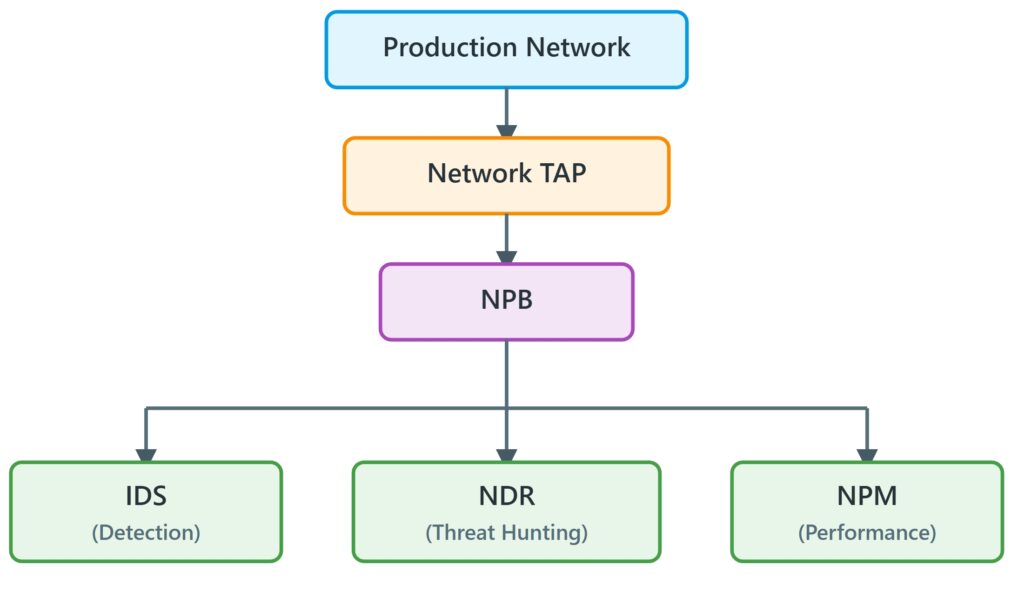
Where:
- TAP passively replicates real network traffic.
- NPB filters, optimizes, and distributes the traffic.
- IDS, DPI, and SIEM analyze the data.
However, if security appliances require inline threat blocking:
Network
|
NPB
|
Bypass
|
IPS
|
Network
In this architecture:
- NPB manages traffic steering and distribution.
- Bypass ensures link continuity if the security appliance fails.
- IPS conducts real-time inspection and threat prevention.
In production data centers and service provider networks, these systems operate in synergy across upstream and downstream workflows:
Scenario A: Out-of-Band Monitoring (TAP + NPB)
Consider a facility with 20 core optical links:
- Network engineers install a TAP on each link to replicate all 20 raw traffic streams without loss.
- All 20 traffic streams are aggregated into a central NPB.
- The NPB aggregates the traffic, eliminates redundant packets (deduplication), filters out non-essential video traffic, and balances the optimized feed across 3 performance analyzers.
Scenario B: Inline Defense (Bypass + NPB)
An enterprise internet egress point experiences extremely high bandwidth. It requires a load-balanced cluster of 3 IPS appliances to block attacks while guaranteeing zero network downtime:
- A Bypass Switch is deployed directly on the egress link.
- Traffic flows into the Bypass Switch and is passed to the NPB.
- The NPB intelligently balances and distributes the heavy traffic across the 3 inline IPS appliances.
- If one IPS fails, the NPB dynamically redirects traffic to the remaining two operational units.
- In the event of a total power failure or NPB malfunction, the physical relay on the primary Bypass Switch instantly trips to fail-open mode, passing raw traffic directly through to ensure complete business continuity.
Do large-scale enterprises typically deploy both at the same time?
Yes, and this is actually very common. For example, telecom operators and financial institutions often deploy both out-of-band monitoring and inline security protection within the same network visibility architecture:
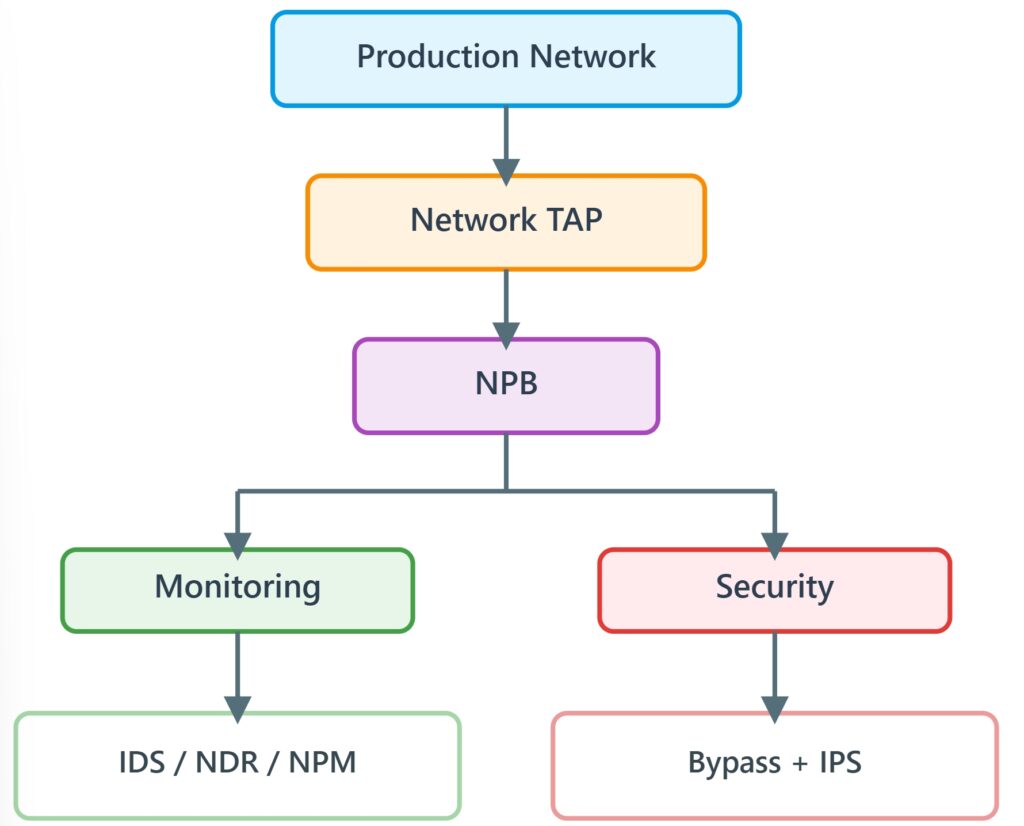
In this architecture, the NPB can serve two different roles:
- Providing traffic feeds to out-of-band monitoring tools
For example: NPB → IDS or NPB → NDR or NPB → NPM
The NPB filters, optimizes, and distributes traffic to different monitoring systems, allowing each tool to receive only the traffic it needs. - Providing traffic to inline security appliances
For example: NPB → Bypass → IPS or: TAP → NPB → Bypass → IPS
In this scenario, the NPB performs traffic steering and sends selected traffic flows to inline security devices, while the Bypass Switch ensures service continuity by automatically bypassing the security appliance in case of failure.
Q1: Is a TAP Mandatory? Should Network Traffic Acquisition Use a TAP or Switch SPAN/Mirroring?
This question essentially boils down to a trade-off: when capturing network traffic, is a TAP truly necessary, or is switch port mirroring (SPAN) sufficient?
The short answer is that a TAP is not required in every scenario. In environments with lower requirements for accuracy and reliability—such as temporary troubleshooting, test environments, or small-to-medium enterprise networks—port mirroring is fully capable of getting the job done. Mirroring offers quick deployment, low costs, and rapid onboarding. However, its limitations are pronounced: under heavy traffic loads, SPAN ports can drop packets—often silently—without generating alerts. It consumes switch processing resources, potentially impacting overall forwarding performance. Furthermore, mirroring cannot capture critical low-layer packet anomalies, such as corrupted frames or dropped packets. Because it relies entirely on the switch, any device reboot or configuration change can interrupt traffic capture.
By contrast, a TAP functions as dedicated infrastructure. It replicates full, raw traffic in a completely non-intrusive, zero-impact manner, remaining independent of switch CPU load and production network operations. Consequently, for scenarios demanding high data integrity—such as security analysis (IDS/NDR), high-speed environments (10G/40G/100G+), mission-critical systems (financial or telecom networks), and compliance auditing/forensics—a TAP is the far more reliable, if not essential, choice.
In summary: if you simply need a quick, “good enough” deployment, SPAN mirroring works. But if your architecture requires long-term, stable, precise, and dependable traffic feeds, a TAP is the superior solution.
Q2: When Must a Bypass Switch Be Deployed?
In network visibility and security architecture design, deploying a Bypass Switch is never an arbitrary choice—it is strictly dictated by the device’s deployment position and the business’s tolerance for network downtime. Simply put: if a device sits in-line (“blocking the road”), a Bypass Switch is essential; if a device is deployed out-of-band (“just watching”), a Bypass Switch is completely unnecessary.
For pure out-of-band monitoring scenarios—where traffic copies are sent via TAPs or SPAN ports to analytical tools like IDS, NPM, or SIEM—security systems merely receive data replicas passively without participating in packet forwarding. Even if these monitoring systems crash, experience software bugs, or undergo reboots and upgrades, primary production traffic remains completely unaffected. Because the link possesses inherent, natural isolation, such projects naturally do not require a Bypass Switch.
However, when appliances are deployed in-line (such as an IPS, inline WAF, transparent bridge firewall, or DLP), the dynamic changes entirely. All production traffic must traverse the device before continuing along the path, making the appliance a Single Point of Failure (SPOF). In the event of a hardware fault, software freeze, or power failure, the entire network link immediately goes down. The core value of a Bypass Switch lies in acting as a hardware-level “safety fuse”—instantaneously engaging a physical fail-open mechanism during an appliance failure to guarantee that while security inspection may be temporarily bypassed, business operations never halt. In real-world engineering, several scenarios present a mandatory requirement for Bypass deployment:
- Inline Security Appliance Deployment: All inline security tools capable of active threat blocking must rely on a Bypass Switch to eliminate SPOF risks.
- Ultra-High Availability Requirements: In mission-critical environments demanding 99.999% uptime—such as financial trading systems, core banking networks, or telecom backbones—any downtime caused by security tool failure is unacceptable. A Bypass Switch serves as an indispensable fail-safe mechanism.
- Frequent Maintenance and Hitless Upgrades: With a Bypass Switch in place, IT operations teams can perform policy updates, firmware upgrades, and hardware hot-swapping without requesting maintenance windows or disrupting online services.
- Multi-Appliance Service Chaining: In complex inline service chains (e.g.,
IPS → WAF → DLP), a Bypass Switch enables granular bypass of a single faulty appliance, preventing a localized failure from bringing down the entire chain. - Risk Isolation and Fail-Safe Protection: When onboarding new vendor appliances, conducting pilot testing, or running systems near peak capacity limits, a Bypass Switch effectively isolates potential performance risks.
Conversely, a Bypass Switch can be safely omitted only in pure out-of-band traffic monitoring, lab/test environments, or low-priority networks where business interruptions are acceptable.
To put it plainly: if it’s not on the primary path, you don’t need a fail-safe; if traffic must pass through the device’s core, a Bypass Switch is an imperative safety requirement.
TAP vs. NPB vs. Bypass Comparison Table for Network Visibility
| Comparison Dimension | Network TAP | Network Packet Broker (NPB) | Bypass Switch |
| Core Position | Traffic Collector | Intelligent Traffic Scheduling & Management Center | Link Continuity Protection (Fail-Open Insurance) |
| Metaphor | Physical “Photocopier” | Intelligent “Sorting Center” | Physical “Emergency Gate” |
| Deployment Mode | Out-of-band (Inline optical tapping/replication) | Out-of-band (Connected between TAPs, SPAN ports, and analysis tools) | Inline (Positioned between network links and inline security tools) |
| Core Function | 100% loss-free, line-rate physical traffic replication | Filtering, aggregation, deduplication, distribution, desensitization, reassembly | Heartbeat monitoring, automatic Fail-Open (physical bypass) / Fail-Closed |
| Traffic Processing Capacity | Stateless; does not alter traffic, performs only 1:1 or 1:N replication | Supports both stateless (ASIC) and stateful (DPU/FPGA) deep processing | Stateless; performs only physical/link-layer switching and inline bypass |
| Impact of Device Failure | Passive optical TAPs require no power; power loss has zero impact | Device failure affects only traffic analysis; primary business link stays up | Extremely high reliability; instantly engages bypass mode on failure, primary business link stays up |
| Primary Problem Solved | How to capture original raw data from the network | How to reduce load on downstream analysis tools via precision traffic distribution | How to prevent inline security tools (e.g., IPS) from becoming a single point of failure (SPOF) |
| Typical Downstream Integration | Connects to NPBs or a single analysis tool | Connects to IDS, NPM/APM, DPI, NDR, SIEM, etc. | Connects inline to IPS, WAF (Inline), DLP, Firewalls |
For more:
What Is a Network Packet Broker (NPB)? How It Works?
What Is a Network Packet Broker (NPB)? Why It Matters and How It Works?
Network Packet Broker Powered by SONiC: PB-APP Solution
Network Packet Broker Powered by SONiC: PB-APP Solution
Open Packet Broker powered by SONiC: Next Genaration NPB Solution-NPB2.0
Open Packet Broker powered by SONiC: Next Genaration NPB Solution-NPB2.0
SONiC-based Network Packet Broker 2.0: Transforming Network Visibility and Efficiency
SONiC-based Network Packet Broker 2.0: Transforming Network Visibility and Efficiency


