Table of Contents
Introduction
These two technologies are familiar to most engineers. So why revisit them? Because well-established designs still matter. When comparing DHCP vs Static IP, which one would you choose?
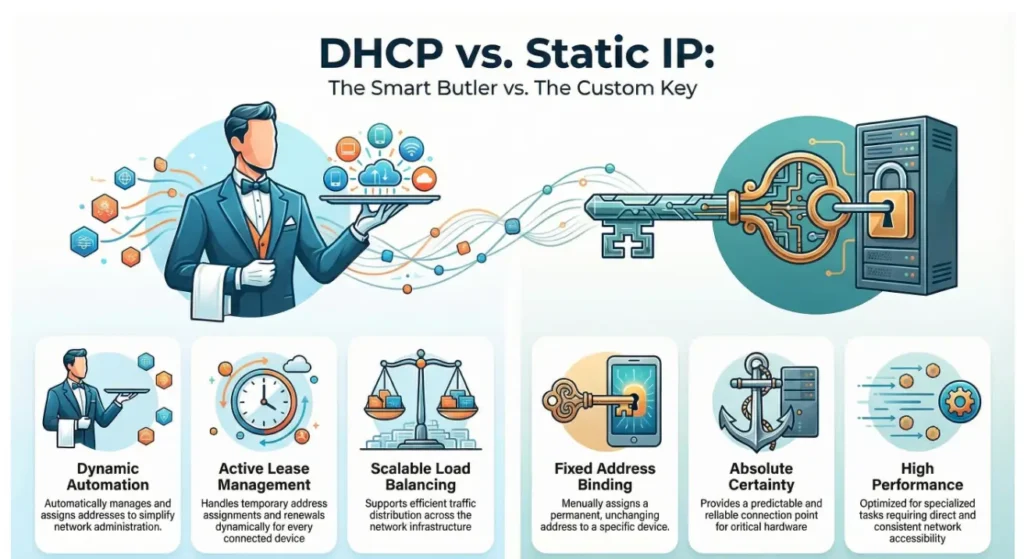
In terms of functionality, each serves a different purpose. There is no absolute advantage. It depends on the deployment scenario. DHCP acts like an automated controller. It assigns IP addresses dynamically, manages leases, and supports automation and load distribution. A Static IP is more like a manually provisioned identifier. It binds a fixed address to a device and provides deterministic behavior and stable performance.
The following sections examine both approaches in detail. They also show how DHCP vs. Static IP are implemented on SONiC.
What is Static IP Meaning in Networking ?

A Static IP is manually assigned to a device, and the address remains unchanged. It is suitable for endpoints that require stable reachability, such as servers, printers, routers, NAS, and remote access devices.
Consider a typical scenario: you configure a device through the CLI by entering commands like ip address x.x.x.x/30. This assigns an IP address and subnet mask to a specific logical or physical interface.
What is DHCP Meaning in Networking ?
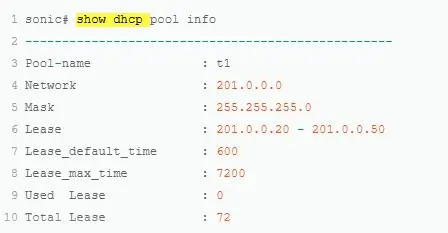
DHCP (Dynamic Host Configuration Protocol) automatically assigns IP addresses through a router or DHCP server, so endpoints do not require manual configuration when they join the network. It is easy to operate and simplifies management, making it suitable for environments with a large number of devices or frequent changes.
Compared with static IP configuration, the workflow is slightly more complex. You need to manage DHCP address pools and configure the DHCP server. In addition, DHCP relay or DHCP proxy functions often need to be deployed and maintained.
DHCP is widely used in both AIDC and campus networks, but the usage model and priorities differ. AIDC environments focus on high density, automation, and rapid provisioning. Campus networks focus on large numbers of endpoints and dynamic access patterns.
AIDC Scenarios
In AIDC scenarios, DHCP is commonly used to assign addresses to servers, management nodes, O&M devices, or temporary endpoints. This supports batch deployment and fast provisioning. In large-scale and automated environments, DHCP significantly reduces manual configuration effort.
Campus Scenarios
In AIDC scenarios, DHCP is commonly used to assign addresses to servers, management nodes, O&M devices, or temporary endpoints. This supports batch deployment and fast provisioning. In large-scale and automated environments, DHCP significantly reduces manual configuration effort.
In campus scenarios, DHCP is effectively the default approach. Endpoints such as student devices, faculty terminals, office PCs, and Wi-Fi clients are numerous and frequently move or reconnect. Campus network designs widely adopt DHCP for access control and address assignment, often combined with mechanisms such as DHCP snooping to enhance security.
How to Choose
The selection criteria typically differ by scenario.
In AIDC, the focus is on automated provisioning at scale, controllable address management, and integration with network, monitoring, and O&M systems.
In campus networks, the focus is on ease of access, automatic address allocation, and preventing rogue DHCP servers and IP conflicts.
DHCP also includes a set of related features that form a broader ecosystem. For example, DHCP snooping can work with IP Source Guard (IPSG) to mitigate spoofing attacks. DHCP relay with Option 82 can insert location information for better traceability. These mechanisms improve both reliability and security of address assignment.
It is also worth noting DHCP reservation. It ensures a device always receives the same IP address, but the assignment is still controlled by the DHCP server. The difference between DHCP reservation and a static IP is summarized in the table below.
| Item | Static IP | DHCP Reservation |
| Configuration location | On the device | On the DHCP server |
| Address assignment | No, manually configured | Yes, automatically assigned |
| Management model | Per-device configuration | Centrally managed on the server |
| Conflict risk | High (prone to duplicates) | Low (server-controlled allocation) |
Pros and Cons for DHCP vs. Static IP
Pros and Cons
DHCP provides automation and simplifies operations. It reduces manual configuration errors and is well suited for large-scale networks. Its drawback is that IP addresses may change, and if the DHCP service is unavailable, new devices may fail to obtain an address.
Static IP provides stable and predictable addressing. It is suitable for devices that require consistent reachability. Its drawback is operational overhead. Manual configuration is error-prone and does not scale well in environments with frequent changes.
Security Considerations
Some references describe static IP as “more secure” or DHCP as “easier to trace.” A more accurate view is that neither is a security mechanism by itself. Security depends on the overall network design.
With proper logging, DHCP snooping, and ARP protection, DHCP deployments are easier to manage and audit. Static IP makes addressing more predictable, which may increase exposure if not properly controlled.
How to Choose between DHCP vs. Static IP
| Scenario | Preferred Option | Reason |
| Mobile devices (phones, laptops, tablets) | DHCP | Devices move frequently. Automatic address assignment is more practical. |
| Printers, NAS, cameras | Static IP or DHCP reservation | These devices require fixed addressing for consistent access and configuration. |
| Servers, gateways, routers, switches | Static IP | Address stability is critical. Changes can impact services and management. |
| Home user devices | DHCP | Low maintenance overhead and sufficient for typical usage. |
How to Support DHCP and Static IP on Enterprise SONiC-AsterNOS
Advantages of Implementing DHCP and Static IP on SONiC
Containerized Architecture (Docker Microservices): Functions like DHCP relay and snooping run in independent containers, providing fault isolation. Restarting a container does not impact the entire system. Static IP configurations are synchronized in real time via ConfigDB. In contrast, other NOS often rely on monolithic processes, increasing the risk of system-wide failure.
Redis-based ConfigDB: Both DHCP relay parameters (e.g., server IP, VRF, max-hop-count) and static IPs are stored in a centralized database. This supports real-time subscription/push via gNMI/YANG and allows automation tools like Ansible to access configurations directly. Other NOS typically use files or CLI commands, requiring reloads for changes.
SAI Abstraction Layer: Supports 15+ ASICs (e.g., Broadcom, Mellanox). DHCP snooping binding tables are hardware-accelerated, and static IP routes are deployed efficiently. Traditional NOS often depend heavily on hardware, making migration difficult.
DHCP Advantages in SONiC
SONiC provides strong capabilities for DHCP relay and snooping:
- Advanced Option Handling: Supports Option 82 (circuit-id
%pformat), policy-action (discard/append/replace), link/VRF selection, and IPv6 relay. Example CLI:ip dhcp-relay 10.10.200.12 vrf Customer1 policy-action discard. - Deep Snooping Protection: Includes MAC verification, dynamic/static binding tables, statistics reset, and VLAN-level controls. Compared to Cumulus, which offers basic snooping without Option 82, SONiC provides stronger security for data center environments.
- High-Density Scalability: Microsoft Azure deploys SONiC across 1M+ ports, validating low-latency operation and support for 400G/800G networks.
Static IP Advantages in SONiC
- Dynamic Management: Commands like
ip address 10.10.100.1/24are stored in ConfigDB, enabling hot changes without service interruption. - Coexistence with DHCP: Relay can specify a source interface to avoid conflicts. Snooping static binding tables prevent spoofing.
- Zero-Config Extension: Derivatives like AsterNOS support SONiC DHCP + TFTP for plug-and-play deployment, automatically assigning IPs based on device location.
Advantages of DHCP vs. Static IP on AsterNOS
AsterNOS provides shared core benefits for both DHCP and static IP in data center and campus scenarios, emphasizing efficiency, security, and intelligent operations.
- Comprehensive Scenario Adaptation: Both DHCP and static IP support DC scenarios (focused on VXLAN/L3 forwarding) and campus networks (focused on security), offering a unified architecture from basic allocation to advanced integration.
- Secure Binding Mechanisms: Both emphasize IP-MAC binding. DHCP uses static binding and snooping/IPSG to block unauthorized traffic. Static IP leverages Static User-Bind and conflict detection to prevent spoofing, providing consistent access protection.
- High Availability with DHCP Failover: DHCP failover (heartbeat sync, load balancing) and static IP SLA/Track integration (automatic withdrawal of unreachable routes) ensure failover and fault tolerance, supporting dual-controller hot standby and state monitoring.
- Automation with ZTP & SLA: ZTP (driven by DHCP Options) and SLA probes simplify deployment and monitoring. CLI commands like pool utilization and conflict status provide clear operational metrics, reducing manual intervention.
- Flexible Multi-Interface Support: Covers management ports, physical, VLAN, and loopback interfaces. Supports IPv4/IPv6, secondary IPs, and option extensions, adapting to virtualization and multi-tenant requirements.
Conclusion: Practical Recommendations
Choosing between DHCP and Static IP depends on the deployment scenario. DHCP suits dynamic, large-scale, or frequently changing networks, offering automation, centralized management, and enhanced traceability with snooping and Option 82. Static IP is ideal for critical devices requiring stable, predictable addresses. On Enterprise SONiC – AsterNOS, both are efficiently supported with centralized ConfigDB, hardware-accelerated binding, coexistence mechanisms, and high availability, ensuring secure, flexible, and automated operations across data center and campus environments.
For DHCP Configuration, please refer to DHCP Configuration On Asterfusion Enterprise SONiC Switch
Need assistance or more info ?
Fill out the form, and we’ll reach out to you today !
Contact US !
- To request a proposal, send an E-Mail to bd@cloudswit.ch
- To receive timely and relevant information from Asterfusion, sign up at AsterNOS Community Portal
- To submit a case, visit Support Portal
- To find user manuals for a specific command or scenario, access AsterNOS Documentation
- To find a product or product family, visit Asterfusion-cloudswit.ch


