Table of Contents
Introduction
UEFI vs. U-Boot is an important boot architecture decision for open networking devices, ARM64 network appliances, and embedded Linux platforms. The boot environment connects the hardware platform with the operating system and influences how the device is installed, provisioned at scale, recovered after a failure, and maintained throughout its lifecycle.
Although UEFI and U-Boot are often compared as alternative boot approaches, they are not identical technologies. UEFI is a standardized firmware interface, while U-Boot is a highly configurable bootloader that can support selected UEFI capabilities. In this article, UEFI vs. U-Boot refers to the comparison of two practical boot, deployment, and operations workflows on open networking hardware.
The UEFI vs. U-Boot choice does not change the network features or forwarding performance after the device boots into the same network operating system. Instead, it affects the boot flow, system installation method, deployment automation, maintenance model, recovery mechanism, and compatibility with existing operating system ecosystems and operational practices.
This article uses Asterfusion ET Series open networking devices as the reference platform to compare UEFI vs. U-Boot boot methods. It helps users select the appropriate approach based on their actual deployment requirements.
Built on the Marvell OCTEON Open Network Platform, the Asterfusion ET Series supports both U-Boot and UEFI boot modes, covering different types of open networking hardware platforms. Currently, ET2500, ET2700, and ET3600 support both boot methods. Users can choose the appropriate boot mode based on their existing deployment architecture, operating system requirements, and operational practices. If a boot mode change is required in the future, Asterfusion can provide technical guidance based on the device model, software version, and current deployment status.
In addition to the ET Series, this platform capability has also been applied to hardware platforms such as CME102 and GHC103, and will be extended to more open networking platforms as the product portfolio evolves.
Key conclusions:
- For devices that run a fixed AsterNOS-VPP image over the long term, where the team places greater emphasis on board-level control, console-based maintenance, and low-level system recovery, U-Boot is the preferred choice.
- For devices that require standard ARM64 ISO installation, PXE/HTTP Boot, EFI/GRUB boot workflows, or integration into a server-like installation and operations model, UEFI is the preferred choice.
In real-world deployments, devices running the same software version provide identical network features, hardware access methods, and forwarding performance regardless of the boot method. The key factors that determine the choice are the boot workflow, system installation method, and the team’s daily operational model.
Ⅰ. U-Boot: A Direct Board-Level Control Approach
What Is U-Boot
U-Boot (Universal Boot Loader) is an open-source bootloader widely used in embedded systems and open networking platforms. It runs before the operating system starts and is responsible for hardware initialization, boot parameter management, and loading the operating system image.
Compared with server-oriented firmware solutions, U-Boot provides direct access to hardware resources and a highly customizable boot process. This makes it suitable for networking devices that require board-level control, platform-specific integration, and low-level recovery capabilities.
Operation Mechanism and Key Features
On the ET platform, U-Boot directly controls the boot parameters, system image, and kernel loading process. System engineers can load images from a network server through TFTP or read and write data from local storage devices such as eMMC, USB, and NVMe.
This approach provides direct control and strong board-level flexibility. It is suitable for modifying boot parameters, loading test images, and performing low-level system recovery operations.
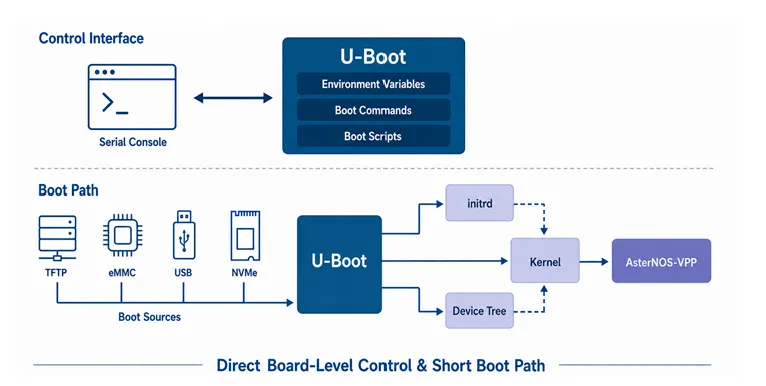
Interactive Command-Line Examples
In serial console debugging mode, typical U-Boot operations include:
printenv
setenv bootargs …
setenv bootcmd …
tftpboot …
mmc read …
nvme scan
booti …
Ⅱ. UEFI: A Server-Style Boot Approach for Standardized Deployment
What Is UEFI
UEFI (Unified Extensible Firmware Interface) is a standardized firmware interface that defines how system firmware initializes hardware and transfers control to the operating system. Unlike traditional board-specific bootloader implementations, UEFI provides a common boot framework for different hardware platforms, operating systems, and boot devices.
UEFI is widely used in modern servers and is also increasingly adopted in ARM64-based networking and embedded platforms that require standardized installation and deployment workflows.
The core value of UEFI is standardization. By providing standardized firmware interfaces, UEFI reduces the dependency of the operating system boot process on board-specific implementations. This allows ARM-based networking devices to adopt system installation, boot management, and automated deployment methods similar to modern servers.
Operation Mechanism and Key Features
UEFI manages the system boot process through components such as the Boot Manager, Boot Entries, EFI System Partition (ESP), and standard EFI bootloaders such as GRUB. This enables ARM-based devices to integrate into enterprise IT automation and operational environments.
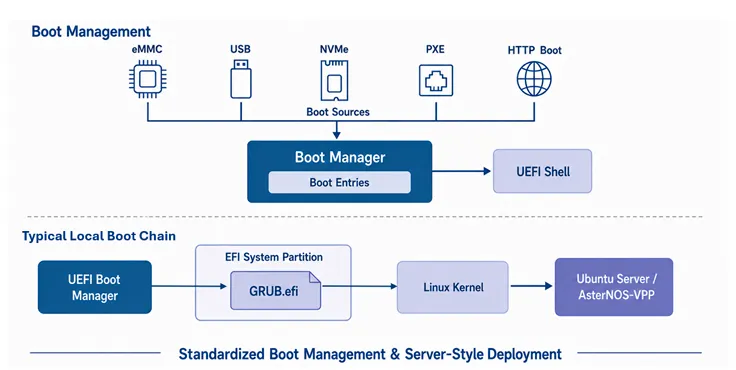
Standard Capabilities
On Asterfusion devices, UEFI firmware supports common server-style boot capabilities, including:
- Menu-based Boot Manager: Manages boot devices, boot order, and boot entries.
- Standard UEFI Shell: Supports script-based pre-boot debugging.
- Multiple Boot Media Support: Supports USB, eMMC, and SATA/NVMe storage interfaces provided by the device.
- Enterprise Network Boot: Supports PXE network boot and HTTP Boot.
- Standard EFI/GRUB Boot Chain
Boot Log Example
During the UEFI boot process on Asterfusion ET devices, users can observe standard firmware initialization output:
TianoCore/EDK2 firmware version SDK12.24.06
Connecting devices. Please wait ……………………… Done
Press ESCAPE for boot options ……
Device Manager
Boot Manager
Boot Maintenance Manager
Continue
Reset
Ⅲ. A Quick Comparison of the Key Differences Between U-Boot and UEFI
The design philosophies of the two boot methods can be summarized as follows:
U-Boot is more like a lightweight, direct, and highly customizable dedicated path. UEFI is more like a standardized infrastructure that provides unified access rules for different boot devices, bootloaders, and operating systems.
Technical and Operational Comparison Matrix
| Comparison Aspect | U-Boot (General-Purpose Embedded Bootloader) | UEFI (Standardized Firmware Interface Implementation) |
| Basic Attribute | A specific open-source bootloader program | A standardized firmware interface specification and its implementations, such as TianoCore EDK II |
| Technical Characteristics | Board-level customization, direct control, and strong low-level flexibility | Standardized boot flow, unified management model, and server-like user experience |
| Interaction Method | Serial console commands, environment variables, and boot scripts | Boot Manager menu, Boot Entries, and UEFI Shell |
| Kernel Loading Mechanism | Directly locates and loads the Kernel, initrd, and DTB (Device Tree Blob) | Loads the system through EFI Loader, GRUB, or Linux EFI Stub |
| System Loading Methods | Asterfusion’s current U-Boot implementation supports image loading from Flash, eMMC, USB, and NVMe, and supports network loading through TFTP. SATA boot is not supported. | Supports booting from eMMC, USB, and SATA/NVMe storage interfaces provided by the device. Also supports PXE and HTTP Boot. |
| Typical Users | Embedded development teams and operation engineers managing dedicated network devices | Enterprise IT teams, system operation engineers, system integrators, and white-box hardware development teams |
Boot Time Consideration: U-Boot provides a more direct boot path. However, on the local Asterfusion ET2500 platform, the time from executing reboot to the start of Linux Kernel loading is 34 seconds with U-Boot and 35 seconds with UEFI. The difference is negligible. Therefore, boot time is not considered a primary factor when selecting between the two boot methods.
Ⅳ. Does the Boot Method Affect AsterNOS-VPP Performance?
No.
U-Boot and UEFI are only responsible for hardware initialization and system loading before the operating system starts. After AsterNOS-VPP boots, both boot methods provide the same network features, management model, and VPP data plane.
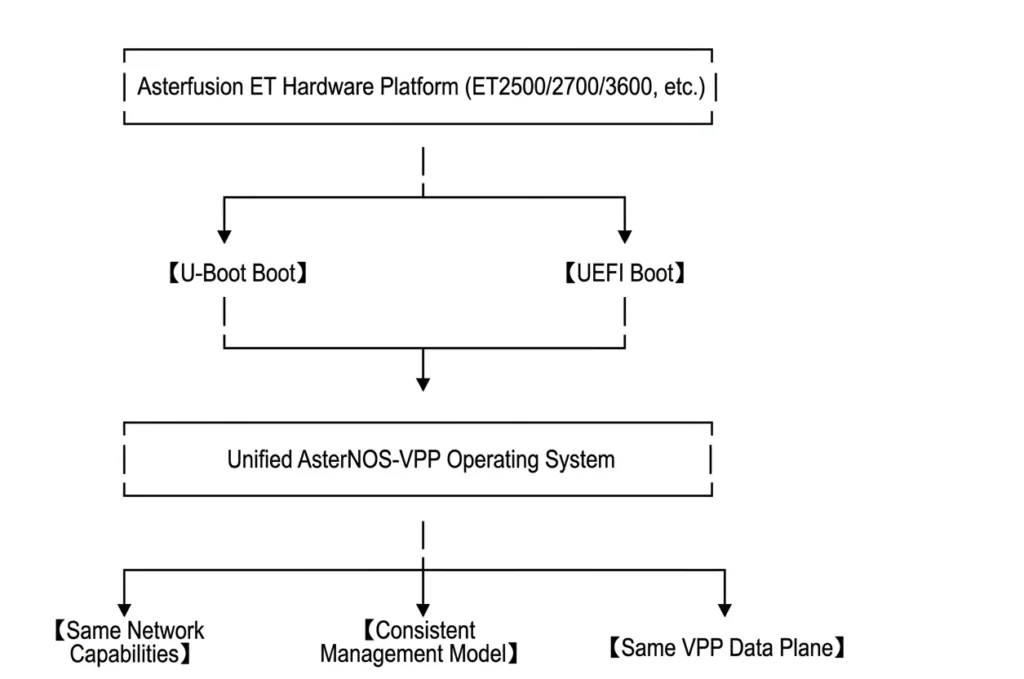
Therefore, choosing U-Boot or UEFI does not affect AsterNOS-VPP’s routing, NAT, VPN, security features, or data plane forwarding performance.
Ⅴ. How to Choose UEFI vs. U-Boot: Answer Three Questions First
Based on the technical and operational differences discussed above, selecting between U-Boot and UEFI can be simplified into three key questions:
- What operating system needs to be installed?
- How will the system be deployed at scale?
- Which operational model is more familiar to the team?
Do You Need to Install a Standard Linux Distribution?
If the deployment requires ARM64 ISO images provided by Linux distributions such as Ubuntu Server, and the goal is to retain the standard EFI/GRUB boot process, package management, and system upgrade workflow, UEFI should be considered.
If the device mainly runs the unified AsterNOS-VPP platform image provided by Asterfusion, and does not require standard ISO installation, PXE/HTTP Boot, or server-style provisioning workflows, U-Boot can be considered.
Do You Need Automated Large-Scale Deployment?
If a project requires PXE or HTTP Boot for large-scale system deployment and expects network devices to follow a server-like provisioning process, UEFI should be considered.
If the device continues to use existing platform image upgrades, serial console maintenance, and TFTP-based recovery workflows, U-Boot can be considered.
Which Operational Model Is More Familiar to the Team?
If the team mainly consists of network device or embedded engineers who are familiar with serial console commands, boot parameters, device trees, and low-level image recovery, U-Boot provides a more familiar operational model.
If the team mainly follows server-oriented operational workflows and is familiar with Boot Manager, EFI, GRUB, and standard Linux installation processes, UEFI can integrate more easily into the existing toolchain.
| Primary Requirement | Recommended Choice |
| Running the platform image delivered by Asterfusion | U-Boot |
| Installing third-party Linux distributions using standard ARM64 ISO | UEFI |
| Continuing serial console, TFTP, and board-level maintenance workflows | U-Boot |
| Using PXE, HTTP Boot, and EFI/GRUB | UEFI |
| Integrating into server-style installation and operational environments | UEFI |
Ⅵ. System Installation and Update Methods
In addition to differences in boot flow and operational tools, U-Boot and UEFI also correspond to different operating system delivery and update models.
This section focuses on scenarios where customers deploy standard Linux distributions and compares the differences between the two approaches in system installation, platform adaptation, and version maintenance.
U-Boot: Vendor-Integrated Platform Image
In Asterfusion’s current U-Boot solution, the Kernel, platform drivers, rootfs, and related system components are integrated and adapted for the target hardware, then delivered as a complete system image.
This model allows Asterfusion to complete system and hardware integration centrally, helping maintain version consistency and operational stability. System upgrades are performed through platform software images released by Asterfusion. It does not directly follow the standard ISO installation and update paths provided by upstream distributions such as Ubuntu and Debian.
UEFI: Standard ISO Installation and Native Package Ecosystem
UEFI provides a standard EFI boot environment, allowing users to install operating systems using ARM64 ISO images officially provided by distributions such as Ubuntu Server.
Since the installation is based on a standard Ubuntu system, users can continue using apt and official software repositories to install applications, receive security updates, and maintain user-space components. User-space software and most system components can continue to follow the upstream distribution update model.
Taking Ubuntu Server 24.04 as an example, the standard ISO can be installed on Asterfusion devices and can properly initialize networking. To improve long-term stability on ET hardware platforms, it is recommended to further update the system with a Kernel that includes the required Marvell platform support.
Asterfusion provides the platform Kernel source code and will provide precompiled .deb packages. Users can either compile the Kernel from source code or directly install the platform Kernel package on a standard Ubuntu system without rebuilding or reinstalling the entire operating system.
System Installation and Update Comparison
| Comparison Aspect | U-Boot | UEFI |
| System Installation Method | Uses a complete system image customized and adapted for the hardware platform | Uses a standard ARM64 ISO image for installation |
| System Update Method | Upgrades through platform software images released by Asterfusion | Retains the native package management and system upgrade mechanisms of the Linux distribution |
| Upstream Update Path | Does not directly follow the standard image update path of upstream distributions | User-space components and most system components can continue to follow the upstream update ecosystem |
| Kernel Integration Method | Integrated into the system image delivered by Asterfusion | Can be compiled from source code or installed through the .deb package provided by Asterfusion |
Ⅶ. Which Asterfusion Platforms Support Both U-Boot and UEFI?
Asterfusion currently provides both U-Boot and UEFI boot options on ET Series open intelligent gateway platforms, CME102, and GHC103 platforms.
Customers can select the appropriate boot method during the procurement and deployment phases based on project requirements. If a change is required later, Asterfusion can provide technical guidance based on the device model, software version, and current deployment status.
| Hardware Platform | Product Form Factor | U-Boot | UEFI | Description |
| ET2500 | Open intelligent gateway | Supported | Supported | Boot method can be selected based on project requirements |
| ET2700 | Open intelligent gateway | Supported | Supported | Boot method can be selected based on project requirements |
| ET3600 | High-performance open intelligent gateway | Supported | Supported | Boot method can be selected based on project requirements |
| CME102 | COM Express Type 7 module | Supported | Supported | Suitable for embedded networking scenarios and standardized system deployment |
| GHC103 | — | Supported | Supported | UEFI mode does not support USB boot |
FAQs
Q1: Does using UEFI improve forwarding throughput or reduce latency during ET device operation?
No.
After the operating system starts, neither U-Boot nor UEFI participates in daily packet forwarding. The forwarding throughput and latency of ET devices are mainly determined by the SoC, CPU, memory, and I/O capabilities, as well as the VPP data plane implementation and specific service functions in AsterNOS-VPP.
The boot method does not affect runtime forwarding performance.
Q2: Can I switch an ET gateway from U-Boot to UEFI after deployment?
Yes.
The boot method can be changed depending on the device model and software version. If customers need to switch boot modes, the Asterfusion technical support team can provide operation guidance based on the current firmware, system version, and deployment status.
Q3: Is UEFI exclusive to the x86 architecture?
No.
UEFI is a processor architecture-independent firmware interface specification. It is widely used in ARM64 servers and some open hardware platforms.
The Asterfusion platform uses an AArch64 UEFI implementation based on TianoCore EDK II.
Q4: Can I install Ubuntu directly with UEFI on Asterfusion ET platforms?
Yes, UEFI allows users to install standard ARM64 Linux distributions such as Ubuntu Server. Additional platform Kernel support may be required for full hardware functionality.
Conclusion
On Asterfusion ET Series open intelligent gateways, U-Boot and UEFI are not replacement technologies or a simple upgrade path. Instead, they are two parallel boot solutions designed for different system installation methods, operational toolchains, and deployment models.
Choosing U-Boot means adopting a more direct board-level control model, platform image delivery approach, and traditional network device maintenance workflow.
Choosing UEFI means adopting standard ISO installation, EFI/GRUB-based boot processes, and a system management model closer to server environments.
Regardless of the selected boot method, AsterNOS-VPP provides the same network features and forwarding performance.
The key question is:
Which boot approach better matches your existing system installation process and operational model?
For further confirmation of the supported boot method for a specific model, third-party operating system Kernel adaptation, or firmware adjustment options, please contact the Asterfusion technical team.
Request a demo or need assistance ?
Fill out the form, and we’ll reach out to you today !


