Table of Contents
Ⅰ. Introduction
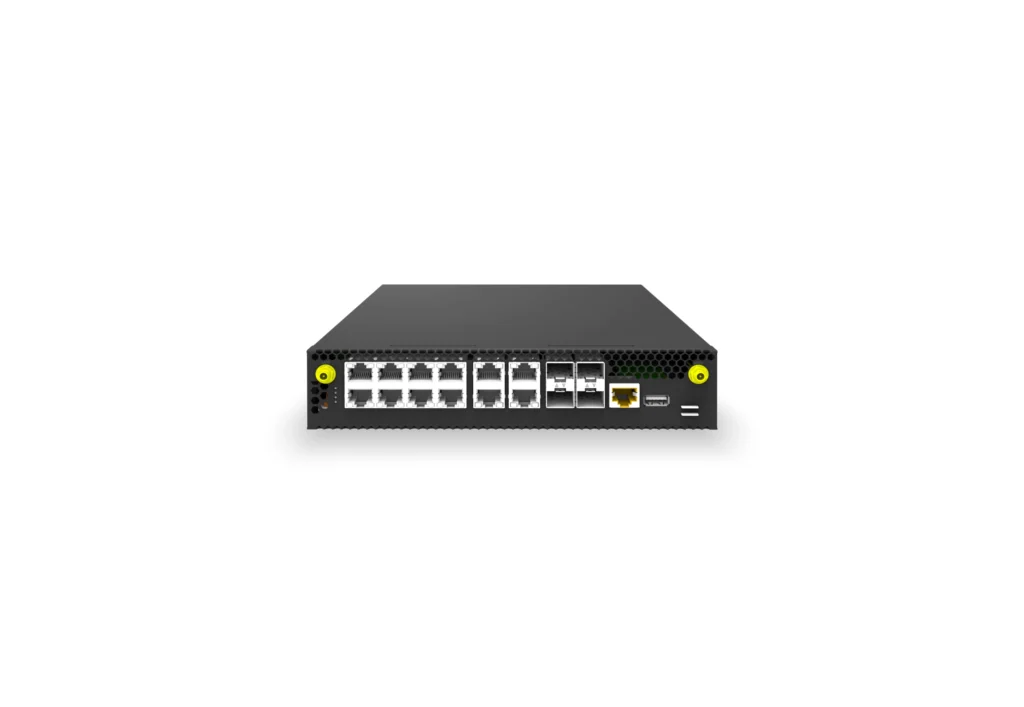
Asterfusion Enterprise SONiC-VPP provides QoS and HQoS support for VoIP networks, video streaming, and other scenarios by ET2508 platform. It supports core features such as priority mapping, queue scheduling, speed limiting, GQ->SQ->FQ mapping, and flow classification, and complies with the 1r3c (RFC 2697) / 2r3c (RFC 2698/4115) standards for traffic shaping.
By managing bandwidth, latency, jitter, and packet loss, QoS effectively ensures the performance of critical services. The introduction of HQoS further meets the increasingly complex demands for fine-grained traffic control. This article will explore the definitions of QoS and HQoS, their core technological evolution, and their fundamental differences. It will also demonstrate how to configure these two technologies in real-world scenarios.
The goal of this article is to clearly differentiate between QoS and HQoS. Next, let’s explore what QoS is, what HQoS is, the differences between these two technologies, and how to configure both QoS and HQoS.
Ⅱ. Understanding Standard QoS (Quality of Service)
QoS Fundamentals
The core objective of QoS is to differentiate traffic handling when network bandwidth is limited or congestion occurs, ensuring the performance of critical services (such as VoIP and video conferencing) while preventing non-critical traffic (such as file downloads) from consuming bandwidth, which could lead to increased latency and packet loss.
Traffic management includes the following processes: Classification, Marking, Congestion Management (Queuing), Congestion Avoidance, Shaping, and Policing.
How QoS Works
The implementation of QoS follows the Differentiated Services (Diff-Serv) architecture defined by the IETF. Its workflow can be divided into the following stages:
Classification
This is the first step of QoS, similar to identity verification during a security check. Network devices need to distinguish different types of traffic based on predefined rules.
Function: Identify critical traffic (such as voice and video) and non-critical traffic (such as file downloads and web browsing).
Technical Details: Devices perform a deep inspection of packet header information.
- Layer 2 (L2): Inspect source/destination MAC addresses, VLAN ID.
- Layer 3 (L3): Inspect source/destination IP addresses.
- Layer 4 (L4): Inspect TCP/UDP port numbers (to differentiate application types).
- Layer 7 (L7): Deep Packet Inspection (DPI) identifies specific applications (e.g., distinguishing between Zoom and YouTube).
Marking
Once traffic is identified, the device applies a “priority label” to it. This allows subsequent network devices to avoid reclassification and simply refer to the label.
Function: Modify specific fields in the packet to mark its priority and place it into the corresponding queue.
Technical Details: Modify the packet header.
- Layer 2 (Ethernet Frame): Modify the CoS (Class of Service) field in the 802.1Q frame header, which has 3 bits (0-7 levels).
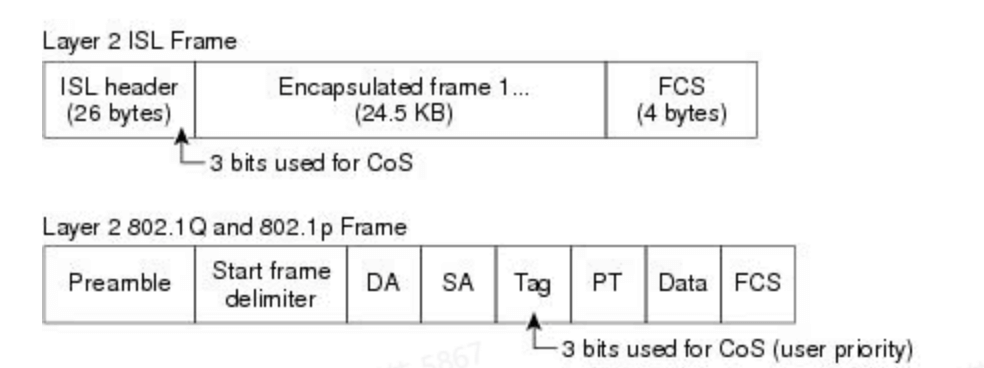
- Layer 3 (IP Packet): Modify the ToS (Type of Service) field in the IP header (now renamed to DS field) to adjust the DSCP (Differentiated Services Code Point), which consists of 6 bits (0-63 levels).

Asterfusion Enterprise SONiC-VPP, in its standard configuration, supports 8 hardware queues per port (Queue 0 – 7). These 8 queues correspond to the 8 CoS (Class of Service) priority levels defined by the IEEE 802.1p standard.
- Queue 7 (Highest Priority): Typically reserved for network control traffic, such as BGP, OSPF routing protocol updates, or LACP (Link Aggregation Control Protocol). If these packets are lost, the entire network may become unstable.
- Queue 6 (High Priority): Used for highly time-sensitive traffic, such as VoIP voice calls. Voice traffic is extremely latency-sensitive and must be forwarded with the highest priority.
- Queue 5-4 (Medium-High Priority): Used for video streaming or critical business data (e.g., database synchronization).
- Queue 3-1 (Medium-Low Priority): Used for general business data or non-real-time traffic that requires guaranteed bandwidth but not low latency.
- Queue 0 (Lowest Priority): Also known as Best Effort. Any unclassified or unmarked “miscellaneous” traffic (e.g., general web browsing, downloads) is placed into this queue by default.
The table below shows the general mapping between Layer 2 CoS values and Layer 3 DSCP values to queues.
| CoS Value (802.1p) | DSCP Value | Queue |
| CoS 7 | DSCP 46 / EF | Queue 7 (Highest Priority) |
| CoS 6 | DSCP 40 / CS6 | Queue 6 |
| CoS 5 | DSCP 34 / AF41 | Queue 5 |
| CoS 4 | DSCP 26 / AF31 | Queue 4 |
| CoS 3 | DSCP 18 / AF21 | Queue 3 |
| CoS 2 | DSCP 10 / AF11 | Queue 2 |
| CoS 1 | DSCP 2 / CS1 | Queue 1 |
| CoS 0 | DSCP 0 / BE | Queue 0 (Lowest Priority) |
In Asterfusion, we support mapping Layer 2 CoS values and Layer 3 DSCP values to local priority, known as TC (Traffic Class), and then mapping them to the 8 queues. The table below shows the mapping between TC and queue priorities on the Asterfusion platform:
| TC (Traffic Class) | Queue | Priority Level |
| TC 7 | Queue 7 (Highest Priority) | Highest Priority |
| TC 6 | Queue 6 | High Priority |
| TC 5 | Queue 5 | Medium-High Priority |
| TC 4 | Queue 4 | Medium Priority |
| TC 3 | Queue 3 | Medium-Low Priority |
| TC 2 | Queue 2 | Low Priority |
| TC 1 | Queue 1 | Very Low Priority |
| TC 0 | Queue 0 (Lowest Priority) | Lowest Priority |
Note: By default, all traffic with DSCP/802.1p priority carried in the packet is mapped to TC priority 0.
Policing & Shaping
This step is used to control traffic rates, ensuring that high-priority services are not starved, while preventing burst traffic from causing network congestion due to insufficient bandwidth.
Function:
- Policing: When traffic exceeds the configured bandwidth (CIR), the excess packets are discarded. This results in a sawtooth-shaped traffic curve.
- Shaping: When traffic exceeds the rate, the excess packets are temporarily stored in memory and sent later. This results in a smoother traffic curve.
Identification Basis: Rate matching is based on the DSCP, CoS, or TC values marked in the previous step.
Queuing & Scheduling
When network congestion occurs (i.e., the output bandwidth is smaller than the incoming traffic), packets must be queued in the buffer before transmission.
Function:
- Queuing: Packets of different priorities are placed into different “lanes” (buffers). For example, voice traffic goes into the “VIP lane,” while download traffic goes into the “regular lane.”
- Scheduling: Determines which lane’s packets will be transmitted first. There are several common scheduling methods:
- PQ (Priority Queuing) or SP (Strict Priority): As long as there are packets in the VIP lane, they will be sent first. Regular lane traffic must wait.
- WRR (Weighted Round Robin): Polls based on weight, where the VIP lane sends 3 packets and the regular lane sends 1 packet, preventing low-priority traffic from being completely “starved.”
- DWRR (Deficit Weighted Round Robin): An enhanced version of WRR. It introduces a “counter” (credit). Each time a queue is scheduled, if the packet size exceeds the current remaining credit, the queue waits and does not send the packet, but the credit balance is carried over to the next round.
In practice, PQ + WRR or PQ + DWRR is often used in combination. Asterfusion supports both PQ and DWRR scheduling methods.
Typical Use Cases for QoS
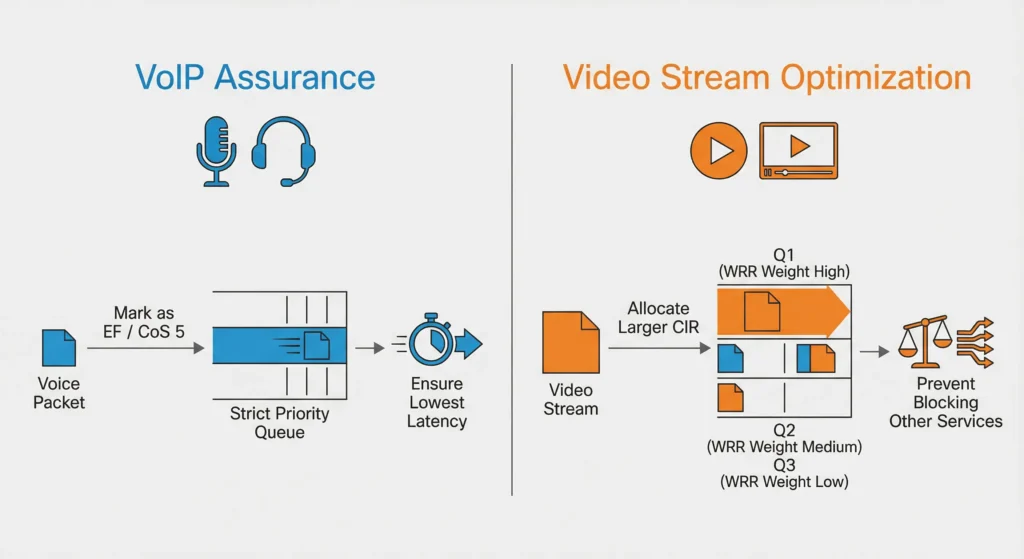
VoIP Guarantee: Mark voice packets as EF/CoS 5 and place them in the Strict Priority queue to ensure the lowest latency.
Video Streaming Optimization: Allocate a larger committed bandwidth (CIR) for video streams and use WRR (Weighted Round Robin) scheduling to prevent high-bandwidth video traffic from blocking other services.
Ⅲ. Delving into Hierarchical QoS (HQoS)
Defining HQoS (Hierarchical Quality of Service)
HQoS (Hierarchical Quality of Service) is an advanced traffic management technology that evolves from standard QoS. It provides two levels of scheduling, also referred to as a hierarchical scheduling structure, which includes user-level scheduling and service-level scheduling.
- User-Level Scheduling: Ensures that VIP user traffic is prioritized. Group Queues (GQ) and Subscriber Queues (SQ) are used for this purpose.
- Service-Level Scheduling: Within each user, different types of services (such as voice, video, data, etc.) are scheduled according to priority, similar to the single-level scheduling in traditional QoS. Flow Queues (FQ) participate in this process.
Through this hierarchical approach, HQoS enables bandwidth allocation at different levels, ensuring that important users and critical services receive priority access to resources.
How HQoS works
Since HQoS adds hierarchical nesting on top of the DiffServ model, its management can be understood as the parent node (service level) allocating departmental resources, while the leaf nodes (user level) allocate tasks to individual members.
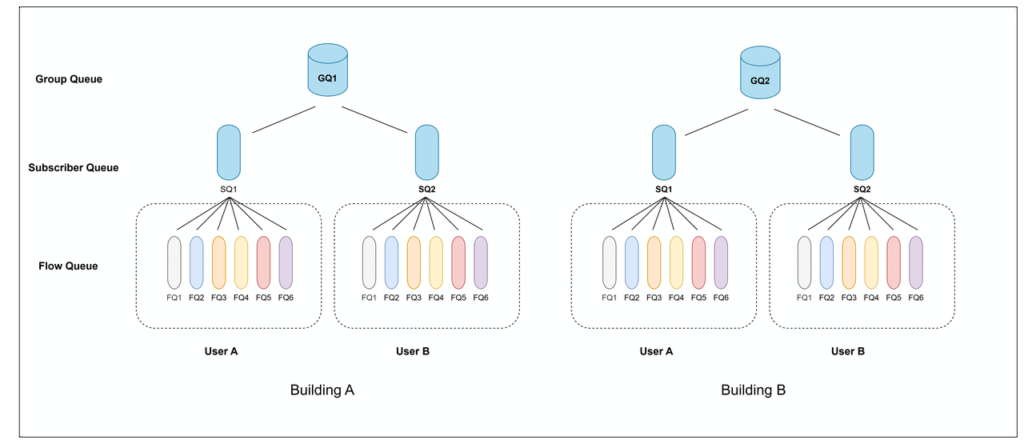
Let’s first define the components involved in HQoS scheduling: GQ, SQ, and FQ.
- GQ (Group Queue): Targets a collection of users, such as those in a VLAN, subnet, or ISP wholesale group. It serves the purpose of macro-level coordination, managing the total bandwidth allocation for the group and preventing malicious resource contention between groups. For example, users within a building could be managed as a single GQ.
- SQ (Subscriber Queue): Targets specific individual users, households, or tenants. Its role is to execute the “supervisor” function by applying total rate limiting (shaping) for all traffic of that user according to their subscribed plan.
- FQ (Flow Queue): Targets specific traffic flows within a user, such as voice, video, and downloads. Its role is to perform micro-level scheduling, differentiate traffic priorities, and ensure that critical traffic is prioritized during congestion.
Now, we can use diagrams to understand how HQoS processes traffic.
Traffic Classification — “Dual Identity Verification”
This is the entry point for traffic, where the system performs two levels of identification to establish hierarchical relationships.
First, when traffic enters the device interface, the system must undergo a strict “dual identity verification,” corresponding to the Classification stage.
The device first identifies which specific user (i.e., identifies the SQ, such as User A or User B) the traffic belongs to, based on information such as VLAN ID or physical interface. It also determines which larger logical group the user belongs to (i.e., identifies the GQ, such as Building A).
Next, the system uses the five-tuple or DSCP markings to identify the type of service the user is using, whether it’s voice, video, or download.
Policing/Marking — “Preprocessing and Coloring”
Before entering the complex scheduling tree, the packets are subjected to preliminary rate limiting and re-coloring to label them for subsequent priority handling.
For example, the total bandwidth for “User A” may be limited to no more than 100 Mbps.
Alternatively, the system can modify the packet’s internal priority (Internal Color/Discard Priority) to color the packet, such as marking it red for priority handling or green to indicate it can be discarded.
Leaf Node Scheduling (Child Policy) — “Micro Control Within Users”
After marking, the packets are sent to the lowest level of the scheduling tree, which corresponds to the Flow Queue (FQ) in the diagram.
At this point, we enter the “leaf node scheduling” phase, which is the micro-level control within a user.
Taking User A (SQ1) as an example, their video traffic might enter FQ1, while file download traffic enters FQ6. At this level, the system typically uses PQ (Strict Priority) or WPRR (Weighted Round Robin) algorithms to handle traffic differently. The PQ algorithm ensures that high-priority traffic in FQ1 (video) gets bandwidth first, ensuring smooth service for critical applications, while the WPRR algorithm fairly allocates bandwidth based on configured weights, ensuring all traffic types receive reasonable resources. At this point, HQoS implements differentiated services for different application flows within the same user.
Parent Node Scheduling (Parent Policy) — “Macro Control Between Users”
Finally, after overflow from the FQ, traffic must pass through the upper-level parent node scheduling (Parent Policy) before being sent out. This involves macro-level control at the SQ and GQ levels.
At the SQ level, the system uses shaping techniques to limit the maximum output bandwidth for User A and User B, ensuring they do not exceed their subscribed service plan limits. At the higher level, Building A (GQ1) and Building B (GQ2) also compete as larger aggregation nodes. When the physical port’s total bandwidth (e.g., 1 Gbps) is insufficient, the GQ level allocates resources between buildings or service providers based on weights.
Through this hierarchical nesting and scheduling from FQ to SQ to GQ, HQoS effectively solves the classic issue of “neighbor’s downloads affecting my gaming experience,” ensuring low latency for critical services while achieving fairness and isolation of bandwidth resources among multiple users.
In summary, HQoS uses hierarchical scheduling to divide traffic into different levels and allocate bandwidth accordingly, ensuring that important users and services receive priority access to resources.
Core Advantages of HQoS
Fine-grained Control: HQoS can provide differentiated SLA guarantees for different tenants.
Bandwidth Sharing and Isolation: While ensuring each user’s minimum bandwidth (CIR), it allows idle bandwidth to be dynamically borrowed by other users (EIR).
Flexibility: Policies can be nested, making HQoS ideal for complex logical interfaces and tunneling scenarios (such as VxLAN/VPN).
HQoS Application
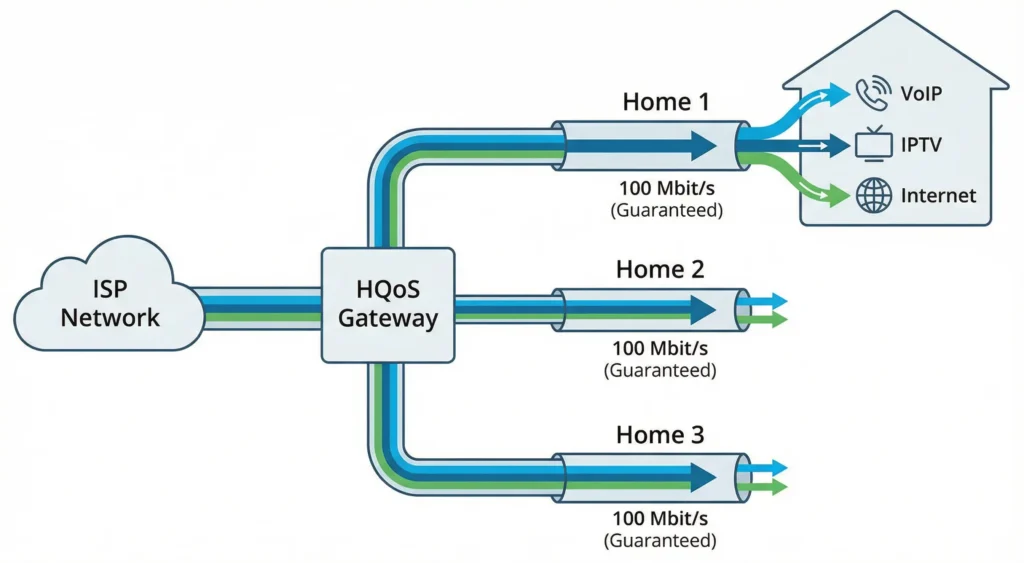
When traditional QoS cannot meet the needs for fine-grained traffic management, HQoS can be used to provide differentiated guarantees for different users and services. This significantly enhances user experience, especially in enterprise networks and ISP (Internet Service Provider) networks, where HQoS effectively meets bandwidth demands for different users and services.
For example, in residential broadband applications, HQoS can allocate bandwidth for different household users (such as VoIP, IPTV, and internet access) and ensure each household receives 100 Mbit/s of bandwidth.
Ⅳ. Key Differences between QoS and HQoS
After going through the above content, let’s summarize the differences between QoS and HQoS from the following aspects:
Scheduling Granularity
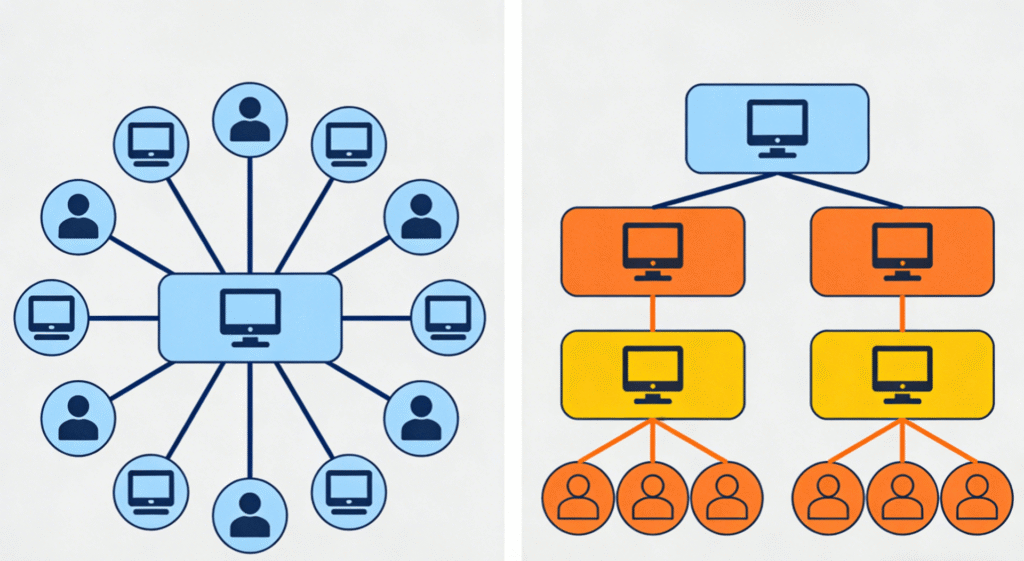
- QoS: Traffic is scheduled based on ports and can only differentiate between services.
- HQoS: HQoS employs two-level scheduling, based on both user and service. It differentiates not only services but also users.
Policy Structure
- QoS: Typically applies a single layer of policies to traffic flows.
- HQoS: Implements a hierarchical structure with parent and child policies, allowing for nested and more complex rule sets.
Control
- QoS: Provides direct control over traffic characteristics based on predefined classifications.
- HQoS: Offers a superior level of granularity, allowing for precise management of sub-flows within larger aggregated bandwidth allocations.
Complexity and Implementation
- QoS: Generally simpler to configure for basic prioritization needs.
- HQoS: More complex to design and implement due to its layered nature, but offers greater power for intricate requirements.
Use Case Scenarios
- QoS: Suitable for straightforward traffic management, ensuring basic service levels.
- HQoS: Ideal for multi-tenant environments, service providers, or complex enterprise networks requiring sophisticated bandwidth partitioning and differentiated services.
Here’s a table that clearly distinguishes between QoS and HQoS for your reference:
| Aspect | QoS | HQoS |
| Scheduling Granularity | Port-based, differentiates traffic types | User and service-based, differentiates both traffic and users |
| Policy Structure | Single-layer policy | Hierarchical structure, supports complex rules |
| Granularity and Control | Controls traffic based on predefined classifications | More granular control, manages sub-flows within aggregated bandwidth |
| Complexity | Simple to configure | More complex, suitable for intricate requirements |
| Use Case | Basic traffic management | Multi-tenant, service providers, or complex enterprise networks |
Ⅴ. How to Configure QoS and HQoS on Asterfusion Platform
QoS Configuration Overview
Step 1: Configure Priority Mapping (Required)
- Configure the priority mapping relationship: This includes mapping DSCP and 802.1p to local priority TC (Traffic Class).
- Configure the mapping from local priority (TC) to output queues.
- Bind the priority mapping to an interface: Apply it to specific interfaces for activation.
- Global binding of TC to queue mapping (Optional).
Step 2: Configure Queue Scheduling (Required)
- In the interface view, set the queue scheduling mode.
- Asterfusion supports Strict Scheduling and DWRR Scheduling.
Step 3: Configure Traffic Shaping (Optional, Configured as Needed)
- Limit the bandwidth rate for interfaces, queues, or specific traffic flows.
- Traffic shaping can be applied optionally based on ports, queues, or flows.
Reference to detailed configuration examples about QoS running on Enterprise SONiC-VPP is available: QoS Configuration Guide
HQoS Configuration Overview
Step1: Build the HQoS Hierarchy
- QoS Mapping
- User Profiles
- User Group Profiles
- Port Profile
Step2: Classification & Application
- Classification (ACL)
- Interface Binding
Reference to detailed configuration examples about HQoS running on Enterprise SONiC-VPP is available: HQoS-VPP Case
Ⅵ. Conclusion
In practical network policy formulation, the choice of the appropriate solution depends on the specific business scenario.
Standard QoS is more suitable for single-service environments. For example, in a small office, it is sufficient to ensure that voice calls have higher priority than general internet traffic. Similarly, in a high-performance core backbone network, fast scheduling based on packet markings is needed without the need for complex logical differentiation.
In contrast, HQoS is better suited for multi-tenant or multi-department environments. It is necessary to ensure that a high burst of traffic from Tenant A does not impact the basic service experience of Tenant B. Additionally, in ISP and campus access scenarios, HQoS is essential for providing customized bandwidth packages (e.g., 100M broadband) for different households or office buildings, as well as in complex business scenarios where VPNs, video, voice, and large background traffic are mixed on the same link.
To fully leverage the combined hardware and software advantages of Asterfusion Enterprise SONiC-VPP and ET series routers, it is recommended to flexibly combine both technologies to achieve optimal performance.
On Asterfusion Enterprise SONiC-VPP and ET series routers, you can combine the two for optimal performance:
- Global Control: Use HQoS to define the “ceiling” bandwidth at the ingress or egress to protect the overall link from being overloaded.
- Fine-Grained Control: In the child policies of HQoS, nest the DWRR or SP algorithms from standard QoS to ensure that critical services (e.g., control plane messages) can always “jump the queue” and be prioritized.
- Dynamic Sharing: Utilize the supported 1r3c/2r3c (RFC 2697/2698) token bucket algorithms, which allow traffic to burst (PIR) during idle times while ensuring basic performance (CIR), maximizing link utilization.

Contact US !
- To request a proposal, send an E-Mail to bd@cloudswit.ch
- To receive timely and relevant information from Asterfusion, sign up at AsterNOS Community Portal
- To submit a case, visit Support Portal
- To find user manuals for a specific command or scenario, access AsterNOS Documentation
- To find a product or product family, visit Asterfusion-cloudswit.ch


