Table of Contents
Introduction
Imagine an employee walking from the company office to a conference center and then entering a nearby coffee shop. At each location, the employee has to manually select an SSID, enter credentials, or go through inconvenient captive portal login pages. For enterprise IT teams, this also means that guest Wi-Fi services, access policies, and authentication workflows must be managed separately across different environments, resulting in high operational complexity.
Unlike cellular networks, traditional Wi-Fi lacks a unified identity framework and roaming mechanism, making seamless connectivity across organizations difficult to achieve. This creates a fragmented user experience and prevents enterprises from delivering connectivity similar to cellular networks. To address these challenges, OpenRoaming was introduced.
What is OpenRoaming ?
OpenRoaming is a global Wi-Fi roaming federation framework promoted by the Wireless Broadband Alliance (WBA). It is built on technologies such as Passpoint, 802.1X, EAP, and RADIUS federation, with the goal of enabling Wi-Fi networks to provide automatic access and secure roaming experiences similar to cellular networks.
Essentially, OpenRoaming is not a specific software product or a hardware feature owned by a single vendor. Instead, it is an open roaming framework that defines mechanisms for cross-organization trust, identity federation, and automatic network access. The capabilities enabled within this framework depend on the roles of participating entities and their implementation methods.
For enterprise users, the most visible benefit is seamless connectivity across different locations. For example, when an employee travels from headquarters to a regional office, their laptop or smartphone can automatically connect to Wi-Fi without requesting passwords from local staff or completing manual login processes. This is the value of OpenRoaming: enabling Wi-Fi connectivity across organizations and locations with an experience similar to cellular networks.
How Does It Work ?
Core Components of OpenRoaming
From an architectural perspective, OpenRoaming involves three key roles. The Identity Provider (IdP) is responsible for maintaining and verifying user identities. The Access Network Provider (ANP) provides Wi-Fi access networks, such as enterprise, airport, hotel, and carrier networks. The Roaming Federation establishes trust relationships between different organizations, allowing ANPs to securely forward authentication requests to the corresponding IdPs. This enables automatic Wi-Fi access across different organizations and locations.
Four Technical Foundations Behind OpenRoaming
These four technologies connect the three core components described above and enable the OpenRoaming framework.
- Passpoint (Hotspot 2.0): Responsible for automatic discovery and negotiation. It allows devices to detect that an AP supports OpenRoaming before connecting to the Wi-Fi network and automatically select the appropriate identity.
- 802.1X & EAP: Responsible for secure identity authentication. Instead of using plaintext passwords, it establishes an enterprise-grade secure channel through authentication methods such as EAP-TLS (certificate-based authentication) or EAP-TTLS.
- RadSec (RADIUS over TLS): Responsible for secure authentication data transmission across networks. It ensures that authentication information exchanged between the access network and the enterprise IdP over the public Internet is encrypted with TLS, preventing interception by attackers.
- RADIUS Federation, DPD, and PKI: These components establish the cross-organization trust and routing framework behind OpenRoaming. Dynamic Peer Discovery (DPD) uses DNS-based discovery to help an Access Network Provider locate the appropriate AAA or RADIUS service for a user’s identity realm. PKI and federation policies establish trust between participating organizations, while RADIUS federation enables authentication requests to be securely routed to the correct Identity Provider.
OpenRoaming Workflow
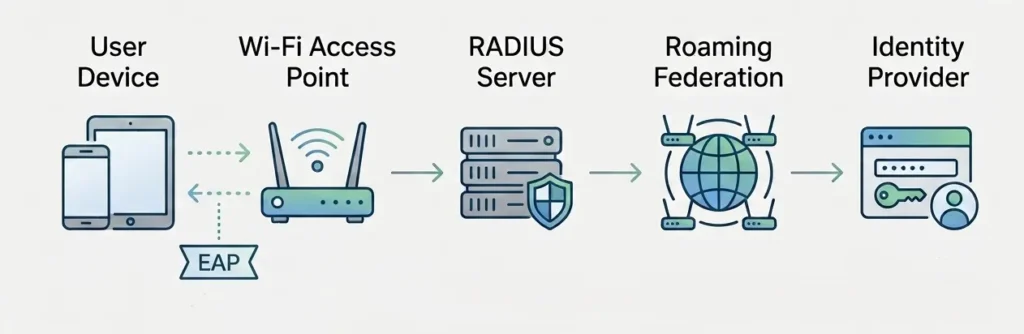
The OpenRoaming workflow can be summarized as follows: the device first discovers an OpenRoaming-enabled network, automatically selects an available identity, initiates EAP-based authentication, and then forwards the authentication request through the RADIUS federation to the corresponding Identity Provider (IdP) for verification. After successful authentication, the device automatically connects to the Wi-Fi network and establishes an encrypted session without requiring users to manually enter passwords or access captive portals.
The workflow can be broken down into the following steps:
a. The device prepares identity credentials. The device typically needs to have an OpenRoaming profile pre-installed or natively support the required Passpoint / OpenRoaming configuration.
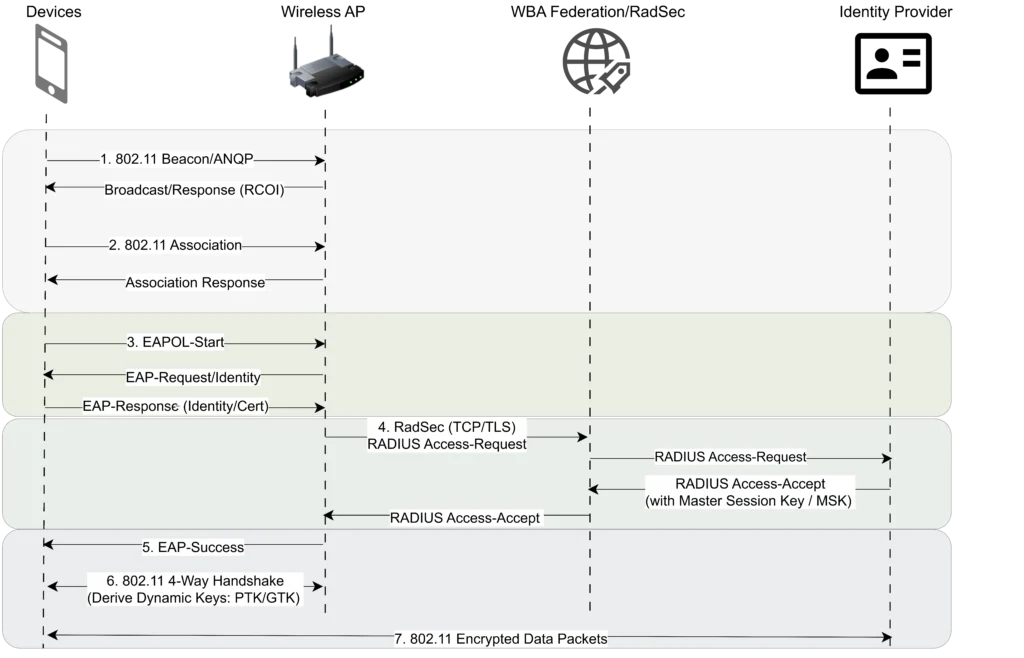
b. The device discovers an available network. The AP broadcasts Passpoint / Hotspot 2.0 information, including the RCOI (Roaming Consortium Organization Identifier). The RCOI identifies the roaming consortium or organization associated with the Wi-Fi network. After detecting the corresponding RCOI value, the device recognizes that the network supports global roaming authentication and automatically matches the appropriate local credentials.
c. The device selects an appropriate authentication method. The device automatically sends encrypted identity information to the AP, such as certificate-based credentials associated with an identity like user@company.com. This process is handled by EAP, with common methods including EAP-TLS, EAP-SIM, and EAP-AKA. The specific method depends on the identity provider and device capabilities.
d. The authentication request is securely forwarded. After receiving the authentication request, the ANP does not store user passwords. Instead, it forwards the authentication traffic to the user’s actual IdP, such as an enterprise identity platform or a carrier AAA system.
Within the roaming infrastructure, RadSec is used to encrypt the communication, while the WRIX (Wireless Roaming Intermediary Exchange) specification defines the mechanisms for cross-network authentication exchange and routing. This ensures that authentication data remains protected during transmission over public networks and enables secure trust exchange between organizations.
e. An encrypted Wi-Fi session is established after successful authentication. The IdP returns the authentication result, and the device establishes a secure Wi-Fi session with the AP to complete the access process.
f. The user gains seamless Wi-Fi access. After successful authentication, the device automatically connects to the Wi-Fi network without requiring captive portal interaction. The user obtains secure Wi-Fi access.
The following diagram shows the related message exchange process:
From Passpoint to OpenRoaming
The evolution from Passpoint to OpenRoaming is not a simple technology replacement. It represents the transition of Wi-Fi from providing automatic connection capabilities to establishing a global identity trust and roaming ecosystem.
Passpoint (Hotspot 2.0) addresses the limitations of traditional Wi-Fi networks, where users need to manually select SSIDs and enter passwords. Based on technologies such as IEEE 802.11u, ANQP, and 802.1X/EAP, Passpoint enables devices to automatically discover trusted networks and complete authentication using existing credentials.
However, Passpoint mainly focuses on the automatic access process between devices and Wi-Fi networks. When users connect to Wi-Fi networks operated by different organizations, a key challenge remains: why should one organization’s identity be trusted by another organization’s Wi-Fi network?
OpenRoaming extends Passpoint by introducing a global Identity Federation and cross-organization trust framework. It connects IdPs and ANPs, allowing users to authenticate automatically on Wi-Fi networks operated by different organizations using their existing identities.
The following table compares Passpoint and OpenRoaming:
| Passpoint | OpenRoaming | |
| Main Goal | Automatic Wi-Fi connection | Global Wi-Fi roaming |
| Technology | 802.11u + ANQP + EAP | Passpoint + Federation |
| Identity | Local profile | Federated identity |
| Scenario | Enterprise Wi-Fi | Cross-organization access |
Why OpenRoaming Is Important for Enterprises
After understanding how OpenRoaming works, its benefits for enterprises become clear. OpenRoaming is not simply about making Wi-Fi connections easier. It transforms the traditional access model based on manual login and captive portals into an identity federation-based automatic access experience.
- Seamless Network Access
OpenRoaming enables users to connect to Wi-Fi networks automatically based on trusted identities, eliminating the need for manual SSID selection, password input, or captive portal interaction. This provides a more seamless connectivity experience similar to cellular networks.
- Reduced Helpdesk and IT Support Workload
For enterprises, OpenRoaming reduces the operational burden caused by password management, guest onboarding, account expiration, and authentication failures. Employees and visitors no longer need to repeatedly request passwords or assistance, allowing IT teams to reduce time spent on routine Wi-Fi access support.
- Improved Visitor Experience and Brand Image
For visitors, OpenRoaming means less waiting time and fewer manual steps during network access. For enterprises, it delivers a more modern and professional connectivity experience. This is especially valuable in environments such as retail stores, hotels, airports, hospitals, campuses, and large office spaces, where smooth wireless access directly impacts customer satisfaction, user experience, and the perception of digital service capabilities.
- Suitable for Multi-Site and Cross-Organization Environments
For enterprises with multiple locations, campus environments, or frequent cross-organization collaboration, OpenRoaming provides a consistent connectivity experience. Whether users are at headquarters, branch offices, shopping centers, hospitals, airports, or conference venues, they can achieve a seamless Wi-Fi experience similar to cellular networks as long as the networks participate in the federation.
- Simplified BYOD and Guest Onboarding
For Bring Your Own Device (BYOD) users, devices only need to complete identity enrollment once. After that, they can automatically reconnect to trusted networks. For guests, enterprises can reduce the effort required for temporary password distribution, front-desk assistance, and manual IT support.
OpenRoaming Deployment Considerations
After understanding the benefits of OpenRoaming, enterprises usually ask the next question: Can it be enabled directly on the existing network? The answer is not always yes. OpenRoaming is not a feature that can be enabled with a simple switch. It requires coordination across the network infrastructure, authentication system, identity management, endpoint support, and compliance framework to achieve successful deployment.
- Verify Whether Existing APs Support Passpoint
The first step is to verify whether existing APs and wireless controllers support Passpoint / Hotspot 2.0 / 802.11u. Without these capabilities, wireless devices cannot properly advertise key information such as RCOI and ANQP, preventing devices from completing the OpenRoaming discovery and identity matching process.
- RADIUS, PKI, and Certificate Management
The OpenRoaming authentication path relies on RADIUS federation and RadSec. Therefore, RADIUS server configuration, certificate issuance, certificate renewal, and trust chain management are critical components. Many deployment failures are not caused by the wireless infrastructure, but by expired certificates, incorrect RadSec configurations, or broken RADIUS proxy paths.
- Integration with Existing IdP and Enterprise IAM Systems
Enterprises need to define where identities originate, which system performs authentication, and how authorization is managed. OpenRoaming needs to integrate with existing Identity Provider (IdP) or Identity and Access Management (IAM) systems, including enterprise directories, SSO platforms, MFA systems, employee identities, guest identities, and partner identities. Without proper integration, the federation may be established, but identity sources will remain isolated.
- Endpoint Compatibility
Not all endpoints natively support OpenRoaming. Enterprises need to verify whether iOS, Android, Windows, macOS, and industry-specific devices support the required profiles, Passpoint capabilities, EAP methods, and certificate configurations. Otherwise, the user experience may become inconsistent, with some users connecting successfully while others fail to authenticate.
- Operational, Compliance, and Privacy Requirements
Because OpenRoaming relies on identity federation and cross-organization authentication, enterprises must also consider requirements related to log retention, access control, privacy boundaries, data minimization, and regional compliance regulations. These considerations are especially important in environments such as healthcare, retail, education, and multinational organizations, where regulatory requirements are often as important as the technical implementation.
The Value of Asterfusion in OpenRoaming Deployment
If an enterprise already has Asterfusion OpenWiFi Controller, routers, and switches deployed, the deployment effort for OpenRoaming can be significantly reduced. The controller provides centralized Wi-Fi configuration management and supports capabilities related to Passpoint / OpenRoaming, helping accelerate deployment across headquarters and branch locations.
In practice, Asterfusion helps enterprises address several key deployment challenges:
- Passpoint readiness: Helps configure APs and controllers with Hotspot 2.0 / Passpoint-related capabilities required for OpenRoaming.
- Built-in AAA server: Simplifies the connection between the wireless access layer and backend authentication systems, reducing the effort required for authentication forwarding, certificate configuration, and federation integration.
- Consistent multi-site operations: Enables headquarters, branch offices, and campus networks to maintain a consistent Wi-Fi access experience.
However, one point should be clarified:
Asterfusion can significantly reduce the complexity of OpenRoaming deployment, but it does not automatically solve every deployment requirement. For example, integration with existing enterprise IdP / IAM systems, endpoint compatibility validation, and compliance and privacy governance still require enterprise planning and verification.
If your current network is not based on the Asterfusion platform, there is no limitation. Asterfusion OpenWiFi Controller also supports third-party device management.
Even without an existing controller deployment, you can apply for a trial through the button below and quickly validate the feasibility of OpenRoaming in your existing network environment.
OpenWiFi Controller Integration with Passpoint and OpenRoaming
Learn how OpenWiFi Controller integrates Passpoint and OpenRoaming to enable centralized management of enterprise Wi-Fi networks. This white paper also introduces OpenWiFi Security Best Practices, helping enterprises build more secure and efficient wireless network environments.
See: Passpoint-Based Secure Authentication and Seamless Roaming for Enterprise Networks


