Table of Contents
Introduction
SLAAC (Stateless Address Autoconfiguration) described in RFC 4862 is a mechanism that automatically allocates IP addresses in an IPv6 network and works closely with the DHCPv6 protocol.
In Enterprise SONiC AsterNOS, we support configuring parameters to manage and modify the IP address allocation mechanism, enabling faster and more precise SLAAC address assignment while ensuring better collaboration with DHCPv6.
What is SLAAC ?
SLAAC (Stateless Address Autoconfiguration) is a method for automatic IP address assignment in IPv6, allowing devices to configure their IPv6 addresses without the intervention of a DHCP server. SLAAC uses Router Advertisement (RA) messages from the network and the device’s MAC address to generate a unique IPv6 address.
How does SLAAC Work?
The SLAAC process can be summarized as follows: a device that requires an IPv6 address sends a request. Upon receiving a response, the device automatically generates an IPv6 address. It then performs a duplicate address detection (DAD) process on the network. If the address is found to be duplicate, the device regenerates the address.
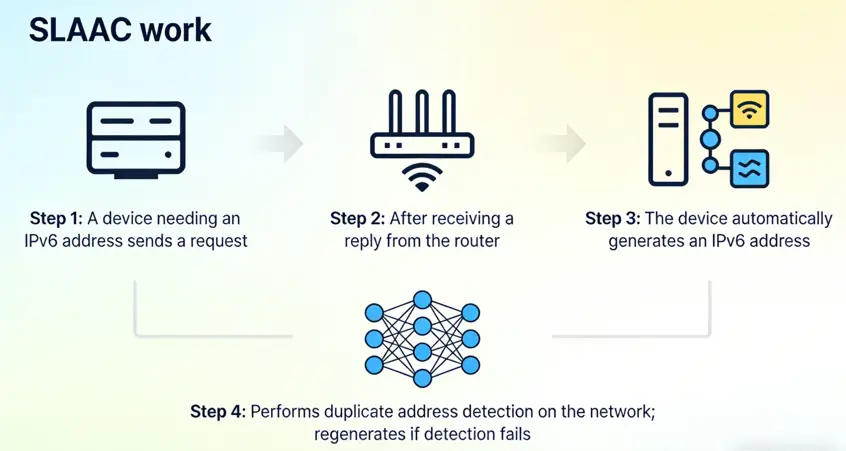
In this process, SLAAC typically uses several types of messages for communication. During the IPv6 address request phase, it relies on two basic ICMPv6 messages: RS (Router Solicitation) and RA (Router Advertisement). During the address generation and validation phase, it uses NS (Neighbor Solicitation) and NA (Neighbor Advertisement) messages from the NDP (Neighbor Discovery Protocol). Below is an overview of the different message types.
| Message Type | Purpose | Sender | ICMPv6 Type | Key Details |
| RS | Host actively requests router to send configuration information when connecting to the network, triggering an immediate RA response to avoid waiting for periodic sends | IPv6 Host | 133 | Destination multicast address ff02::2 (all routers), source is the link-local address |
| RA | Provides network prefix, prefix length, default gateway, MTU, etc., includes A/O/M bits to control address configuration method | Router | 134 | Can be sent periodically (default 200 seconds) or in response to an RS, destination multicast ff02::1 (all nodes) |
| NS | Duplicate Address Detection (DAD), verifies address uniqueness, also used for address resolution | IPv6 Host | 135 | Destination is the requested node’s multicast address to check if the address is occupied |
| NA | Responds to NS, announces its own link-layer address, confirms address status | IPv6 Host / Router | 136 | Can be sent as unicast or multicast, completing address conflict detection and resolution |
The entire SLAAC process is as follows:
1. Device Startup and Interface Initialization: When an IPv6 device starts, it first initializes its network interface and generates a link-local address. This address is automatically created from the device’s MAC address using the EUI-64 format. The link-local address is primarily used for communication within the same link (e.g., local network segment), allowing devices to communicate with each other before a global IPv6 address is assigned.
2. Sending Router Solicitation (RS) Request: A device that requires configuration information sends an RS request. These devices are typically IPv6-enabled devices such as computers, smart devices, or servers. Upon startup, these devices send an RS message to the local network, inquiring whether there is an available router. This step is usually performed to obtain additional configuration information.
3. Router Responds with Router Advertisement (RA) Message: When an IPv6 router in the network receives an RS request, it responds with an RA message, providing network prefix information (e.g., the IPv6 prefix assigned to the network segment) and other network configuration details (e.g., whether DNS servers are required).
The RA message contains one or more IPv6 prefixes that the device can use to automatically configure its own IPv6 address. These network prefixes in the RA message are configurable. The router decides which IPv6 prefixes to include in the RA message based on its configuration. Additionally, the administrator can specify which IPv6 prefixes the router should advertise to its directly connected network segments.
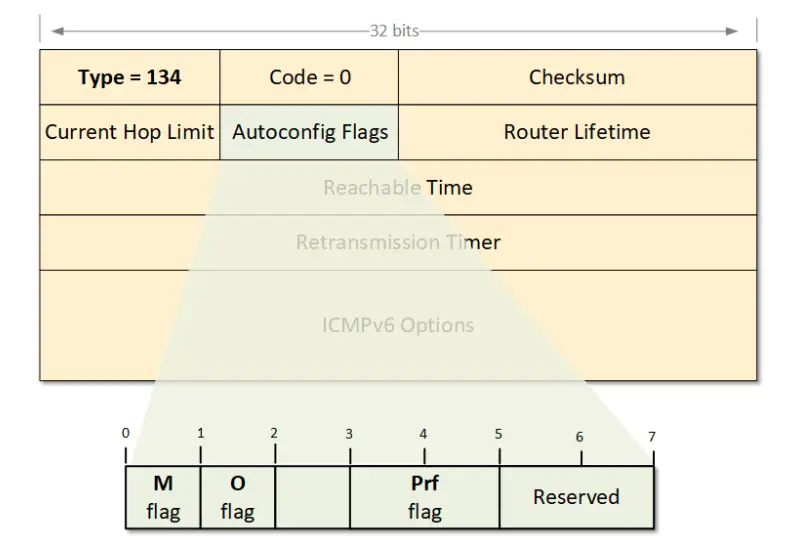
The format of the RA message is as follows. Asterfusion platform supports modifying some fields in the RA message, such as the “Set M/O/A/L Flag” parameter to modify the autoconfiguration flag.
4. Device Generates Global IPv6 Address: The device combines the IPv6 prefix provided in the RA message with its interface ID (usually generated from the MAC address) to create a complete IPv6 address. The format of the IPv6 address is: <network prefix> + <device's interface ID>. For example, if the prefix is 2001:db8:abcd::/64 and the device’s interface ID is 1234:5678:abcd:ef01, the device’s IPv6 address will be: 2001:db8:abcd::1234:5678:abcd:ef01.
5.Address Deduplication and Validation: After configuring the address, the device uses the Duplicate Address Detection (DAD) mechanism in Neighbor Discovery Protocol (NDP) to ensure the IPv6 address is unique on the network. If the address is duplicated, the device will abandon it and attempt to generate a new one.
In DAD detection, the device requesting validation sends an NS (Neighbor Solicitation) message, which is multicast rather than a global broadcast. The message includes the IPv6 address being checked. If no response is received, the device will officially enable this IPv6 address. If there is a conflict, the device that already holds the address will send a NA (Neighbor Advertisement) message to inform that the address is in use. The “new node” receiving this NA message will mark the address as “duplicate/invalid” and treat the DAD as failed. The address will not be activated, and the device must regenerate or obtain a new address.
Both link-local addresses and global IPv6 addresses undergo DAD detection before being used under standard implementation and default configuration. However, administrators can disable or adjust DAD as needed.
6.Configuration Complete: Once the address configuration is completed, the device can use the IPv6 address to communicate with other devices on the network.
How SLAAC Cooperates with DHCPv6?
Although SLAAC allows devices to automatically generate IPv6 addresses, it does not automatically configure other network parameters, such as DNS servers. If additional network configuration information is needed, SLAAC can work in conjunction with DHCPv6. SLAAC handles the stateless address autoconfiguration, while DHCPv6 provides supplementary network configuration parameters, such as DNS server addresses. Together, they complement each other to complete the full IPv6 network configuration for the device.
- SLAAC: Responsible for IPv6 Address Autoconfiguration The specific process has been discussed earlier, but it is important to note that the entire process is stateless: there is no server storing the host’s address assignment records, and the configuration is completed through interaction between the router and the host.
- Core Triggering Condition for Cooperation: RA Message Flags The cooperation between SLAAC and DHCPv6 is controlled by two key flags in the RA message sent by the IPv6 router: the M flag (Managed Address Configuration flag) and the O flag (Other Configuration flag). The standard configuration for their cooperation is as follows:
- M = 0: Informs the host that it will not use DHCPv6 for stateful address allocation (i.e., the host will still generate the IPv6 address using SLAAC).
- O = 1: Informs the host to use stateless DHCPv6 to obtain additional network parameters, other than the address.
This combination of flags is the default and most widely used mode for SLAAC and DHCPv6 cooperation. It ensures that the host not only has an automatically generated IPv6 address but also receives a complete set of network configuration parameters.
By collaborating, SLAAC and DHCPv6 enable the network to statelessly configure IPv6 addresses, speeding up the configuration process, while DHCPv6 handles the configuration of other network-related parameters such as DNS.
How SLAAC Saves Money and Time, and SLAAC Weaknesses
Deploying SLAAC in an IPv6 network has both advantages and disadvantages. The most significant advantage is that it can save time and human resources by automatically assigning IPv6 addresses. However, there are drawbacks in terms of address detection and other aspects. Below, let’s look at the advantages and disadvantages of SLAAC.
Advantages:
- No Need for DHCP Server: SLAAC does not rely on a DHCP server, reducing configuration and management overhead in the network. Devices can automatically obtain addresses without external server support.
- Simplified Configuration: Ideal for small networks or simple IPv6 configuration scenarios, as it automatically handles IPv6 address assignment for devices.
- Fast: Devices can quickly configure their IPv6 address and start communication after startup.
Disadvantages:
- Lack of Centralized Control: Since SLAAC does not use DHCP, it cannot provide address allocation management like DHCP, such as managing leases, assigning specific IP addresses, or providing additional configuration information (e.g., DNS servers).
- Insufficient Duplicate Address Detection: In SLAAC mode, addresses are generated locally by each host based on the prefix and interface ID/random number. Unlike DHCPv6, which uses a centralized address pool and lease management, address uniqueness mainly relies on the DAD process of each host. If there are implementation issues, configuration errors, or security attacks that prevent proper execution of DAD on a host, address conflicts could occur within the network.
How to Set SLAAC Parameters on Asterfusion Platforms
On Asterfusion Platform Campus series switches, SLAAC functionality is supported. The following parameters can be configured:
- Set M/O/A/L Flag
- Set Prefix
- Set Route Information
- Set DNS
- Set MTU
Let’s explain the meaning of each flag:
M Flag:1-bit “Managed address configuration” flag. When set, it indicates that addresses are available via Dynamic Host Configuration Protocol [DHCPv6]. If the M flag is set, the O flag is redundant and can be ignored because DHCPv6 will return all available configuration information.
O Flag: 1-bit “Other Configuration” flag. When set, it indicates that other configuration information is available via DHCPv6. Examples of such information include DNS-related details or information on other servers within the network.
A Flag: Autonomous Address Configuration, controls whether the host is allowed to autonomously generate a SLAAC address based on the prefix in the RA message. This is typically set to 1, allowing the host to use SLAAC.
L Flag: On-Link Flag, marks whether the network prefix carried in the RA message is an “on-link prefix” (which determines the host’s routing behavior). The default is 1, indicating that the prefix is local to the link. The host considers all IPv6 addresses within the network segment to be “on-link” and can communicate directly with these addresses using the Neighbor Discovery (ND) protocol, without routing through a gateway.
Set Prefix: Configures the IPv6 network prefix, providing a global unicast / unique local prefix (e.g., 2001:db8:1::/64) to the host. This is the “foundation” for SLAAC address generation.
Set Route Information: Configures IPv6 routing information, providing static route entries to the host, allowing it to be aware of routes to non-local network segments (this replaces the static route distribution in traditional IPv4 configurations).
Set DNS: Configures the IPv6 DNS server, directly providing the host with the DNS server’s IPv6 address and DNS search list (e.g., xxx.com). This is the DNS configuration method in the absence of DHCPv6.
Set MTU: Configures the link MTU (Maximum Transmission Unit) value, distributing a unified MTU value to all hosts on the link to ensure consistency across all devices and prevent communication failures due to fragmentation.
Conclusion
SLAAC is a key component in IPv6’s automatic configuration, allowing devices to generate IP addresses without DHCP intervention. By using RA messages combined with the MAC address, it quickly allocates unique addresses, reducing management overhead in the network.
However, despite simplifying address configuration, SLAAC lacks centralized address management and configuration control, which can lead to address conflicts, especially when DAD (Duplicate Address Detection) fails. Additionally, SLAAC is solely responsible for automatic address configuration and does not provide complete network configuration information, such as DNS servers. To address this limitation, SLAAC can work in conjunction with DHCPv6, where SLAAC handles address assignment, and DHCPv6 provides additional network configuration information.
On Asterfusion Campus series switches, by supporting SLAAC functionality and its integration with DHCPv6, administrators can flexibly configure SLAAC-related parameters, such as the M/O/A/L flags, IPv6 prefixes, routing information, DNS, and MTU values. These configuration options enhance Asterfusion’s flexibility in IPv6 address assignment and network configuration, enabling seamless integration with existing network architectures.

In conclusion, SLAAC provides a simplified and decentralized method for IPv6 address configuration. However, its combination with DHCPv6 offers a complete network configuration solution that meets the diverse needs of enterprise networks. The comprehensive support for SLAAC and DHCPv6 on the Asterfusion platform further enhances the platform’s performance and scalability, ensuring efficient operation of enterprise networks in an IPv6 environment.

Contact US !
- To request a proposal, send an E-Mail to bd@cloudswit.ch
- To receive timely and relevant information from Asterfusion, sign up at AsterNOS Community Portal
- To submit a case, visit Support Portal
- To find user manuals for a specific command or scenario, access AsterNOS Documentation
- To find a product or product family, visit Asterfusion-cloudswit.ch


