Table of Contents
Introduction
The Asterfusion switch based on SONiC supports DHCP snooping to handle illegal DHCP requests and IGMP snooping to address audio and video client stuttering, providing protection for Layer 2 security.
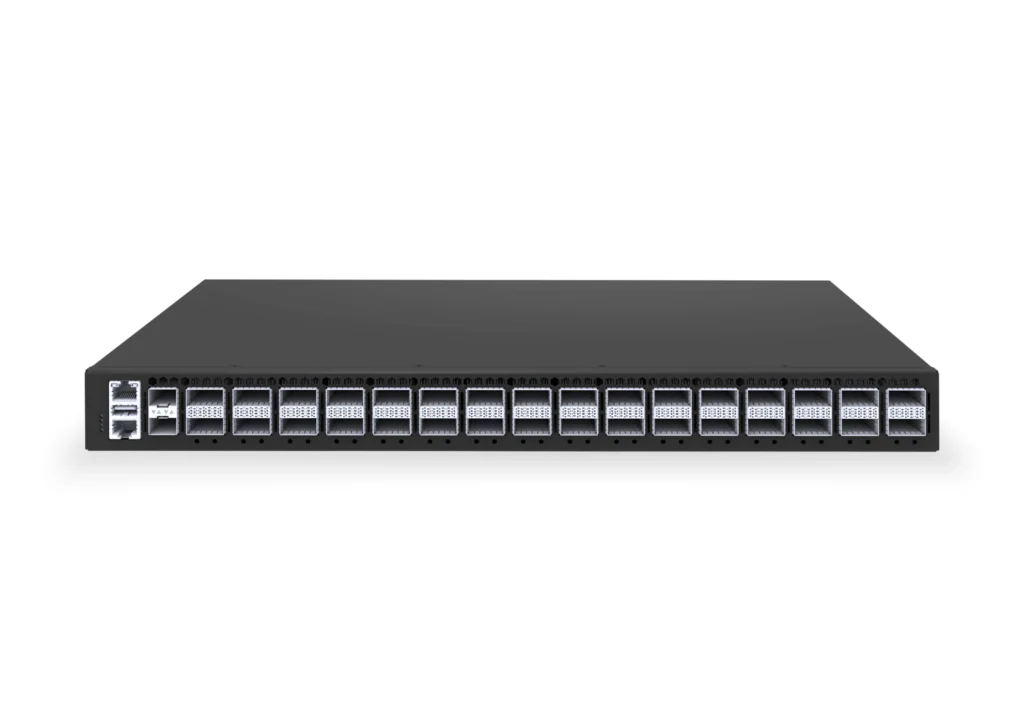
In previous sections, we have already discussed these two technologies in detail. This article will review the technical aspects and introduce the differences and comparison between the two, as well as how to configure them.
What is DHCP Snooping
DHCP snooping is a Layer 2 security feature deployed on access switches. It operates based on the DHCP protocol by “monitoring/filtering DHCP packets” to intercept illegal DHCP traffic. This prevents unauthorized DHCP servers, certain types of DHCP attacks, and protects against man-in-the-middle attacks through DHCP snooping.
In simple terms, DHCP snooping maintains a binding table on the switch that records the IP address, MAC address, VLAN, interface, lease time, etc. Only clients that obtain an IP address through a legitimate DHCP request will have their information entered into this table. If a DHCP packet differs from the records in the table, the spoofed DHCP packet will be discarded. By enabling DHCP snooping, DHCP server spoofing attacks and DHCP packet forgery can be prevented.
A common scenario is in schools, where some tech-savvy students, aiming to speed up their internet, might connect unauthorized devices and mistakenly configure them as illegal DHCP servers, causing intermittent network disruptions. This issue arises due to problems with the DHCP packet exchange. By enabling DHCP snooping and setting user ports to “Untrusted,” network administrators can ensure that unauthorized DHCP server packets from rogue routers are discarded, restoring normal network operation.
How DHCP Snooping Works
Let’s first understand the DHCP packet exchange process. It is a widely used protocol for dynamically assigning IP addresses and other critical information to hosts in a local area network (LAN).
A DHCP protocol exchange involves two roles and four steps:
- DHCP Server: The entity that allocates IP addresses to hosts in the LAN, typically defining the address pool and related information.
- DHCP Client: The entity in the LAN waiting to be assigned an IP address, such as your computer.
Steps:
- The DHCP client broadcasts a DHCP Discover packet to request service from a DHCP server within the LAN.
- The DHCP server responds with a DHCP Offer packet, providing the client with an IP address, subnet mask, gateway, and other configuration details, based on its configured address pool.
- If the client accepts the configuration in the DHCP Offer packet, it broadcasts a DHCP Request packet to inform the DHCP server and other hosts in the LAN of the selected IP address.
- Finally, the server sends a DHCP ACK packet to the client, confirming the lease of the IP address.
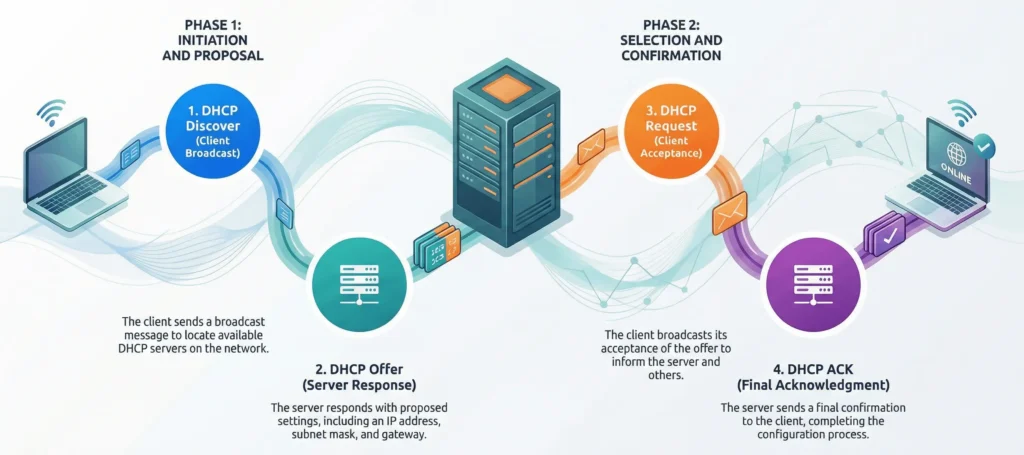
After understanding DHCP, let’s look at DHCP Snooping. This feature divides interfaces on the device into trust and untrust categories. Interfaces connected to trusted DHCP servers are set as trust, while all other interfaces are set as untrust. This ensures that only Offer and ACK packets arriving through trust interfaces are delivered to the DHCP client. Any DHCP packets coming from untrust interfaces are discarded, thus preventing server spoofing attacks.
Additionally, DHCP Snooping helps prevent the exhaustion of DHCP address pools. The DHCP client is bound to untrust interfaces, and DHCP Snooping first matches incoming DHCP packets from untrust interfaces against the DHCP binding table. If the client is legitimate, its information will be recorded in the DHCP binding table created during the DHCP Offer phase. If the packet is from an attacker, the spoofed packet will not match any current data in the table and will be discarded, effectively stopping such spoofed packet attacks.
On Asterfusion Campus switches with DHCP Snooping enabled, technologies such as DAI, SAVI, IPSG, and MAC-scan can be implemented in the future based on the corresponding relationships of parameters in the DHCP Snooping binding table.
Learn more about DHCP Snooping: What is DHCP Snooping and How Does it Work?
What is IGMP Snooping
IGMP Snooping is a multicast management technology implemented on Layer 2 switches, based on the Internet Group Management Protocol (IGMP) defined by the IETF. The logic is simple: by “listening” to IGMP messages exchanged between hosts and Layer 3 devices (such as routers), the switch creates a mapping table that links multicast addresses to specific ports. This ensures that multicast data is forwarded only to the ports that have requested it, rather than flooding the entire broadcast domain.
How IGMP Snooping Works
The workflow of IGMP Snooping involves three steps and four types of packets:
- Listening: The Layer 2 switch continuously listens for IGMP packets on the network without interfering with the packet exchange. It only extracts and analyzes the packet information.
- Building Table Entries (MFT): The switch records key information, such as the multicast group IP and the corresponding receiving host’s access port, creating and dynamically updating the Multicast Forwarding Table (MFT). This table specifies which ports require the traffic of a specific multicast address.
- Precise Forwarding: When multicast traffic arrives, the switch looks up the table and forwards the multicast traffic only to the target receiving ports recorded in the table. Other ports that are not associated with the multicast group will remain silent, effectively preventing multicast traffic from flooding the Layer 2 network.
An important role in IGMP Snooping is the IGMP Snooping Querier, which is the core management entity in a multicast network. It is typically performed by a multicast router or Layer 3 switch (automatically elected within a multicast domain, with only one querier per domain). The Querier is the sole sender of various IGMP query packets and is responsible for initiating multicast subscription queries, confirmations, and maintaining the validity of the multicast subscription relationships across the network.

The efficient operation of IGMP Snooping relies on the recognition of several specific packet types:
- General Query: Sent by the IGMP Snooping Querier, it asks the entire network, “Which hosts need to receive multicast traffic?” Hosts that require the traffic will respond with a report.
- Membership Report: Actively sent by hosts that wish to join a multicast group, declaring, “I need to receive traffic from this multicast group.” The switch extracts the multicast group IP and incoming port from the packet. It then either creates a new table entry in the Multicast Forwarding Table (MFT) for the initial multicast group join or updates the aging time of an existing entry (in response to the query). The port is then bound to the corresponding multicast group.
- Leave Group: Sent by hosts that no longer need to receive traffic from a multicast group, declaring, “I no longer need to receive traffic from this group, remove this multicast relationship.”
- Group-Specific Query: This query is sent by the IGMP Querier after receiving a Leave Group packet, asking the network if any other hosts still need to receive traffic from the multicast group (the group mentioned in the Leave Group packet).
To explain Leave Group and Group-Specific Query together: After a host sends a Leave Group message, the switch extracts the multicast group IP and port from the packet and marks the corresponding entry in the MFT as “pending deletion.” The IGMP Querier then sends a Group-Specific Query to check whether there are other hosts in the network still needing to subscribe to the group. If no response is received, the switch will delete the corresponding table entry.
Learn more about IGMP Snooping: Multicast IGMP Snooping in SONiC Enterprise Switches for Optimal Traffic
How to Enable DHCP Snooping vs IGMP Snooping on Asterfusion Platforms
How to Configure DHCP Snooping on Asterfusion Campus Switches
Network Requirements:
A company, in order to simplify management, wishes to use a DHCP server to assign IP addresses to the terminals in the network. At the same time, it needs to prevent users from accessing the network with statically configured IP addresses.
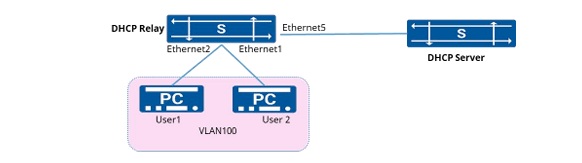
Configuration Steps:
1. Create VLAN 100 and configure the IP address.
- sonic(config)#vlan 100
- sonic(config)#interface ethernet1
- sonic(config-if-1)#switch port access vlan 100
- sonic(config)#interface ethernet2
- sonic(config-if-2)#switch port access vlan 100
- sonic(config)# interface vlan 100
- sonic(config-vlanif-100)#ip address 10.1.2.1/24
2. Enable the DHCP relay function.
- sonic(config)#dhcp-relay test v4
- sonic(config-dhcp-relay-test__v4)#down_link interface vlan 100
- sonic(config-dhcp-relay-test__v4)#up_link interface 5
- sonic(config-dhcp-relay-test__v4)#server_ip 10.10.1.1
- sonic(config-dhcp-relay-test__v4)#loopback_interface loopback 0
- sonic(config-dhcp-relay-test__v4)#exit
3. Enable DHCP Snooping
- sonic(config)#dhcp snooping enable
- sonic(config)#interface vlan 100
- sonic(config-vlanif-100)#dhcp-snooping enable
4. Configure the interface connecting to the DHCP server as a trusted port
- sonic(config)# interface ethernet 5
- sonic(config-if-5)#dhcp-snooping enable
- sonic(config-if-5)#dhcp-snooping trusted
- Enable DAI and IPSG to perform legitimacy checks on user packets.
- sonic(config)#interface vlan 100
- sonic(config-vlanif-100)#ipv4-source-check enable
- sonic(config-vlanif-100)#arp anti-attack-check enable
Verification:
- Check the IP address obtained on the user’s PC.
- Change the IP address on the user’s PC to a static configuration, then attempt to ping the external network address and the PC’s gateway address. Neither should be reachable.
- Check the packet loss statistics for security features on the device.

More DHCP Snooping secnarios, please refer to DHCP Configuration on CX-M Asterfusion Enterprise SONiC Switch
How to Configure IGMP Snooping on Asterfusion Campus Switches
Network Requirements:
The router connects to the user network through the device. The network includes PC A, PC B, and PC C. Only PC A and PC B need to receive multicast data for multicast group 224.1.1.1, while PC C does not need to receive it.
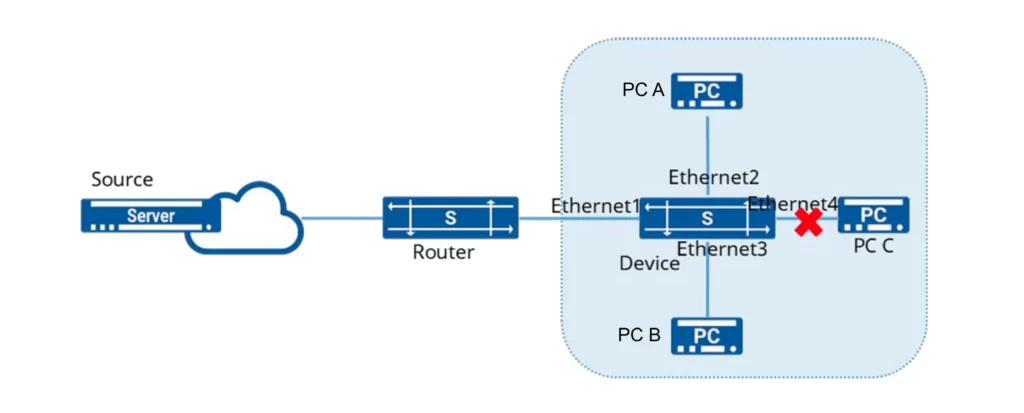
Configuration Steps:
1. Create VLAN and Add Member Interfaces
- sonic(config)# vlan 100
- sonic(config)# port-group ethernet 1-4
- sonic(config-port-group-1-4)# switchport access vlan 100
2. Enable IGMP Snooping on the interfaces and statically add interfaces Ethernet2 and Ethernet3 to the multicast group.
- sonic(config)# interface ethernet 1
- sonic(config-if-1)# igmp snooping enable
- sonic(config)# interface ethernet 2
- sonic(config-if-2)# igmp snooping enable
- sonic(config)# interface ethernet 3
- sonic(config-if-3)# igmp snooping enable
- sonic(config)# interface ethernet 4
- sonic(config-if-4)# igmp snooping enable
- sonic(config)# interface l2mc-static-group ethernet 2 100 224.1.1.1
- sonic(config)# interface l2mc-static-group ethernet 3 100 224.1.1.1
Verification:
1. Check the multicast group information.
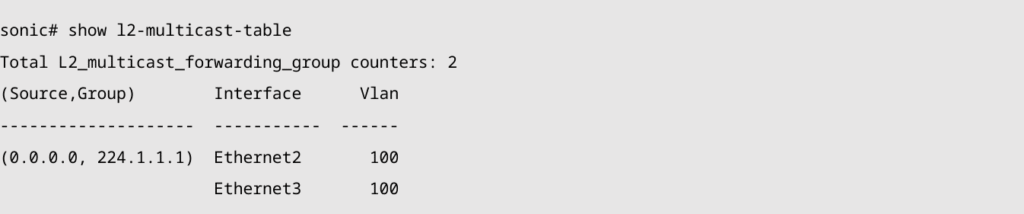
2. Send a multicast packet with the destination IP address 224.1.1.1, and confirm that only PC A and PC B receive the multicast packet, while PC C does not receive it.
Key Differences between DHCP Snooping and IGMP Snooping
After reviewing the application scenarios of these two technologies, you’ll understand that both are designed for Layer 2 protection, but they differ significantly.
| Item | IGMP Snooping | DHCP Snooping |
| Purpose | Controls the forwarding of multicast traffic, ensuring that multicast traffic is only forwarded to the ports that actually need it. | Prevents unauthorized DHCP servers from assigning IP addresses, ensuring that clients receive configurations only from legitimate DHCP servers. |
| Protocol Used | IGMP (Internet Group Management Protocol) | DHCP (Dynamic Host Configuration Protocol) |
| Main Mechanism | Monitors and records the IGMP Membership Report/Leave messages from hosts, constructing the multicast forwarding table (MFT). Dynamically maintains forwarding entries by analyzing the IGMP Querier’s query messages and Leave Group messages. | Monitors DHCP request and response messages, validates whether the DHCP server is legitimate, and records valid DHCP binding information (such as MAC address, IP address, VLAN, etc.). |
| Table Maintenance | Multicast Forwarding Table (MFT), which records the binding between multicast addresses and ports. | DHCP Snooping Binding Table, which records the binding information between legitimate DHCP servers and clients (such as IP address and MAC address). |
| Threat Prevention | Prevents multicast storms and unnecessary multicast traffic flooding, reducing bandwidth wastage. | Prevents Rogue DHCP Servers from causing IP address spoofing and poisoning issues. |
| Typical Application Scenarios | Used in data centers, campus networks, video surveillance systems, and other scenarios to reduce unnecessary multicast traffic and improve bandwidth utilization. | Used to prevent rogue DHCP servers from assigning IP addresses in the network, protecting the network from DHCP spoofing attacks. Common in enterprise networks, campus networks, and data centers. |
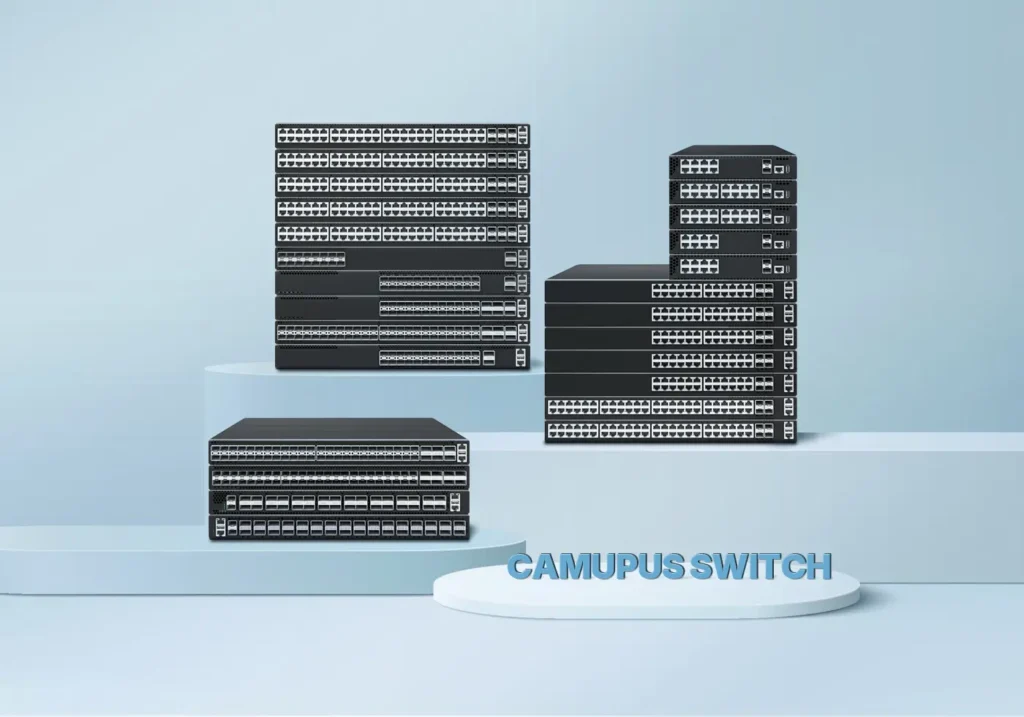
Asterfusion offers campus and enterprise switches that support both DHCP Snooping and IGMP Snooping, two core network security and optimization features, providing stable, secure, and efficient network transmission for scenarios such as campus networks, enterprise office networks, and more.
Conclusion
Asterfusion’s campus and enterprise switches deliver robust Layer 2 network security and efficient multicast management through native support for DHCP Snooping and IGMP Snooping (with MLD Snooping for IPv6 networks).
Both technologies rely on Layer 2 traffic monitoring and intelligent packet processing. But their core objectives are distinct: DHCP Snooping blocks rogue DHCP servers, fends off DHCP-related attacks, and fortifies access security; IGMP Snooping stops multicast flooding, enables precise data delivery, and optimizes bandwidth utilization. Together, they solve two key pain points: Layer 2 security risks and multicast inefficiencies in modern networks.

Contact US !
- To request a proposal, send an E-Mail to bd@cloudswit.ch
- To receive timely and relevant information from Asterfusion, sign up at AsterNOS Community Portal
- To submit a case, visit Support Portal
- To find user manuals for a specific command or scenario, access AsterNOS Documentation
- To find a product or product family, visit Asterfusion-cloudswit.ch


