Table of Contents
Asterfusion is proud to announce that our latest AsterNOS-VPP routing operating system V6.1R0102P02 version now officially supports PPPoE. This powerful feature is fully optimized for our ET2508 open gateway—a Marvell Octeon 10-based, hardware-software integrated white-box BNG. Most importantly, we’re shattering industry pricing by offering this carrier-grade solution starting at just over $2,000 USD.
What is PPPoE ?
PPPoE (Point-to-Point Protocol over Ethernet) is a protocol that carries Point-to-Point Protocol (PPP) over Ethernet networks. Its primary purpose is to establish a subscriber session over an Ethernet access network, similar to traditional dial-up connections. Once the session is established, the network can assign an IP address, authenticate the subscriber, apply service policies, and perform accounting and billing.
Understanding PPPoE connection establishment requires a clear insight into its packet anatomy. Mechanically, a PPPoE packet consists of a standard PPP packet encapsulated directly inside an Ethernet frame. Its detailed encapsulation layout is shown below
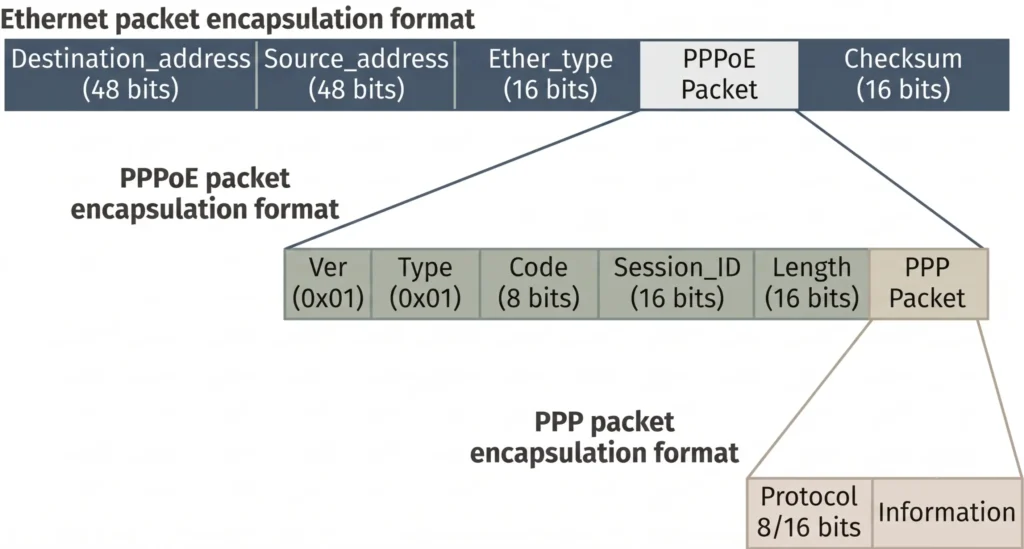
| Field | Length | Value / Description |
| Ver | 4 bits | PPPoE Version Number: Must be fixed and set to 0x01. |
| Type | 4 bits | PPPoE Type: Must be fixed and set to 0x01. |
| Code | 8 bits | PPPoE Packet Type: Indicates the packet subtype based on the following values: • 0x00: Session Data • 0x09: PADI (PPPoE Active Discovery Initiation) • 0x07: PADO (PPPoE Active Discovery Offer) or PADT (PPPoE Active Discovery Terminate) • 0x19: PADR (PPPoE Active Discovery Request) • 0x65: PADS (PPPoE Active Discovery Session-confirmation) |
| Session_ID | 16 bits | PPP Session ID: A fixed value for any given PPP session. Together with the Ethernet Source and Destination MAC addresses, it uniquely defines a specific PPP session. Note: 0xffff is reserved for future use and cannot be used. |
| Length | 16 bits | PPPoE Payload Length: Specifies the length of the PPPoE payload in bytes. This field excludes the lengths of both the Ethernet and PPPoE headers. |
Who uses PPPoE?
PPPoE is primarily used in broadband access networks. The most common users are telecommunications operators, ISPs, and enterprise access networks.
It is widely deployed on customer-side devices such as routers and ONTs/CPEs, while network-side devices such as BNGs (Broadband Network Gateways) and BRAS platforms act as PPPoE servers. These devices use PPPoE to provide subscriber authentication, IP address assignment, accounting, billing, and policy enforcement.
Why Use PPPoE?
To understand why PPPoE is widely deployed, it helps to look at the needs of the organizations that use it.
The key value of PPPoE is that it combines Ethernet access with the authentication, authorization, and accounting capabilities of PPP. This makes it well suited for environments where subscriber-based management is required.
For ISPs and enterprise campus networks, PPPoE enables:
- Per-user authentication
- Per-user IP address assignment
- Per-user QoS, ACL, auditing, and accounting
- Centralized policy delivery through RADIUS instead of configuring policies locally on each device
A simple example is broadband billing. Your household may pay $60 per month for Internet access, while your neighbor pays $70 for a different service plan. The service provider tracks each subscriber’s PPPoE session on the PPPoE server and applies billing policies based on the subscribed service. Billing is just one of the many functions enabled by PPPoE’s session-based architecture.
How Does PPPoE Works ?
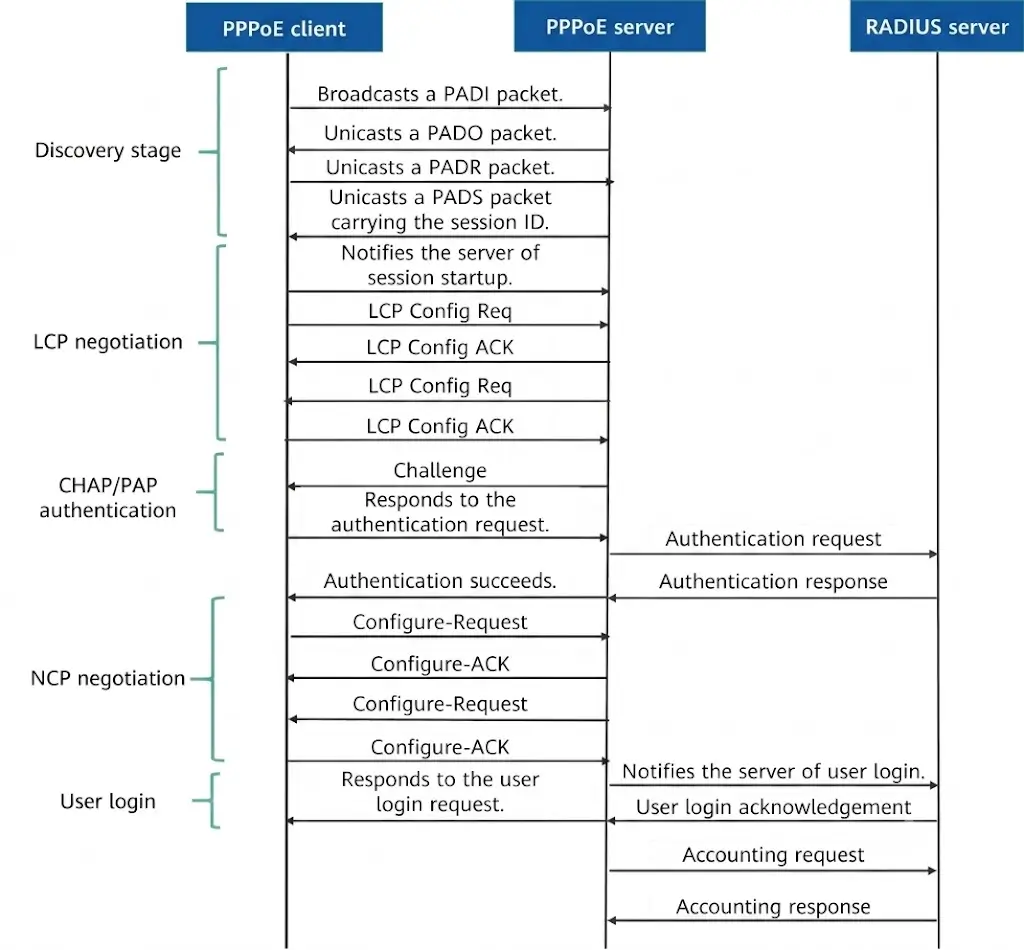
The PPPoE session establishment process consists of three stages:
- Discovery Phase – The client discovers a PPPoE server and obtains its MAC address and a Session ID.
- Session Phase – Standard PPP negotiation, user authentication, and IP address assignment are performed over the PPPoE session.
- Termination Phase – The session is disconnected and all associated resources are released.
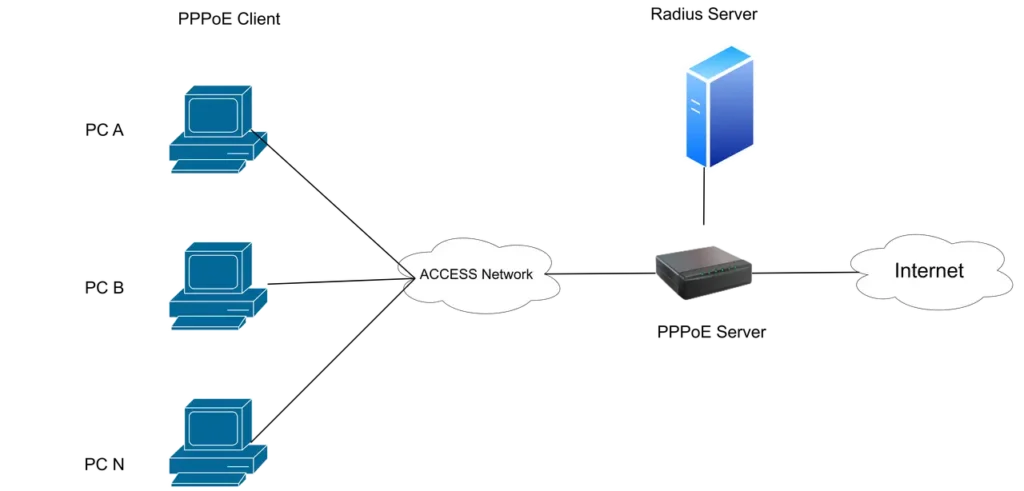
A typical PPPoE deployment involves four key components:
- PPPoE Client – The subscriber device, such as a PC, router, or CPE.
- Access Network Devices – Switches, OLTs, and aggregation devices that transport PPPoE traffic between subscribers and the service network.
- PPPoE Server – Responsible for subscriber discovery, authentication, IP address assignment, and traffic forwarding.
- RADIUS Server – Provides AAA services, including Authentication, Authorization, and Accounting.
A device is generally considered a carrier-grade BNG only when it combines PPPoE session management, AAA integration, QoS enforcement, NAT capabilities, and routing policy control within a single platform. For this reason, the PPPoE server function is typically deployed on a BNG.
The following sections explain how PPPoE operates in each phase of the session establishment process.
1. Discovery Phase
Purpose and Participants
The Discovery phase is used to locate a PPPoE server and establish a PPPoE session. It involves three components:
- PPPoE Client – Initiates the discovery process.
- PPPoE Server – Responds to discovery requests and creates the session.
- Access Network Devices – Such as switches, OLTs, and aggregation devices. They typically provide Layer 2 forwarding and do not participate in the PPPoE protocol itself.
According to RFC 2516, the Discovery phase consists of four messages:
- PADI (PPPoE Active Discovery Initiation) – “I want to connect to a PPPoE service.”
- PADO (PPPoE Active Discovery Offer) – “I can provide the requested service.”
- PADR (PPPoE Active Discovery Request) – Requests establishment of a session with a selected server.
- PADS (PPPoE Active Discovery Session-confirmation) – Confirms session creation and assigns a Session ID.
Discovery Process Example
Assume a home PC (PC A) acts as a PPPoE client.
After connecting to the network, PC A broadcasts a PADI frame on the local Ethernet segment. The message essentially announces, “Any PPPoE server available, I would like to connect.” The PADI also includes a Service-Name Tag indicating the requested service type.
Any PPPoE server capable of providing the requested service responds with a unicast PADO message. The PADO contains information such as the AC-Name (Access Concentrator Name) and the Service-Name Tag, indicating the services available on that server. At this stage, PC A may receive multiple PADO messages from different PPPoE servers.
PC A selects one of the responding servers and sends a PADR message to formally request session establishment. The PADR includes the selected Service-Name Tag, confirming the requested service.
The chosen PPPoE server then replies with a PADS message to confirm session creation. The PADS assigns a Session ID that is unique for that client on the server. Together, the Session ID and the source and destination MAC addresses uniquely identify the PPPoE session.
At this point, the Discovery phase is complete, and the PPPoE session enters the Session phase, where PPP negotiation, authentication, and IP address assignment take place.
2. Session Phase
After the Discovery phase is completed, PPPoE enters the Session phase. At this stage, the PPPoE client and PPPoE server begin standard PPP negotiation to establish a logical point-to-point connection.
Three key components are involved:
- PPPoE Client – The subscriber device initiating the connection.
- PPPoE Server (BNG) – Terminates PPP sessions, manages subscriber sessions, and interacts with the AAA infrastructure.
- RADIUS Server – Acts as the backend AAA platform, providing Authentication, Authorization, and Accounting services.
PPP negotiation is typically divided into three sub-phases: LCP negotiation, Authentication, and NCP negotiation.
2.1 LCP Negotiation (Link Control Protocol)
LCP is exchanged directly between the client and the server to establish and configure the PPP link.
- Function: Negotiate parameters such as MRU (Maximum Receive Unit), link quality monitoring mechanisms, and the authentication protocol to be used, typically PAP or CHAP.
- Purpose: Establish the PPP link and ensure both sides agree on the operational parameters required for reliable communication.
2.2 Authentication Phase
Authentication is the core of the AAA framework. The BNG acts as an intermediary and forwards authentication requests to the RADIUS server. The authentication method is determined during LCP negotiation, with PAP and CHAP being the most common options.
PAP (Password Authentication Protocol)
PAP uses plain-text authentication. The client sends its username and password directly to the server. The server forwards the credentials to the RADIUS server for validation. The RADIUS server returns either an Access-Accept message if authentication succeeds or an Access-Reject message if authentication fails. Based on the RADIUS response, the server notifies the client whether the authentication attempt was successful.
CHAP (Challenge Handshake Authentication Protocol)
CHAP provides stronger security because the password is never transmitted in plain text.
The server generates and sends a random Challenge value to the client. The client uses the Challenge and its password to calculate a hash and returns the result as a Response. The server forwards the Challenge and Response to the RADIUS server for verification. The RADIUS server validates the Response and determines whether the client is legitimate, then returns either Access-Accept or Access-Reject. Based on the result, the server notifies the client whether authentication has succeeded or failed.
2.3 NCP Negotiation (Network Control Protocol)
After successful authentication, PPP enters the Network Control Protocol phase. For IPv4 services, this is typically handled by IPCP (IP Control Protocol).
During IPCP negotiation, the client and server exchange network parameters. The PPPoE server can assign addresses from a local IP pool or use attributes received from the RADIUS server, such as Framed-IP-Address, to support centralized address management and subscriber policy control.
Once IPCP negotiation is complete, PC A receives its IP address and other network parameters, such as DNS server information. The subscriber is now connected to the network and can access Internet services.
Data Transfer Phase
After the PPPoE session is fully established, the network enters normal data forwarding mode.
- Encapsulation: User traffic is encapsulated in PPP frames, which are then carried inside PPPoE frames and finally transported over Ethernet frames.
- Per-subscriber forwarding: The PPPoE server maintains forwarding state on a per-session basis and applies subscriber-specific policies, including QoS rate limiting, ACL enforcement, traffic accounting, and usage-based billing.
At this point, the PPPoE session is fully operational and remains active until the client or server initiates session termination.
3. Termination Phase
When a PPPoE session needs to be closed, either because the subscriber disconnects voluntarily (for example, shutting down the device or going offline) or because of operator-enforced policies such as forced logoff or service suspension due to unpaid bills, either side can send a PADT (PPPoE Active Discovery Terminate) message to terminate the session.
After the PADT exchange is completed, the PPPoE server removes the corresponding session entry from its session table and releases the associated Session ID. The PPPoE session is then torn down, and all subscriber resources are reclaimed. Any IP address assigned to the subscriber is returned to the address pool for future allocation, allowing it to be reused by new subscribers.
How to Configure PPPoE on Asterfusion Enterprise SONiC Gateway
For more configuration details, please refer to the PPPoE Server Configuration Guide
Control in SONiC, Forwarding in VPP: A New PPPoE Design for Scalable Networks
Building a Scalable PPPoE Gateway with SONiC and VPP Integration


