Table of Contents
A switch is a network device used for the forwarding of electrical (optical) signals, and choosing a Layer 2/3 switch can be a difficult task when people are choosing a switch to buy. What is a Layer 2/Layer 3 switch? Layer 2 vs layer 3 switch ,which one should you choose? This article will provide you with a comprehensive explanation of Layer 2/Layer 3 switches to help you choose the most appropriate switch.
Quick Answer: Should you choose Layer 2 or Layer 3?
| Your Network Scenario | Recommended Choice | Primary Reason |
| Single Subnet / Flat Network (< 50 devices, small offices, IP cameras, basic Wi-Fi) | Layer 2 Switch | Cost-effective, plug-and-play, no routing needed. |
| Pure Access Layer Port Density (Connecting PCs/APs to an upstream core device) | Layer 2 Switch | High port density at lower cost; upstream switches handle gateways. |
| Multi-VLAN & Inter-VLAN Routing (Enterprise departments, server isolation) | Layer 3 Switch | Enables wire-speed local routing without overloading firewalls/routers. |
| High Availability & Scalability (Core/Aggregation layer, Leaf-Spine, BGP/EVPN, AIDC) | Layer 3 Switch | Supports advanced protocols (OSPF, BGP, VRRP, ECMP) for seamless expansion and redundancy. |
What is Layer 2 switch?
A layer 2 network switch is a network device used in a local area network (LAN). It performs packet forwarding and switching operations on the data link layer (layer 2).
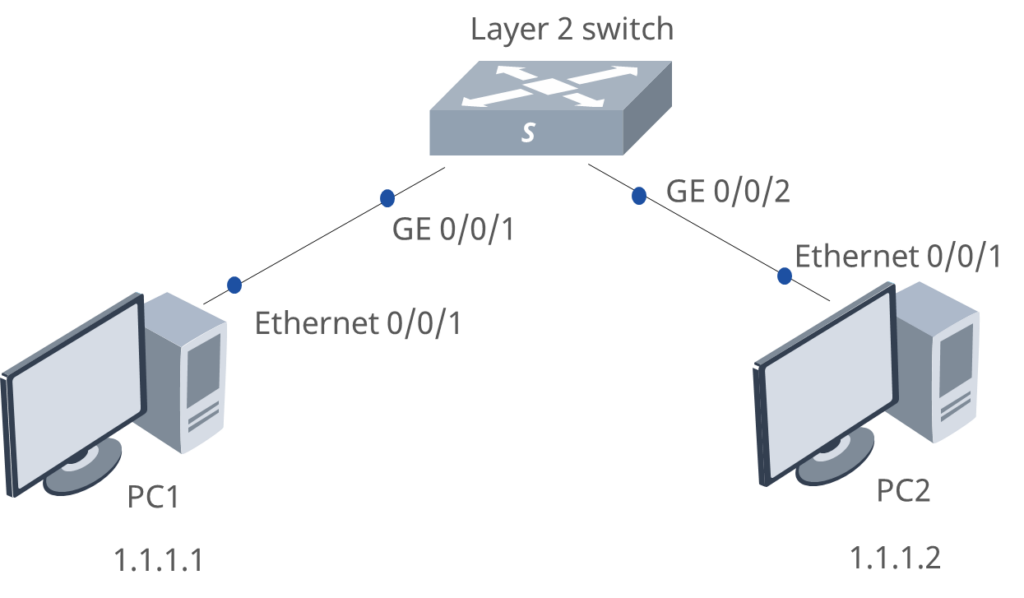
A layer 2 switch forwards packets by learning and maintaining a MAC address table (also called a CAM table or forwarding table). When a packet is received, the switch looks up the target MAC address and queries the MAC address table to determine which port the packet should be forwarded to. If there is no corresponding target address record in the MAC address table, the switch broadcasts the packet to all ports so that the target device responds and updates the corresponding record.
By using a layer 2 switch, data transmission in the network can be more efficient and reliable. It can reduce conflicts, collisions, and broadcast storms, and improve bandwidth utilization of the network. In addition, the layer 2 switch also supports the function of VLAN (virtual local area network), which can divide the local area network into different virtual networks to enhance the flexibility and security of the network.

Main functions of Layer 2 switch
- Learning and establishing MAC address tables
When a switch receives a data packet, it learns the source MAC address and associates it with the corresponding input port. In this way, in the subsequent forwarding process, the switch can quickly find the correct output port according to the target MAC address and forward the data packet in a directional manner.
- Forwarding and filtering of data packets
The switch looks up the corresponding output port in the MAC address table according to the target MAC address, and then selectively forwards the data packet to the target device. This method avoids the waste of broadcasting to all ports and improves the transmission efficiency of the network.
- Elimination of conflicts and collisions
Unlike a hub, a switch forms an independent channel between each port, and the data packet is forwarded only to the port where the target device is located, thereby eliminating conflicts and collisions.
- Broadcast and multicast support
The switch can effectively forward broadcast and multicast data packets to all relevant ports to ensure that the information can be accurately conveyed to the required devices.
The switch can divide different ports or devices into different logical networks by configuring virtual local area networks (VLANs). This can enhance the security, isolation and flexibility of the network and simplify management and maintenance.
- Link aggregation
The switch supports bundling multiple physical links into one logical link to improve bandwidth utilization and redundancy availability.
- Spanning Tree Protocol (STP)
Layer 2 switches support STP, which prevents network loops by blocking redundant links. This ensures network reliability and uptime.
Application scenarios of Layer 2 Switches
Layer 2 switches are mostly used in small local area networks, such as security monitoring, catering, KTV, small hotels, small inns, etc. There are fewer terminals in a small local area network, and all devices are in the same subnet. There is no need for cross-subnet (VLAN) communication, and a layer 2 switch can meet the needs. For example, a convenience store with a peak capacity of 40 people, terminals and devices can be placed in the same subnet, and a layer 2 switch can meet the requirements.
Benefits of Layer 2 Switches
- Improved Network Performance
Layer 2 switches reduce congestion, increase available bandwidth for faster data transfer, and improve application performance.
- Better Network Organization
VLANs divide the network into smaller sections, enhancing organization and simplifying management.
Enhanced Network Security: VLANs separate sensitive traffic from other traffic, thereby improving network security.
- Improved Network Resilience
Link aggregation automatically redistributes traffic across available links in the event of a failure, thereby improving network resiliency.
Limitations of Layer 2 Switches
- Limited Scalability
Because Layer 2 switches make forwarding decisions based on MAC addresses, they are not suitable for large networks with thousands of devices.
- Limited Routing Functionality
Layer 2 switches cannot perform routing functions, limiting their usefulness in certain network scenarios.
- Reduced visibility
Layer 2 switches provide less visibility into network traffic than Layer 3 switches, which makes diagnosing and troubleshooting network issues more challenging.
What is Layer 3 switch?
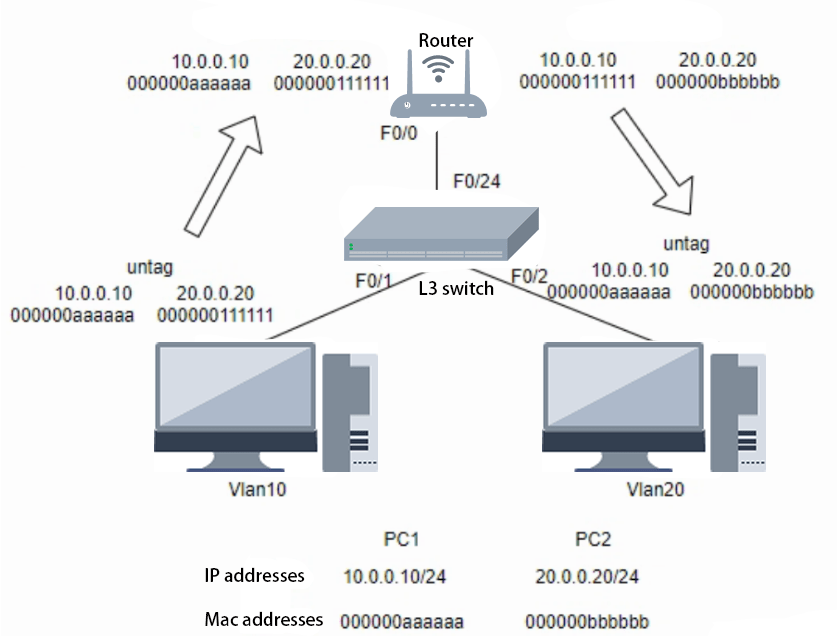
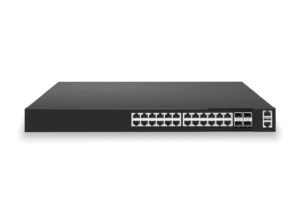
A layer 3 switch is a network device used for packet forwarding and routing in a computer network. It is located at the third layer (network layer) of the network, so it is also called a network switch or a routing switch. A layer 3 switch is a switch with some router functions. The most important purpose of a layer 3 switch is to speed up data exchange within a large local area network. The routing function it has also serves this purpose, and it can route once and forward multiple times.

The main functions of a layer 3 switch
The layer 3 switch is more intelligent and flexible than the layer 2 switch in packet forwarding and routing, and can provide a higher level of network management and control functions.
- Routing function
The three-layer switch has routing function, which can realize data transmission between different subnets. When the data packet arrives at the three-layer switch, it will decide which subnet to send it to based on the target IP address. If the target IP address is the same as the current subnet, the data packet will be directly forwarded to the target device by the switch; otherwise, the switch will send the data packet to the default gateway for further processing.
- VLAN function
The three-layer switch supports the virtual local area network (VLAN) function, which can divide different physical ports into different logical networks. This can increase the security and flexibility of the network, and also reduce problems such as broadcast storms and conflicts.
- QoS function
The three-layer switch supports the quality of service (QoS) function, which can prioritize and process different types of traffic. This can ensure that important data traffic in the network is transmitted first, improve network performance and user experience.
- Port aggregation function
The three-layer switch supports the port aggregation (Link Aggregation) function, which can bind multiple physical ports into a logical channel to increase bandwidth and improve reliability.
Application scenarios of Layer 3 Switches
Layer 3 switches are mainly used to solve the intercommunication problem between multiple VLANs (virtual local area networks) in large networks. For example, an international company that is divided into smaller local area networks (VLANs) by department, the general manager needs to visit different business departments due to business needs, which will generate a large number of cross-VLAN access, which can be achieved using a layer 3 switch.
What is the main advantage of Layer 3 switches?
- In most cases, introducing a Layer 3 switch can reduce the number of network devices that need to be monitored, managed, and maintained.
- By pushing Layer 3 functionality to a firewall or Layer 3 switch, you can reduce or eliminate the need for dedicated routers in your network.
Limitations of Layer 3 Switches
- While Layer 3 switches are generally competitively priced, if you have a limited budget, you may not have many options when looking for a switch with Layer 3 capabilities.
- If you have a relatively small network, adding a Layer 3 switch may increase complexity without providing much additional benefit.
How to choose layer 3 switch for your needs?
When choosing a Layer 3 switch for your network, there are several key factors to consider:
- Network Size and Scalability
Determine the current and future size of your network, including the number of users, devices, and network segments.
Choose a Layer 3 switch with sufficient port density and routing capacity to accommodate your network’s growth.
Consider features like support for various routing protocols, IPv4 and IPv6 routing, and high-performance switching capabilities.
- Performance and Throughput
Evaluate the switching and routing performance of the Layer 3 switch, measured in terms of forwarding rates, latency, and throughput.
Look for switches with high-speed backplane and switching fabrics to handle the expected traffic load in your network.
Consider features like wire-speed routing, hardware-based load balancing, and support for jumbo frames.
- Security and Access Control
Ensure the Layer 3 switch offers robust security features, such as:
- Access Control Lists (ACLs) for granular traffic filtering and access control
- IP Source Guard to prevent IP spoofing
- DHCP snooping and IP-MAC-port binding to mitigate address-based attacks
- Integration with security platforms or network access control solutions
- Quality of Service (QoS) and Traffic Management
Assess the QoS capabilities of the Layer 3 switch, including support for:
- CoS (Class of Service) and DSCP (Differentiated Services Code Point) marking
- Traffic shaping, policing, and rate limiting
- Congestion management techniques like weighted fair queuing
- Advanced Routing and Resilience Features
Look for Layer 3 switches that support advanced routing protocols, such as OSPF, EIGRP, BGP, and VRF (Virtual Routing and Forwarding).
Consider features like VRRP (Virtual Router Redundancy Protocol) and ECMP (Equal-Cost Multipath Routing) to provide high availability and load-sharing.
Ensure the switch offers robust failover mechanisms and recovery capabilities to minimize downtime.
- Management and Monitoring
Evaluate the management and monitoring features of the Layer 3 switch, such as:
- Web-based or command-line interface for configuration and management
- Support for SNMP, Syslog, and other monitoring protocols
- Comprehensive monitoring and reporting capabilities for network visibility
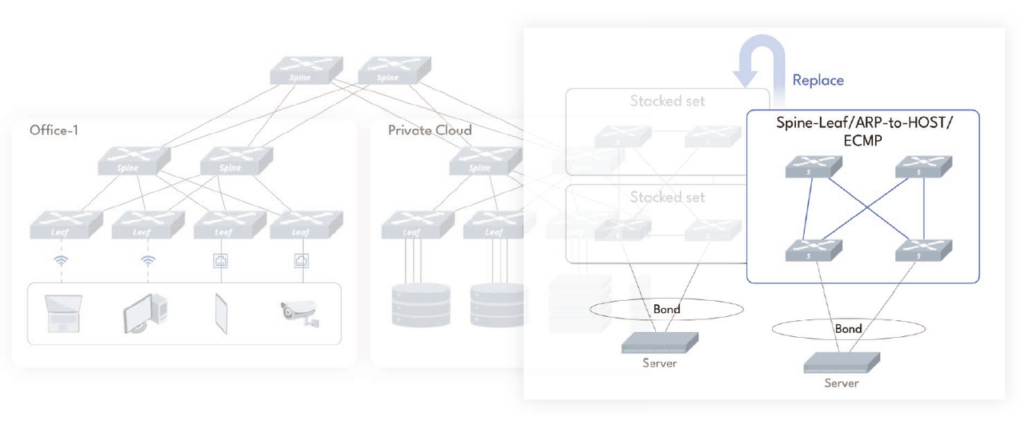
As we all know, L3 switches are often used in large enterprise campuses and industrial scenarios. Asterfusion can build high scalability and reliable campus networks with 2-3 commodity single chip SKUs.
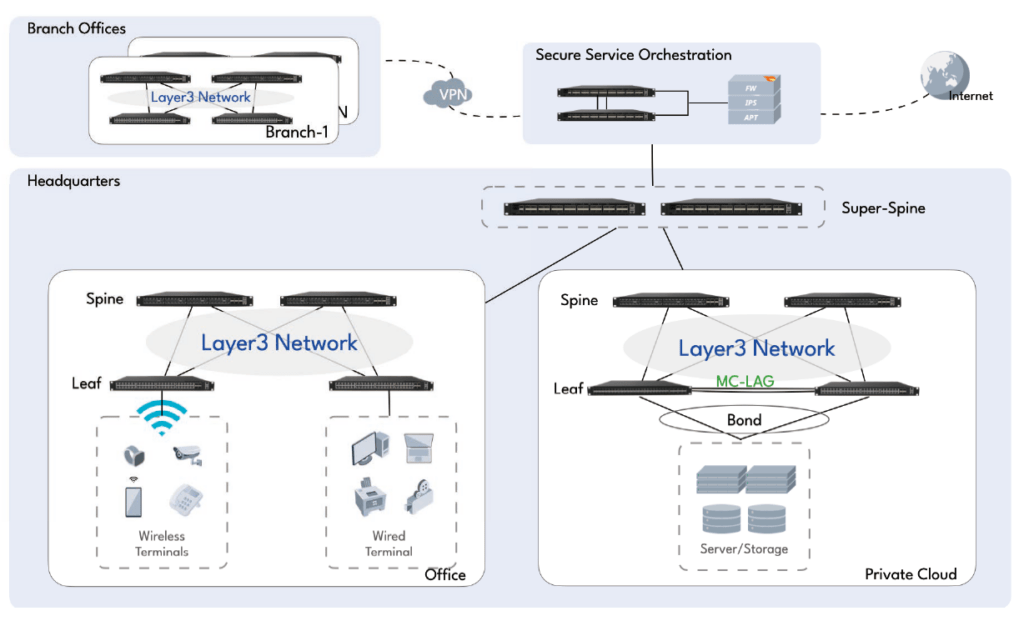
In addition to the conventional Layer 2/Layer 3 switch functions, Asterfusion switches can also support BGP-EVPN and RoCEv2 technologies.
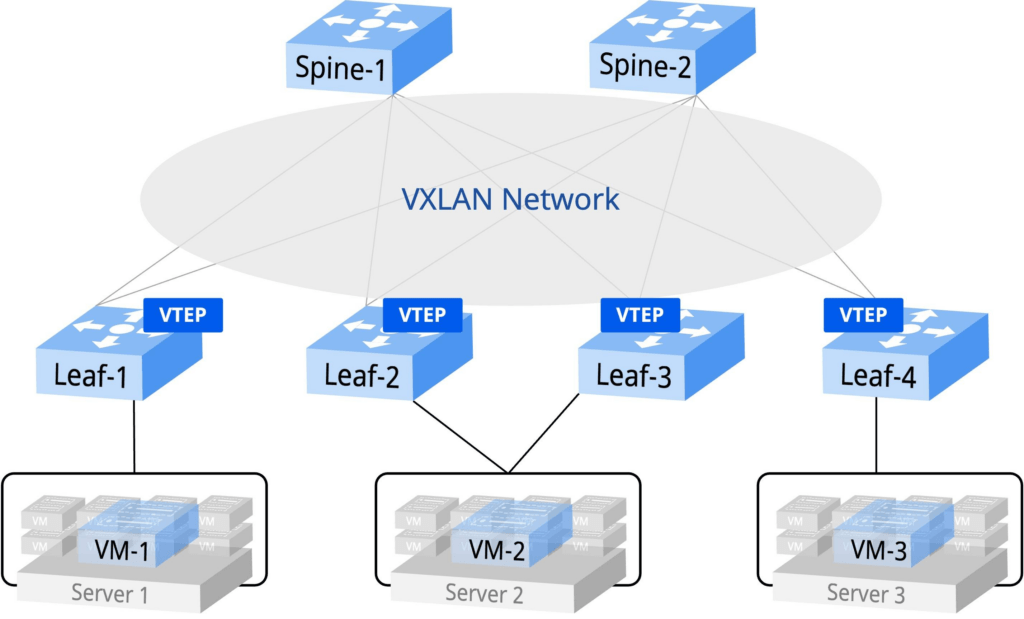
Asterfusion proposed the EVPN Multi-Homing solution, using the Spine-Leaf elastic and scalable architecture. Through technologies such as BGP EVPN and VXLAN, the virtual network and distributed network function gateway of the tenants in the cloud are unloaded from the computing space and directly carried on the CX-N switch, so that this part of the released VM computing power can be used to create/carry more virtual computing nodes for services, thereby improving the efficiency of CPU computing power, and ultimately achieving improved network reliability and fault tolerance, optimized network load balancing, simplified network design and management, support for high availability and availability SLA of services, and support for virtualization and cloud computing effects.
RoCEv2 technology can help build a high-bandwidth and low-latency network to meet the needs of large AI models. Click here to learn more.
What is the difference between layer 2 and layer 3 switches?
Following is a comparison of the main differences between Layer 2 and Layer 3 switch:
| Layer 2 switch | Layer 3 switch | |
| Routing Function | Primarily forward based on MAC addresses. | Be able to route based on IP addresses in addition to MAC addresses |
| Transfer Method | Using the MAC address table to learn and forward data packets, it determines the forwarding path of the data packet by finding the mapping relationship between the source MAC address and the destination MAC address. | In addition to learning and forwarding MAC addresses, it can also route data packets based on target IP addresses and routing table information, thereby supporting communication between different subnets. |
| Processing capacity | Processing capabilities are simpler. | Processing capabilities are more complex.It needs to maintain and process more information, including IP addresses, routing tables, and routing protocols. Therefore, when processing large amounts of data traffic or complex network topologies, the processing capabilities stronger. |
| Security and flexibility | Relatively simple and has limited functions.Does not have built-in security features by default, making them vulnerable to security threats like ARP spoofing attacks. | Having higher levels of network management and security control capabilities. Supporting functions such as access control lists (ACLs), VLANs, and quality of service (QoS), allowing for more sophisticated traffic control and security policy configuration. |
| Communication Range | Can only forward data within the same subnet. | Can forward data and communicate across multiple subnets. |
| Cost and complexity | More cost-effective . | More expensive and more complex |
| Scalability | Scalability is limited. | The inter-segment routing functionality of Layer 3 switches provides higher scalability. |
Simply put, Layer 2 switches, do not have the Capability to act as Layer 3 gateways. A Layer 3 switch is, first and foremost, a Layer 2 switch. However, it has an additional capability that can be configured by software to act as a Layer 3 Gateway.
What is a Layer 3 Gateway?
It makes it possible for different network segments (broadcast domains/VLANs) to communicate. In other words, a Layer 3 gateway helps hosts in different network segments to communicate with each other. Without a Layer 3 Gateway, it would be impossible to communicate across network segments.
How to Choose Layer 2 vs layer 3 switch: A Practical Decision Framework
Selecting between a Layer 2 and Layer 3 switch comes down to evaluating your network against seven core operational requirements:
- Network Size & Device Count: Layer 2 switches are ideal for smaller, single-site environments with under 50–100 endpoints where traffic remains mostly local. Layer 3 switches become essential for medium to large networks with hundreds or thousands of connected devices spread across different departments or buildings.
- VLAN Count & Segmentation: If your network only requires 1 to 3 basic VLANs with minimal isolation, a Layer 2 switch can handle the load. However, if you run complex, highly segmented networks with dozens of VLANs (e.g., isolating IoT, Guest Wi-Fi, R&D, and Servers), a Layer 3 switch is necessary to manage these environments efficiently.
- Inter-VLAN Traffic Volume: Choose a Layer 2 switch if more than 80% of your data traffic stays within its original subnet or VLAN. If your network generates high cross-subnet traffic—such as continuous heavy communication between user workstations and local server farms—a Layer 3 switch is needed to route that traffic locally at wire speed.
- Uplink Speeds & Bandwidth: Layer 2 switches typically suffice for standard 1G/10G edge connections where high-density access is the main goal. Layer 3 switches support high-bandwidth fabrics with 25G, 100G, or 400G uplinks, preventing bottlenecking when heavy inter-subnet traffic moves across the core network.
- Redundancy & High Availability: Layer 2 switches depend on basic loop-prevention and link aggregation protocols like STP/RSTP and LACP. Layer 3 switches provide advanced high-availability mechanisms, utilizing protocols like VRRP, ECMP (Equal-Cost Multipath), and multi-homing to create resilient, load-balanced paths with zero single points of failure.
- Internet & Boundary Edge: A Layer 2 switch relies entirely on an external firewall or dedicated router to act as the default gateway and handle all routing. A Layer 3 switch offloads internal Inter-VLAN routing from perimeter devices, allowing your firewall to focus its CPU resources exclusively on deep packet inspection, threat protection, and WAN traffic.
- Future Expansion Plans: If your network footprint is static and unlikely to change, a Layer 2 switch provides a cost-effective solution. If you plan to scale, integrate hybrid cloud architectures, or deploy data center fabrics leveraging VXLAN and BGP-EVPN, investing in Layer 3 switches ensures your infrastructure can expand seamlessly.
Typical Deployment Examples
To put these principles into practice, here is how Layer 2 and Layer 3 switches fit into real-world network architectures, ranging from small offices to modern AI data centers:
- Small Office (20–50 Users): A single Layer 2 switch connected directly to an edge firewall or ISP router is the most practical setup. All devices (PCs, printers, IP phones, Wi-Fi APs) sit on 1 to 2 flat subnets. The firewall serves as the default gateway, handling minimal Inter-VLAN routing alongside internet access and perimeter security.
- Multi-Department Enterprise Campus: A classic two-tier Collapsed Core architecture. Access-layer Layer 2 switches provide high port density for user endpoints across various departments (HR, Finance, R&D). These edge switches connect via high-speed uplinks to a central Layer 3 switch at the core/aggregation layer, which performs hardware-wire-speed Inter-VLAN routing, enforces Access Control Lists (ACLs), and offloads traffic from the perimeter firewall.
- Multi-Building Campus Architecture: A three-tier design (Access, Distribution, Core) utilizing Layer 3 switches at both the distribution (building) and core levels. Routed ports and dynamic routing protocols (like OSPF or BGP) run between buildings instead of spanning large Layer 2 domains. This confines broadcast traffic to individual buildings, prevents network-wide loops, and guarantees fast convergence across long-distance fiber runs.
- Data Center & AI High-Performance Networks: In modern cloud and AI architectures, the design question evolves far beyond a basic “Layer 2 vs. Layer 3 switches” choice. Modern Spine-Leaf fabrics rely entirely on Layer 3 IP Clos architectures at the underlay, while leveraging advanced technologies to handle massive EAST-WEST machine-to-machine traffic:
- BGP-EVPN & VXLAN Overlay: Decouples physical infrastructure from logical networks, allowing Layer 2 adjacency to stretch over a scalable Layer 3 underlay without running Spanning Tree Protocol (STP).
- ECMP (Equal-Cost Multipath): Distributes traffic across dozens of parallel Layer 3 links to maximize bandwidth utilization and eliminate single points of failure.
- RoCEv2 & Lossless Ethernet: AI clusters and high-performance computing demand zero packet loss and microsecond-level latency. Switches use Priority Flow Control (PFC) and Explicit Congestion Notification (ECN) on top of Layer 3 fabrics to support remote direct memory access (RDMA) over Ethernet.
Can a Layer 3 Switch Replace a Router?
Yes, a Layer 3 switch can replace a router for internal local area network (LAN) routing, but it is rarely designed to replace a router or firewall at the WAN and Internet edge.
- What it CAN replace (LAN & Internal Routing): Inside an enterprise LAN or campus network, a Layer 3 switch excels at inter-VLAN routing, subnet segmentation, and high-speed local packet forwarding. Because it routes data in hardware using specialized ASIC chips, it provides significantly higher throughput, lower latency, and greater port density at a lower cost-per-port than traditional dedicated routers. For routing traffic between internal departments, VLANs, or server racks, a Layer 3 switch is the preferred choice.
- What it CANNOT replace (WAN, Internet Edge & Security): A Layer 3 switch lacks the specialized capabilities required at the network perimeter:
- Advanced WAN Technologies: Routers handle non-Ethernet media types, MPLS circuits, SD-WAN overlays, NAT (Network Address Translation), and complex WAN protocols that Layer 3 switches typically do not support.
- Deep Security & Inspection: Stateful firewalls and edge routers provide advanced threat prevention, deep packet inspection (DPI), IPSec VPN termination, and strict perimeter policy enforcement. Layer 3 switches offer basic Access Control Lists (ACLs), but they cannot deliver comprehensive perimeter security.
- Massive Internet Routing Tables: Edge routers operating on the public Internet must process full global BGP routing tables (often over 900,000+ routes). Layer 3 switches have specialized hardware memory (TCAM) optimized for high speed, but with a much smaller capacity compared to the deep RAM buffers of dedicated WAN routers.
The Bottom Line: Use Layer 3 switches to handle high-bandwidth internal routing across your enterprise LAN, while relying on dedicated edge routers or next-generation firewalls to manage WAN connections, internet access, and perimeter security.
Other Questions:
What is L2 and L3?
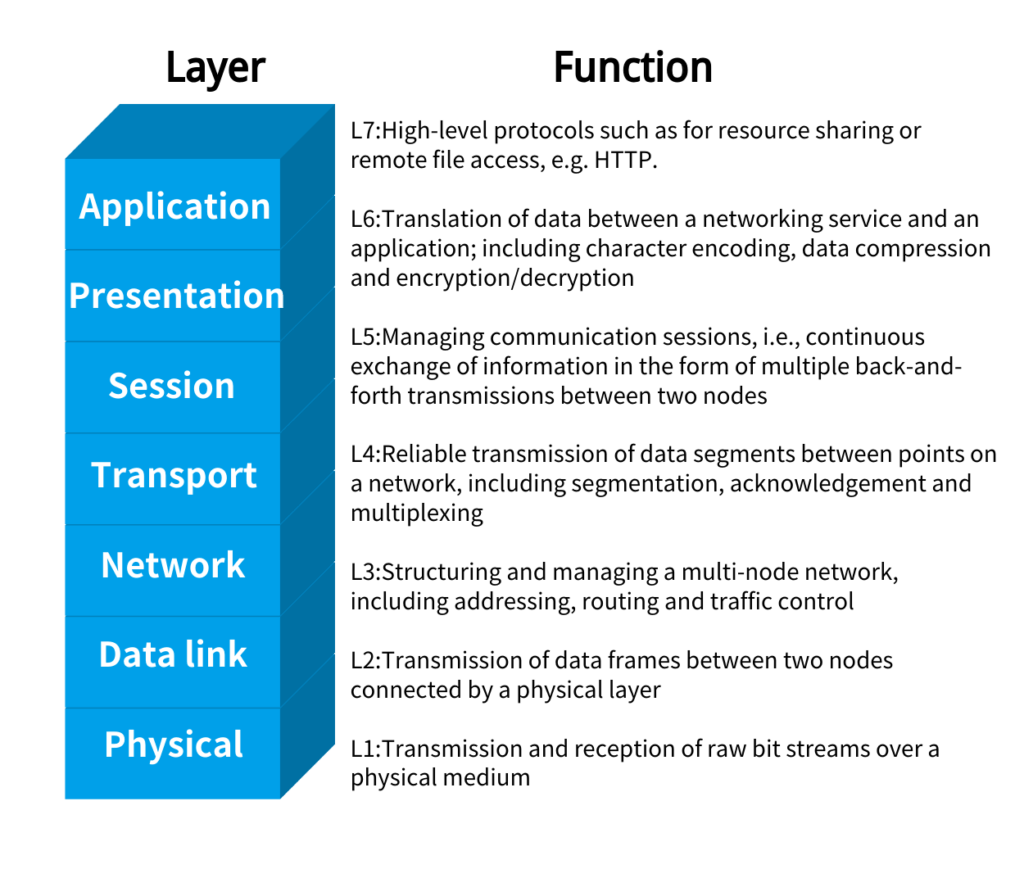
L2 and L3 refer to the second and third layers of the OSI (Open Systems Interconnection) reference model, which is a conceptual framework used to describe the functions of a networking system.
L2 – Data Link Layer
The data link layer is responsible for reliable data transfer between directly connected network nodes.
- Key functions include:
- Framing: Packaging data into frames with necessary headers and trailers.
- Media access control (MAC) addressing: Assigning and using unique MAC addresses to identify network devices.
- Error detection and correction: Detecting and correcting errors that may occur during data transmission.
- L2 devices, such as Ethernet switches and bridges, operate at this layer.
L3 – Network Layer
- The network layer is responsible for end-to-end data delivery, including logical addressing and routing.
- Key functions include:
- Logical addressing: Assigning and using logical addresses, such as IP addresses, to identify devices on a network.
- Routing: Determining the best path for data to travel from the source to the destination.
- Fragmentation and reassembly: Breaking down large data packets into smaller fragments for transmission and reassembling them at the destination.
- L3 devices, such as routers and multilayer switches, operate at this layer.
What is the difference between L2 and L3 VLAN?
The main difference between Layer 2 (L2) VLAN and Layer 3 (L3) VLAN lies in their functionality and the way they operate within a network.
| Layer 2 VLAN (L2 VLAN) | Layer 3 VLAN (L3 VLAN) |
| L2 VLANs operate at the data link layer (Layer 2) of the OSI model. | L3 VLANs operate at the network layer (Layer 3) of the OSI model. |
| They use MAC addresses to logically segment a network into different broadcast domains. | They use MAC addresses to segment a network into different broadcast domains logically. |
| Devices in the same L2 VLAN can communicate directly with each other, but communication between devices in different VLANs is not possible without a router or L3 device. | Devices in different L3 VLANs can communicate with each other directly, as the router or L3 device handles the inter-VLAN routing. |
| L2 VLANs are primarily used for broadcast domain isolation, improved security, and better network management. | L3 VLANs provide the benefits of L2 VLANs, but also enable routing between VLANs, allowing for more complex network architectures and increased scalability. |
| Switching is the main mechanism used in L2 VLANs, with switches forwarding frames based on the destination MAC address. | Routing is the main mechanism used in L3 VLANs, with routers or multilayer switches forwarding packets based on the destination IP address. |
Are layer 3 switches faster?
Generally speaking, layer 2 switches are very fast because they do not look at the layer 3 portion of the packet, whereas layer 3 switches take the time to inspect the packet before sending it to its destination.
Are managed switches layer 3?
Not necessarily. Both managed and unmanaged switches can be either Layer 2 or Layer 3 switches.
The key distinction between managed and unmanaged switches is the level of configuration and management capabilities they provide, not the layer they operate at.
Managed switches typically offer more advanced features and configuration options.
Unmanaged switches, on the other hand, usually have a fixed configuration and do not provide the same level of management and configuration options as managed switches.
Can a layer 3 switch be used as a router?
Yes, a Layer 3 switch can be used as a router in a network.
The key capabilities that enable a Layer 3 switch to function as a router include:
- Routing Functionality
- Multilayer Switching
- Routing Interfaces
- Advanced Routing Features
By utilizing the Layer 3 routing capabilities of a Layer 3 switch, you can eliminate the need for a dedicated router in certain network architectures. This can simplify the network design, reduce hardware requirements, and potentially improve performance by combining switching and routing functions in a single device.
However, it’s important to note that the routing capabilities and performance of a Layer 3 switch may be limited compared to a dedicated, high-end router, especially in larger or more complex network environments. The choice between using a Layer 3 switch or a dedicated router will depend on the specific requirements and scale of your network.
Can Layer 3 switches replace Layer 3 routers?
Given all the talk about Layer 3 switches, are dedicated routers a thing of the past? In most small to medium-sized networks, dedicated routers are no longer needed for intra-office communications.
For example, if you place users in a different VLAN than your network infrastructure, such as servers, the routing of traffic between the users and the servers can be done on a Layer 3 switch or firewall. No dedicated router is required.
However, routers still play an important role in many business networks, especially for communications outside the local network. Connecting to a remote office or the Internet requires connecting to a non-Ethernet network, such as one provided by an ISP, and this is where a router comes in. Routers can also be used in large corporate networks, where they often remain specialized devices.
Reference:
Asterfusion(2023.6)”How to Choose Layer-3 /Core Switches for Enterprise Networks?“
CRC Press, Taylor & Francis(2024)“Designing Switch/Routers: Fundamental Concepts and Design Methods”


